mcskins.top
mcskins.top: The HD specialist: edits skins from 64×64 up to 512×512, with poses, colour filters and handy converters. Ranked #8 of 9 in Minecraft Skin Editors by our editors (7.7/10); pricing: Free; best for HD skins and format conversions.
At a glance
- Editor score7.7 / 10
- PricingFree
- Best forHD skins and format conversions
- Free to useYes
- HD skinsYes
- Facts checked18 Sep 2026
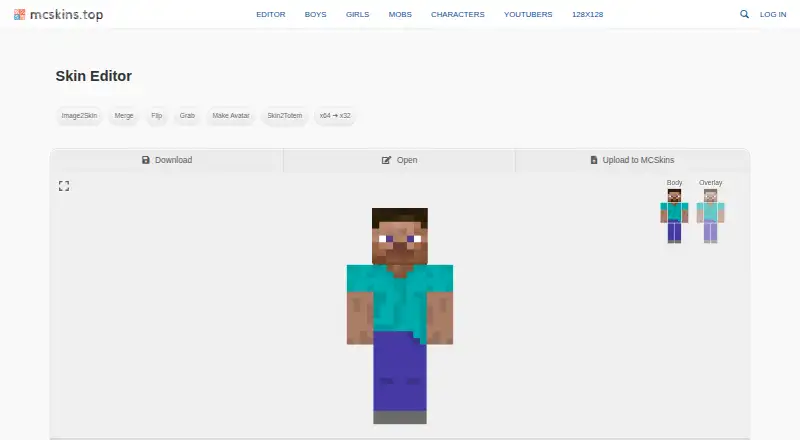
Where it wins
- Canvas sizes of 64, 128, 256 and 512 pixels for HD skins
- Walk, hug, run and fly poses preview the skin in motion
- Image2Skin, merge, flip, avatar, totem and 64-to-32 converters
Where it doesn't
- Terse labels, with many settings tucked into an Advanced panel
- Little information about who runs the site
- Features are listed without explanations or a help page
Our verdict on mcskins.top
mcskins.top pairs a skin gallery, sorted into boys, girls, mobs, characters and YouTubers, with an editor built for high-resolution work. The canvas switches between Steve and Alex models and between 64, 128, 256 and 512 pixel sizes, so HD skins are a first-class option rather than an afterthought, and a dedicated 128×128 section of the gallery collects them. Body and overlay layers can be edited separately, with a brush picker, a grid, mirror painting and a palette.
The preview poses the model in default, walk, hug, run and fly positions, and one-click adjustments invert colours, warm or cool the skin, and raise or lower saturation, brightness, hue and transparency. A strip of converters turns an image into a skin, merges two skins, flips one, grabs an existing skin, makes an avatar, produces a totem texture and converts a 64×64 skin down to the old 64×32 layout. An Advanced panel sets the fill type, the spray and lighten or darken steps, overlay transparency and the mouse behaviour, and finished skins download or upload to the site's gallery.
The interface is terse, with short labels and settings buried in the Advanced panel, and the site publishes little about who runs it or how each converter works. Features are listed without explanations or a help page, so some trial and error is part of the process. For anyone who needs to edit an HD skin or convert between formats, though, it covers jobs the mainstream editors skip, and it costs nothing to use.
Your product? Our editors can test mcskins.top in depth and publish a review, labelled as paid · from $149/mo →
mcskins.top pricing
mcskins.top fact sheet
| Free to use | Yes |
|---|---|
| Paid from | Free |
| Runs on | Browser |
| Paint on 3D model | Not verified |
| Editable layers | Not verified |
| HD skins | Yes |
| Slim (Alex) model | Yes |
| Load by username | Not verified |
| Posing & animation | Yes |
| Pricing | Free |
| Website | mcskins.top |
| Facts checked | 18 Sep 2026 |
Alternatives to mcskins.top
- Nova SkinPaint on a 3D model, pose it in a scene and search a library of 70M+ skins and textures, all for free.9.2
- PMCSkin3DBasic and Advanced editors in one app, with custom brushes, a pose mode, HD skins and one-click publishing.9.0
- BlockbenchA full 3D modelling suite whose Minecraft Skin format edits player and entity skins, free on web and desktop.8.8
See all mcskins.top alternatives →
mcskins.top vs the competition
- mcskins.top vs Godlike.Host
- mcskins.top vs Nova Skin
- mcskins.top vs PMCSkin3D
- mcskins.top vs Blockbench
- mcskins.top vs Laby Skin Studio
- mcskins.top vs The Skindex



Compare mcskins.top with any tool side by side →
Used mcskins.top? Be the first to review it
The editor score above is our own research. What this page doesn't have yet is a reader's view — what you used mcskins.top for, what worked and what didn't. No stars are seeded and no review is paid for; an editor reads every one before it appears.
Write a reviewTwo minutes · verified accounts only · read by an editor before it appears
Featured on iTechGuides

mcskins.top is listed in our Minecraft Skin Editors directory. Add the badge to your site — it links back to this page.
<a href="https://www.itechguides.com/products/mcskins-top/"><img src="https://www.itechguides.com/best/badge/mcskins-top.svg" alt="Featured on iTechGuides" width="230" height="46"></a>
Reviewed by iTechGuides Editors · Editorial team · Updated Oct 2026
Advertiser disclosure: iTechGuides is reader-supported. Vendors can pay for top positions in our rankings and for a place on other products' pages, and we may earn a commission when you click some links. Bought places stand at the number bought; this page and our disclosure say so. Paying vendors may get a fuller, more detailed review from our editors, and that review can change their score. How we rank.
Last updated · How we research and update