
MCCTL
MCCTL: A focused web panel for managing Vanilla and Paper servers with a free tier. Ranked #21 of 26 in Minecraft Server Control Panels by our editors (6.0/10); pricing: Free plan; best for small Vanilla or Paper server owners.
At a glance
- Editor score6.0 / 10
- PricingFree plan
- Best forSmall Vanilla or Paper server owners
- Free planYes
- Scheduled backupsYes
- Facts checked20 Sep 2026
Where it wins
- Free tier includes lifecycle controls, console access, and manual backups.
- Manages plugins, mods, configurations, existing folders, and server backups.
- Vanilla and Paper setup wizard with Discord alerts on Plus and Pro.
Where it doesn't
- Platform coverage is limited to the web interface.
- Scheduled backups and Discord notifications require a paid tier.
- Setup coverage centers on Vanilla and Paper server software.
Our verdict on MCCTL
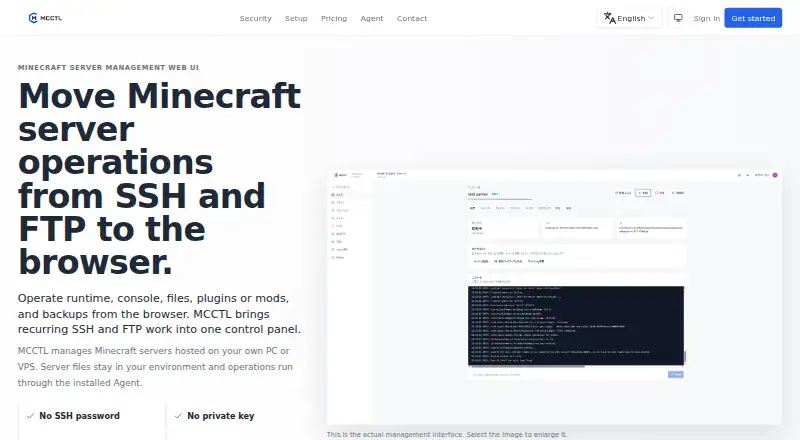
MCCTL is a browser-based control panel for Minecraft servers hosted on a user's own PC or VPS. Its Agent connects the web interface to the server environment, giving small server owners a central place to start, stop, restart, and monitor servers. The panel also includes a web console with ANSI color logs and command execution, plugin and mod management, configuration editing, backups, existing server-folder registration, and a setup wizard for Vanilla and Paper servers.
Pricing follows a freemium structure. The Free plan includes manual backups, while Plus adds scheduled backups, Discord notifications, and player kick and ban actions. Pro includes those Plus features and adds advanced permissions. Business is positioned for custom requirements. This makes the free tier suitable for owners who want core lifecycle controls and manual backup handling, while scheduled operations, Discord notifications, and player-management actions sit behind paid plans. The published plan structure gives a clear progression from basic administration to more advanced control.
MCCTL's strongest fit is a focused Vanilla or Paper setup managed through a browser, particularly when the server runs on a personal PC or VPS and an existing server folder needs to be registered. Its web-only platform coverage keeps the product centered on browser administration rather than a broader platform ecosystem. Choose MCCTL if you need practical server controls, console access, configuration editing, plugin or mod operations, and backup workflows in one panel. Look elsewhere if your priority is a platform beyond web access or server software outside the setup wizard's Vanilla and Paper scope.
Your product? Our editors can test MCCTL in depth and publish a review, labelled as paid · from $149/mo →
MCCTL pricing
All 4 MCCTL plans and prices →
MCCTL fact sheet
| Free plan | Yes |
|---|---|
| Paid from | Not verified |
| Supported operating systems | Not verified |
| Server software support | Vanilla, Paper |
| Scheduled backups | Yes |
| Web file manager | Yes |
| SFTP access | Not verified |
| Multi-user roles | Not verified |
| Server import | Yes |
| Deployment | Cloud |
| Platforms | Web |
| Support | Docs |
| Built for | Solo, Small business, Mid-market (editorial estimate) |
| Integrations | 1 integrations: Discord |
| Pricing | Free plan (source) |
| Website | mcctl.com |
| Facts checked | 20 Sep 2026 |
MCCTL integrations
MCCTL lists 1 integrations on its own site.
- Discord
Alternatives to MCCTL
- MulticraftA capable Minecraft control panel for personal owners and commercial hosting providers.7.9
- Crafty ControllerA polished, free control panel with broad core tools for Java and Bedrock servers.7.9
- MineOS.netA free, broad control panel for multi-user Java and Bedrock server hosting.7.8


Used MCCTL? Be the first to review it
The editor score above is our own research. What this page doesn't have yet is a reader's view — what you used MCCTL for, what worked and what didn't. No stars are seeded and no review is paid for; an editor reads every one before it appears.
Write a reviewTwo minutes · verified accounts only · read by an editor before it appears
Featured on iTechGuides

MCCTL is listed in our Minecraft Server Control Panels directory. Add the badge to your site — it links back to this page.
<a href="https://www.itechguides.com/products/mcctl/"><img src="https://www.itechguides.com/best/badge/mcctl.svg" alt="Featured on iTechGuides" width="230" height="46"></a>
Reviewed by iTechGuides Editors · Editorial team · Updated Oct 2026
Advertiser disclosure: iTechGuides is reader-supported. Vendors can pay for top positions in our rankings and for a place on other products' pages, and we may earn a commission when you click some links. Bought places stand at the number bought; this page and our disclosure say so. Paying vendors may get a fuller, more detailed review from our editors, and that review can change their score. How we rank.
Last updated · How we research and update