MC Version Converter
MC Version Converter: A free open-source batch converter for Java world version downgrades. Ranked #10 of 18 in Minecraft World Converters by our editors (7.1/10); pricing: Free plan; best for batch Java version downgrades.
At a glance
- Editor score7.1 / 10
- PricingFree plan
- Best forBatch Java version downgrades
- Free planYes
- Paid fromFree
- Java-Bedrock conversionNo
- Facts checked20 Sep 2026
Where it wins
- Converts multiple Java worlds in one batch workflow.
- Preserves entities, attributes, signs, components, and metadata.
- Writes converted worlds to new output folders, preserving originals.
Where it doesn't
- Supports Java Edition only, not Java-to-Bedrock conversion.
- Conversion targets are limited to versions 1.18.2 through 1.21.11.
- Java Edition 1.17.x and older worlds are not supported.
Our verdict on MC Version Converter
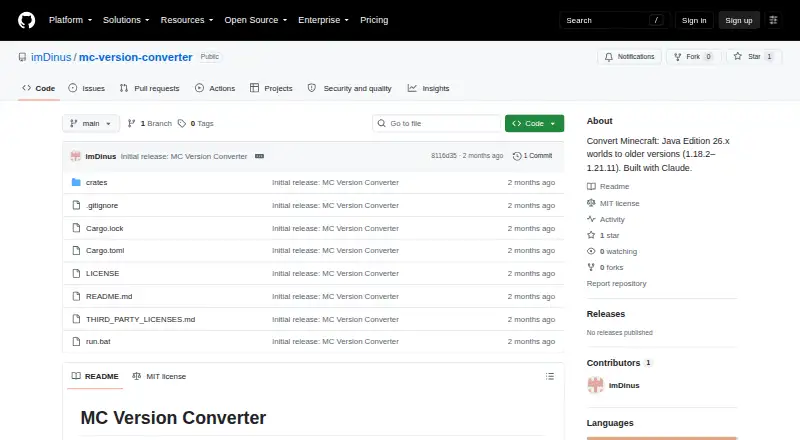
MC Version Converter is a free, open-source command-line tool for Minecraft: Java Edition worlds saved in version 26.1 or later. It is designed for players, server operators, and technical users who need to convert newer Java worlds into structures readable by Java Edition versions 1.18.2 through 1.21.11. The tool rebuilds legacy world folder layouts and level.dat data while converting item components, entity equipment, selected entity fields, attributes, sign text, JSON text data, and other NBT data. It writes results to new output folders, leaving the original world preserved.
The pricing model is straightforward: MC Version Converter is open source and has a free plan. It is distributed as source code and can be built for Windows, Linux, or macOS. Its command-line format supports batch conversion of multiple worlds, which suits recurring migration work better than a single-world utility. World information and supported-version commands also provide a way to inspect conversion scope before processing a world.
Its main constraint is version scope. The supported source is Minecraft: Java Edition 26.1 or later, while the supported targets run from 1.18.2 through 1.21.11. Java Edition 1.17.x and older worlds are outside that range, and the tool does not convert between Java and Bedrock. It is also unofficial and is not affiliated with Mojang or Microsoft. Choose MC Version Converter when batch Java downgrades, open-source distribution, and preservation of substantial world data matter; choose another option when Bedrock conversion, older source worlds, or a graphical workflow is required.
Your product? Our editors can test MC Version Converter in depth and publish a review, labelled as paid · from $149/mo →
MC Version Converter pricing
MC Version Converter fact sheet
| Free plan | Yes |
|---|---|
| Paid from | Free |
| Source editions | Minecraft: Java Edition 26.1 or later |
| Target editions | Minecraft: Java Edition 1.18.2–1.21.11 |
| Java-Bedrock conversion | No |
| Version conversion | Yes |
| Format conversion | Yes |
| Preserves entities | Yes |
| Batch conversion | Yes |
| Deployment | Self-hosted |
| Platforms | Windows, macOS, Linux |
| Support | Docs |
| Built for | Solo, Small business (editorial estimate) |
| Pricing | Free plan |
| Website | github.com |
| Facts checked | 20 Sep 2026 |
Alternatives to MC Version Converter
- ChunkerA capable local converter with strong region, mapping, and automation controls.9.2
- Universal Minecraft ToolA deep Windows toolkit for cross-edition conversion, world editing, and chunk pruning.9.0
- WorldSwitchAffordable two-way Java–Bedrock conversion with free small-file conversions.8.7


See all MC Version Converter alternatives →
Used MC Version Converter? Be the first to review it
The editor score above is our own research. What this page doesn't have yet is a reader's view — what you used MC Version Converter for, what worked and what didn't. No stars are seeded and no review is paid for; an editor reads every one before it appears.
Write a reviewTwo minutes · verified accounts only · read by an editor before it appears
Featured on iTechGuides

MC Version Converter is listed in our Minecraft World Converters directory. Add the badge to your site — it links back to this page.
<a href="https://www.itechguides.com/products/mc-version-converter/"><img src="https://www.itechguides.com/best/badge/mc-version-converter.svg" alt="Featured on iTechGuides" width="230" height="46"></a>
Reviewed by iTechGuides Editors · Editorial team · Updated Oct 2026
Advertiser disclosure: iTechGuides is reader-supported. Vendors can pay for top positions in our rankings and for a place on other products' pages, and we may earn a commission when you click some links. Bought places stand at the number bought; this page and our disclosure say so. Paying vendors may get a fuller, more detailed review from our editors, and that review can change their score. How we rank.
Last updated · How we research and update