
Maxisnap
Maxisnap: Affordable Windows capture with offline OCR and self-hosted uploads, but no macOS support. Ranked #21 of 61 in Screen Capture Software by our editors (6.2/10); pricing: Free plan; best for windows users wanting inexpensive capture with self-hosting.
At a glance
- Editor score6.2 / 10
- PricingFree plan
- Best forWindows users wanting inexpensive capture with self-hosting
- Free planYes
- Paid from$18/yr
- Annotation toolsYes
- Facts checked24 Sep 2026
Where it wins
- Scrolling capture, recording, annotations and offline OCR in the free tier
- Exports PNG, JPEG, MP4, GIF and WebM with global hotkeys
- Studio supports SFTP, FTP, S3, R2 and HTTP upload destinations
Where it doesn't
- Windows-only desktop platform
- Cloud storage is limited by plan
- Self-hosted dashboard requires the separate Studio purchase
Our verdict on Maxisnap
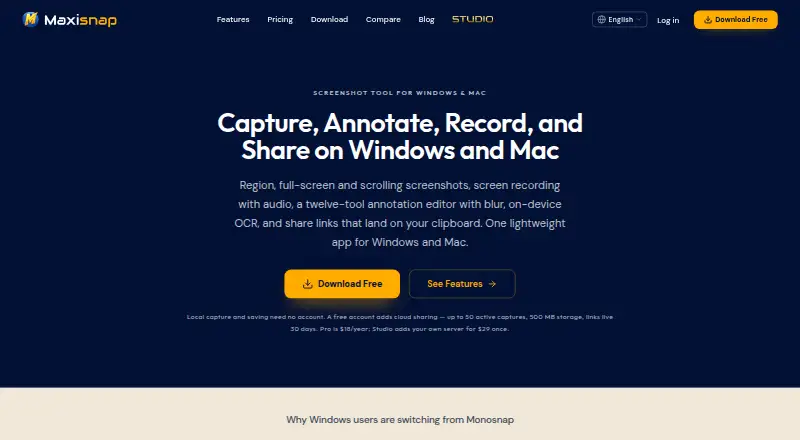
Maxisnap is a Windows desktop application for screenshots and screen recording, aimed at solo users and small to mid-market teams that need capture, editing and sharing in one tool. It handles region, full-screen, window and scrolling screenshots, records system audio and microphone input, and includes a 12-tool annotation editor with blur, crop and numbered steps. On-device OCR runs offline, while local saving and clipboard copying support quick workflows. The free tier has no time limit or watermark.
The Free plan costs $0 per month and includes capture modes, 12 annotation tools, screen recording with audio, on-device OCR and 500 MB of cloud storage. Pro costs $18 per year, adding 10 GB of Maxisnap Cloud storage, videos up to 1 GB, ad-free share pages, private links and per-image analytics. Pro Plus costs $59 per year and raises storage to 50 GB, supports videos up to 5 GB and provides full per-image analytics. Maxisnap Studio is a $29 one-time purchase with custom upload destinations, a self-hosted dashboard, custom branding and per-capture privacy controls.
Its ecosystem fit is strongest for organizations that already operate storage or file-transfer infrastructure. Studio connects to SFTP, FTP, S3, Cloudflare R2 and HTTP, while cloud share links can be copied to the clipboard. PNG, JPEG, MP4, GIF and WebM exports, global hotkeys and multi-monitor capture broaden desktop workflows. Choose Maxisnap for inexpensive Windows capture with offline OCR and self-hosted delivery; choose another product if you need macOS, Linux, a browser extension or a platform-neutral capture experience.
Your product? Our editors can test Maxisnap in depth and publish a review, labelled as paid · from $149/mo →
Maxisnap pricing
All 4 Maxisnap plans and prices →
Maxisnap fact sheet
| Free plan | Yes |
|---|---|
| Paid from | $18/yr |
| Scrolling capture | Yes |
| Annotation tools | Yes |
| OCR | Yes |
| Browser extension | No |
| Desktop platforms | Windows |
| Cloud sharing | Yes |
| Export formats | PNG, JPEG, MP4, GIF, WebM |
| Deployment | Desktop, Cloud, Self-hosted |
| Platforms | Windows |
| Compliance & security | GDPR |
| Support | Email, Docs |
| Built for | Solo, Small business, Mid-market (editorial estimate) |
| Integrations | 5 integrations: SFTP, FTP, S3, Cloudflare R2, HTTP |
| Pricing | Free plan (source) |
| Website | maxisnap.com |
| Facts checked | 24 Sep 2026 |
Maxisnap integrations
Maxisnap lists 5 integrations on its own site.
- SFTP
- FTP
- S3
- Cloudflare R2
- HTTP
Alternatives to Maxisnap
- SnagitA polished capture and editing toolkit for teams that can budget for an annual subscription.9.3
- ShareXA flexible Windows capture toolkit with scrolling screenshots, OCR, recording and upload workflows.9.1
- ZightA cross-platform capture tool with team workflows, integrations, and a free plan.9.0



See all Maxisnap alternatives →
Used Maxisnap? Be the first to review it
The editor score above is our own research. What this page doesn't have yet is a reader's view — what you used Maxisnap for, what worked and what didn't. No stars are seeded and no review is paid for; an editor reads every one before it appears.
Write a reviewTwo minutes · verified accounts only · read by an editor before it appears
Featured on iTechGuides

Maxisnap is listed in our Screen Capture Software directory. Add the badge to your site — it links back to this page.
<a href="https://www.itechguides.com/products/maxisnap/"><img src="https://www.itechguides.com/best/badge/maxisnap.svg" alt="Featured on iTechGuides" width="230" height="46"></a>
Reviewed by iTechGuides Editors · Editorial team · Updated Oct 2026
Advertiser disclosure: iTechGuides is reader-supported. Vendors can pay for top positions in our rankings and for a place on other products' pages, and we may earn a commission when you click some links. Bought places stand at the number bought; this page and our disclosure say so. Paying vendors may get a fuller, more detailed review from our editors, and that review can change their score. How we rank.
Last updated · How we research and update