
MAX ScreenControl
MAX ScreenControl: AI agents for desktop control, browser automation, and centralized fleet management. Ranked #19 of 24 in AI Computer Use Agents by our editors (7.4/10); pricing: 30-day trial; best for organizations managing browser-based agent fleets.
At a glance
- Editor score7.4 / 10
- Pricing30-day trial
- Best forOrganizations managing browser-based agent fleets
- Free planNo
- Paid from$29/mo
- Desktop app controlYes
- Facts checked22 Sep 2026
Where it wins
- Desktop control uses real mouse and keyboard input
- Computer vision and OCR support graphical application automation
- Fleet management includes monitoring, audit logs, and concurrent licensing
Where it doesn't
- No free plan is available
- The Trial plan allows one concurrent agent
- API access and audit logs begin with the Business plan
Our verdict on MAX ScreenControl
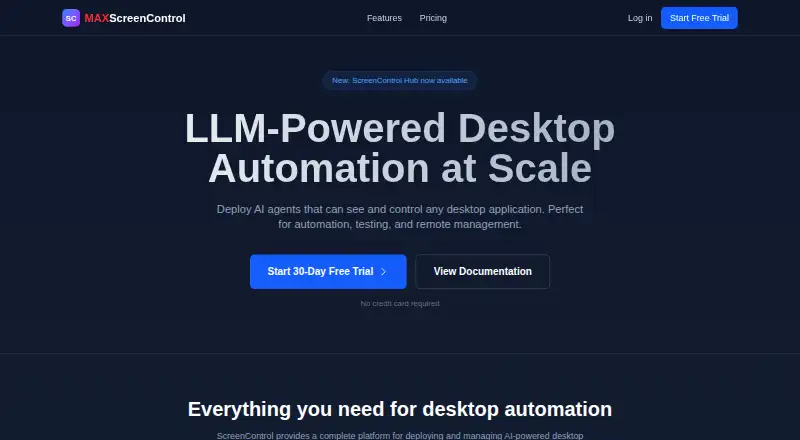
MAX ScreenControl is a platform for deploying and managing AI agents that operate graphical desktop applications and browsers. Agents use computer vision and OCR to understand application interfaces, then issue real mouse and keyboard input. Browser automation is provided through Chrome, Firefox, and Safari extensions. The product is aimed at individuals, small teams, organizations, and enterprises handling desktop automation, testing, remote management, or browser-based agent fleets.
Pricing is organized around usage and organizational scale. The 30-day Trial includes all features, one concurrent agent, and community support. Solo costs $29 per month and adds email support for individuals while retaining all core features. Team costs $99 per month for small teams and adds priority support plus a team dashboard. Business costs $199 per month for organizations and includes ScreenControl Hub, API access, and audit logs. Enterprise is positioned for more agents, making it the clearest fit for larger deployments that need expanded concurrent capacity.
The standout strength is the combination of low-level desktop interaction and operational controls. Centralized fleet management, real-time status, logs, usage monitoring, concurrent-agent licensing, audit logs, Model Context Protocol support, and ScreenControl Hub extend the product beyond a single automation script. Claude and Model Context Protocol are listed integrations, while the platform entry centers on browser extensions. Choose MAX ScreenControl when agents must work across graphical applications and browsers under centralized oversight. Individuals seeking a simple browser automation tool may find its fleet-management capabilities more than they need, while organizations needing API access or audit logs must select Business or above.
Your product? Our editors can test MAX ScreenControl in depth and publish a review, labelled as paid · from $149/mo →
MAX ScreenControl pricing
All 5 MAX ScreenControl plans and prices →
MAX ScreenControl fact sheet
| Free plan | No |
|---|---|
| Paid from | $29/mo |
| Desktop app control | Yes |
| Supported platforms | Chrome, Firefox, Safari browser extensions |
| Browser control | Yes |
| Screen understanding | Yes |
| Deployment | Not verified |
| Human approval controls | Not verified |
| API access | Yes |
| Free trial | 30 days · no card needed |
| Deployment | Browser extension |
| Platforms | Chrome extension |
| Support | Email, Community |
| Built for | Solo, Small business, Mid-market, Enterprise (editorial estimate) |
| Integrations | 2 integrations: Claude, Model Context Protocol |
| Pricing | 30-day trial (source) |
| Website | maxscreencontrol.com |
| Facts checked | 22 Sep 2026 |
MAX ScreenControl integrations
MAX ScreenControl lists 2 integrations on its own site.
- Claude
- Model Context Protocol
Alternatives to MAX ScreenControl
- CoastyA programmable computer-use platform with managed machines, workflows, approvals, and APIs.9.2
- Claude CoworkA broad computer-use workspace for business automation, with paid plans starting at $17 annually.9.1
- Clawd CursorA free, open-source local MCP server for controlled desktop automation.9.0



See all MAX ScreenControl alternatives →
Used MAX ScreenControl? Be the first to review it
The editor score above is our own research. What this page doesn't have yet is a reader's view — what you used MAX ScreenControl for, what worked and what didn't. No stars are seeded and no review is paid for; an editor reads every one before it appears.
Write a reviewTwo minutes · verified accounts only · read by an editor before it appears
Featured on iTechGuides

MAX ScreenControl is listed in our AI Computer Use Agents directory. Add the badge to your site — it links back to this page.
<a href="https://www.itechguides.com/products/max-screencontrol/"><img src="https://www.itechguides.com/best/badge/max-screencontrol.svg" alt="Featured on iTechGuides" width="230" height="46"></a>
Reviewed by iTechGuides Editors · Editorial team · Updated Oct 2026
Advertiser disclosure: iTechGuides is reader-supported. Vendors can pay for top positions in our rankings and for a place on other products' pages, and we may earn a commission when you click some links. Bought places stand at the number bought; this page and our disclosure say so. Paying vendors may get a fuller, more detailed review from our editors, and that review can change their score. How we rank.
Last updated · How we research and update