Mavis Beacon Teaches Typing
Mavis Beacon Teaches Typing: A structured typing tutor with broad practice content, but no free plan. Ranked #23 of 36 in Typing Tutor Software by our editors (7.0/10); pricing: Paid; best for learners wanting guided mainstream lessons.
At a glance
- Editor score7.0 / 10
- PricingPaid
- Best forLearners wanting guided mainstream lessons
- Free planNo
- Paid from$29.99/yr
- Facts checked20 Sep 2026
Where it wins
- 100+ skill checks, timed tests, and real-world typing challenges
- Sets personal speed and accuracy goals and saves progress across sessions
- Includes posture and ergonomics instruction plus a completion certificate
Where it doesn't
- No free plan; access is sold through paid 12-month plans
- Designed for learners aged 13 and older
- Completion certificate arrives after approximately eight hours of practice
Our verdict on Mavis Beacon Teaches Typing
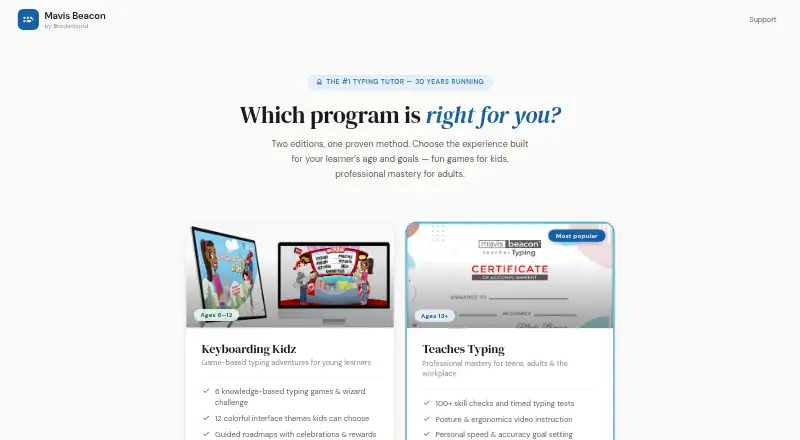
Mavis Beacon Teaches Typing is a browser-based typing tutor for learners aged 13 and older, including teens, adults, and workplace users. Its core approach is structured practice: lessons build typing skills through more than 100 skill checks, timed tests, and real-world typing challenges. Learners can set personal speed and accuracy goals, save progress across sessions, and receive a downloadable completion certificate after approximately eight hours of structured practice. Posture and ergonomics video instruction adds guidance beyond keystroke accuracy.
Pricing is organized around annual 12-month access. The Single User plan costs $29.99 per 12 months for 1 learner. The Family plan costs $49.99 per 12 months for up to 4 learners, making it the broader option for a household. The Renewal plan costs $19.99 per 12 months and extends an existing license. These plans make the product a straightforward paid choice for learners who want a defined curriculum, while the lack of a free plan makes it less suitable for buyers seeking no-cost practice before committing.
Platform coverage includes the web, Windows, and macOS, with the browser-based program also running on Chromebook devices. That combination supports learners moving between common personal and workplace environments while keeping progress available across sessions. The focus remains narrow and practical: guided typing development, measurable goals, tests, and applied challenges rather than a wider learning suite. Choose Mavis Beacon Teaches Typing if you want mainstream, guided lessons with progress tracking and multiple practice formats. Consider another option if you need a free plan or typing instruction for learners under 13.
Your product? Our editors can test Mavis Beacon Teaches Typing in depth and publish a review, labelled as paid · from $149/mo →
Mavis Beacon Teaches Typing pricing
All 3 Mavis Beacon Teaches Typing plans and prices →
Mavis Beacon Teaches Typing fact sheet
| Free plan | No |
|---|---|
| Paid from | $29.99/yr |
| Guided lessons | Yes |
| Adaptive practice | Not verified |
| Skill diagnostics | Not verified |
| Personalized drills | Not verified |
| Offline mode | Not verified |
| Keyboard layouts | Not verified |
| Money-back guarantee | 30 days |
| Deployment | Cloud, Browser extension |
| Platforms | Web, Windows, macOS |
| Built for | Solo, Small business, Mid-market, Enterprise (editorial estimate) |
| Pricing | Paid (source) |
| Website | mymavisbeacon.com |
| Facts checked | 20 Sep 2026 |
Alternatives to Mavis Beacon Teaches Typing
- Typing.comA broad, school-ready typing tutor with adaptive practice and a capable free edition.9.4
- TIPP10A capable typing tutor for individual learners and connected school programs.9.3
- Typing AgentA school-focused typing platform with diagnostics, adaptive practice, and accessibility options.9.2



See all Mavis Beacon Teaches Typing alternatives →
Used Mavis Beacon Teaches Typing? Be the first to review it
The editor score above is our own research. What this page doesn't have yet is a reader's view — what you used Mavis Beacon Teaches Typing for, what worked and what didn't. No stars are seeded and no review is paid for; an editor reads every one before it appears.
Write a reviewTwo minutes · verified accounts only · read by an editor before it appears
Featured on iTechGuides

Mavis Beacon Teaches Typing is listed in our Typing Tutor Software directory. Add the badge to your site — it links back to this page.
<a href="https://www.itechguides.com/products/mavis-beacon-teaches-typing/"><img src="https://www.itechguides.com/best/badge/mavis-beacon-teaches-typing.svg" alt="Featured on iTechGuides" width="230" height="46"></a>
Reviewed by iTechGuides Editors · Editorial team · Updated Oct 2026
Advertiser disclosure: iTechGuides is reader-supported. Vendors can pay for top positions in our rankings and for a place on other products' pages, and we may earn a commission when you click some links. Bought places stand at the number bought; this page and our disclosure say so. Paying vendors may get a fuller, more detailed review from our editors, and that review can change their score. How we rank.
Last updated · How we research and update