MAutoAlign
MAutoAlign: A focused DAW plugin for aligning phase across multitrack recordings. Ranked #33 of 41 in AI Audio Mixing Software by our editors (4.6/10); pricing: 15-day trial; best for engineers aligning phase across multitrack sessions.
At a glance
- Editor score4.6 / 10
- Pricing15-day trial
- Best forEngineers aligning phase across multitrack sessions
- Free planNo
- Stem separationNo
- Facts checked24 Sep 2026
Where it wins
- Automatically analyzes track instances for delay and polarity differences
- Supports surround processing up to 8 channels and ambisonics up to 64
- Offers optional spectral phase compensation by frequency
Where it doesn't
- Focuses on phase alignment rather than automating a full mix
- Requires a compatible DAW and plugin format
- No free plan; access is through a license or subscription
Our verdict on MAutoAlign
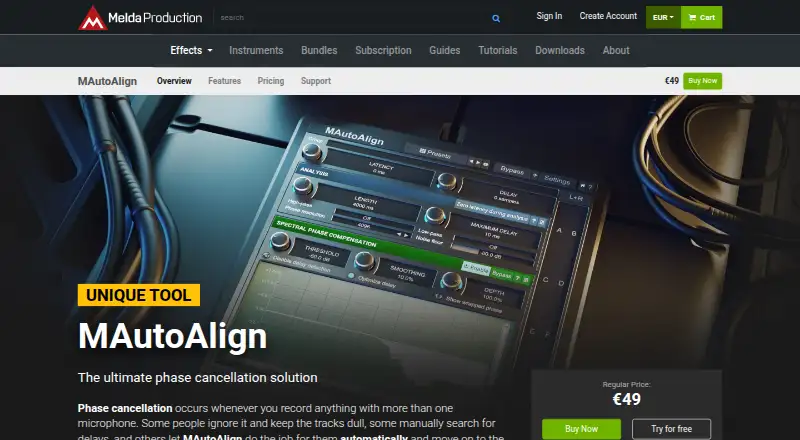
MAutoAlign is a desktop DAW plugin for audio producers and engineers working with recordings made using multiple microphones. It analyzes plugin instances across tracks to determine suitable delays and polarity inversions, addressing phase cancellation rather than taking on the broader work of an AI mixing system. Windows and macOS are supported, with VST, AU and AAX formats listed for compatible DAWs.
Its defining strength is the range of alignment controls around that focused task. Users can enable spectral phase compensation by frequency, choose M/S and other channel modes, and work with surround processing up to 8 channels or ambisonics processing up to 64 channels. Automatic gain compensation and a safety brickwall limiter are also included, along with MIDI controller support and MIDI learn. This makes the plugin relevant for multitrack and spatial sessions where phase relationships need attention, while its scope remains narrower than a tool that automates mixing, EQ or dynamics.
MAutoAlign is paid, with a Single license that covers all your computers and includes free-for-life updates, or monthly and annual MeldaProduction subscriptions that include the vendor's plugins and support Windows and Mac. A 15-day free trial is available, but there is no free plan. Email, community and documentation are listed as support channels. Choose it when phase alignment is a recurring task in a compatible DAW, especially across multi-mic or multichannel sessions. If the goal is broader mix automation rather than alignment, this plugin is not designed for that job.
Your product? Our editors can test MAutoAlign in depth and publish a review, labelled as paid · from $149/mo →
MAutoAlign pricing
All 3 MAutoAlign plans and prices →
MAutoAlign fact sheet
| Free plan | No |
|---|---|
| Paid from | Not verified |
| DAW plugin | Yes |
| Stem separation | No |
| Automatic EQ | No |
| Automatic dynamics | No |
| Spatial processing | Immersive |
| Maximum track count | Not verified |
| Plugin formats | Not verified |
| Free trial | 15 days |
| Deployment | Desktop |
| Platforms | Windows, macOS |
| Support | Email, Community, Docs |
| Built for | Solo, Small business, Mid-market (editorial estimate) |
| Pricing | 15-day trial (source) |
| Website | meldaproduction.com |
| Facts checked | 24 Sep 2026 |
Alternatives to MAutoAlign
- iZotope Neutron 5A deep AI-assisted mixing suite for producers who want detailed control inside a DAW.9.2
- iZotope Nectar 4A focused vocal suite with AI assistance, harmonies, effects, and unmasking.7.9
- EZmix 3A flexible preset-led mixing tool, but not a complete automatic full-mix solution.7.9



See all MAutoAlign alternatives →
Used MAutoAlign? Be the first to review it
The editor score above is our own research. What this page doesn't have yet is a reader's view — what you used MAutoAlign for, what worked and what didn't. No stars are seeded and no review is paid for; an editor reads every one before it appears.
Write a reviewTwo minutes · verified accounts only · read by an editor before it appears
Featured on iTechGuides

MAutoAlign is listed in our AI Audio Mixing Software directory. Add the badge to your site — it links back to this page.
<a href="https://www.itechguides.com/products/mautoalign/"><img src="https://www.itechguides.com/best/badge/mautoalign.svg" alt="Featured on iTechGuides" width="230" height="46"></a>
Reviewed by iTechGuides Editors · Editorial team · Updated Oct 2026
Advertiser disclosure: iTechGuides is reader-supported. Vendors can pay for top positions in our rankings and for a place on other products' pages, and we may earn a commission when you click some links. Bought places stand at the number bought; this page and our disclosure say so. Paying vendors may get a fuller, more detailed review from our editors, and that review can change their score. How we rank.
Last updated · How we research and update