MasterSchedule.app
MasterSchedule.app: A focused manual scheduler with strong validation, exports, and access controls. Ranked #26 of 29 in School Scheduling Software by our editors (6.7/10); pricing: Paid; best for schools preferring manual visual schedule building.
At a glance
- Editor score6.7 / 10
- PricingPaid
- Best forSchools preferring manual visual schedule building
- Free planNo
- Paid from$100/yr
- Timetable automationManual
- Facts checked20 Sep 2026
Where it wins
- Visual placement for courses, teachers, periods, semesters, and block days
- Real-time teacher conflict detection and student requirement validation
- Role-based access, audit logs, imports, and CSV exports included
Where it doesn't
- Manual scheduling model does not automate timetable creation
- No room constraints for room-based scheduling workflows
- Web-only access and no student information system functionality
Our verdict on MasterSchedule.app
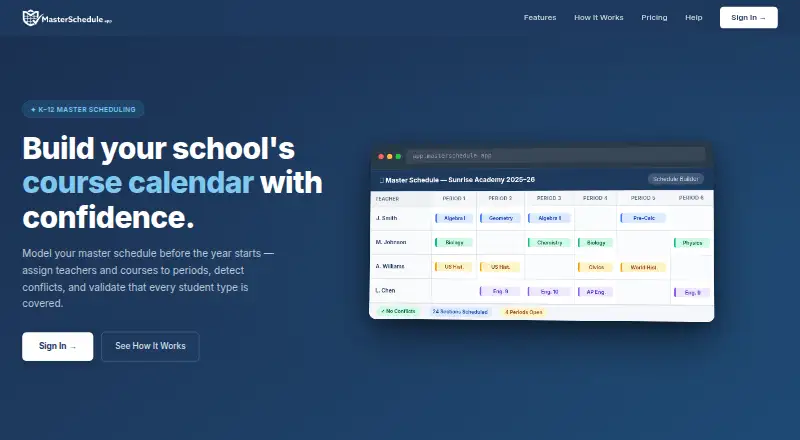
MasterSchedule.app is a web-based planning tool for K–12 school staff and administrators. It helps teams build and validate master course schedules before entering data into a student information system. The visual builder supports course, teacher, period, semester, and block-day placement, while student types and requirement groups help schools organize student scheduling rules. It is designed for manual schedule construction rather than functioning as a student information system or automatically generating timetables.
The product’s strongest area is schedule control and validation. Real-time teacher conflict detection highlights overlapping assignments, and the schedule validator checks student course requirements. Staff can configure teacher unavailable periods and prep periods, import data from Excel through a guided walkthrough, and export schedule and student-selection data as CSV. These features suit schools that want a visual workflow with explicit review points. The published plans also include unlimited courses and teachers, multi-admin access with role control, and full access to all features.
The School Plan costs $100 per school per year with annual billing. An Early Access plan is listed at $0 per school per year and includes the same feature set, including conflict detection, CSV export, and role-controlled multi-admin access; the offer is limited to sign-ups by June 30, 2026. MasterSchedule.app is a good fit for schools that prefer staff-led schedule building, requirement checks, and controlled administrative access. Schools seeking automated timetable generation or room-based constraints should choose a product built around those workflows instead.
Your product? Our editors can test MasterSchedule.app in depth and publish a review, labelled as paid · from $149/mo →
MasterSchedule.app pricing
All 2 MasterSchedule.app plans and prices →
MasterSchedule.app fact sheet
| Free plan | No |
|---|---|
| Paid from | $100/yr |
| Timetable automation | Manual |
| Conflict detection | Yes |
| Teacher constraints | Yes |
| Room constraints | Not verified |
| Student group scheduling | Yes |
| Multi-campus support | Not verified |
| Deployment | Cloud |
| Platforms | Web |
| Compliance & security | GDPR |
| Support | Docs |
| Built for | Small business, Mid-market (editorial estimate) |
| Pricing | Paid (source) |
| Website | masterschedule.app |
| Facts checked | 20 Sep 2026 |
Alternatives to MasterSchedule.app
- TimeEdit ScheduleA deep scheduling system for complex, multi-campus academic timetables.9.4
- UniTimeA free, open-source scheduler covering courses, exams, students, instructors, rooms, and events.9.3
- TimetableMasterA broad school scheduler with free access, AI generation, and advanced tiers for larger operations.9.2



See all MasterSchedule.app alternatives →
Used MasterSchedule.app? Be the first to review it
The editor score above is our own research. What this page doesn't have yet is a reader's view — what you used MasterSchedule.app for, what worked and what didn't. No stars are seeded and no review is paid for; an editor reads every one before it appears.
Write a reviewTwo minutes · verified accounts only · read by an editor before it appears
Featured on iTechGuides

MasterSchedule.app is listed in our School Scheduling Software directory. Add the badge to your site — it links back to this page.
<a href="https://www.itechguides.com/products/masterschedule-app/"><img src="https://www.itechguides.com/best/badge/masterschedule-app.svg" alt="Featured on iTechGuides" width="230" height="46"></a>
Reviewed by iTechGuides Editors · Editorial team · Updated Oct 2026
Advertiser disclosure: iTechGuides is reader-supported. Vendors can pay for top positions in our rankings and for a place on other products' pages, and we may earn a commission when you click some links. Bought places stand at the number bought; this page and our disclosure say so. Paying vendors may get a fuller, more detailed review from our editors, and that review can change their score. How we rank.
Last updated · How we research and update