
Maputnik
Maputnik: A free, developer-focused editor for creating and refining interactive MapLibre styles. Ranked #23 of 26 in Map Creation Software by our editors (6.5/10); pricing: Free plan; best for developers editing MapLibre map styles.
At a glance
- Editor score6.5 / 10
- PricingFree plan
- Best forDevelopers editing MapLibre map styles
- Free planYes
- Paid fromFree
- Map output typesInteractive
- Facts checked22 Sep 2026
Where it wins
- Free and open source across web, desktop, API, and self-hosted use
- Edits MapLibre GL layers, style values, and local style files
- Supports CLI, Docker, file watching, and multiple export options
Where it doesn't
- Focused on style editing rather than full map creation and publishing
- Requires MapLibre GL style knowledge for advanced workflows
- Local development options add setup work beyond browser editing
Our verdict on Maputnik
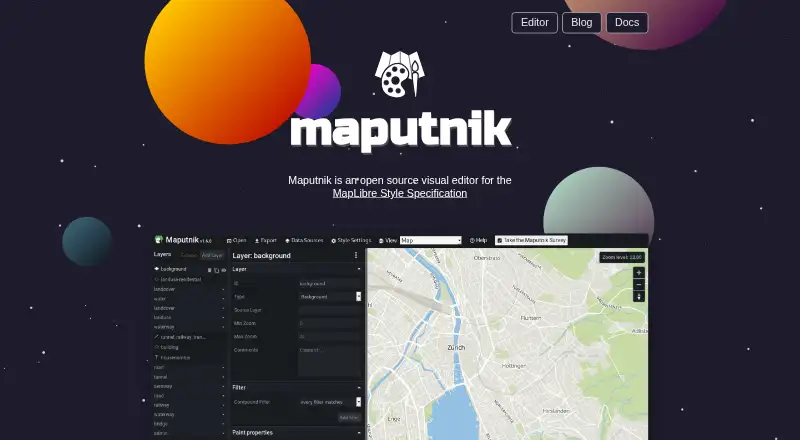
Maputnik is an open-source visual editor for MapLibre GL styles, designed for developers and map designers who need to create or refine interactive map styling. It runs in a web browser and is also available through desktop-oriented executables for Windows, macOS, and Linux, as well as API and self-hosted environments. Users can start with built-in open-source styles or existing style files, then edit map layers and style values through a visual interface.
For local workflows, Maputnik supports style-file editing and upload, local file watching, CLI-based development, and Docker. A desktop-oriented executable can work with local style files and provide a local HTTP API for configured styles. These options suit teams that want to keep style work close to local files or integrate editing into a development workflow, while browser-based editing offers a lighter starting point. The platform also supports custom data import and interactive map output.
Export options include Mapbox GL JSON, GitHub Gist, and flat files, giving developers several ways to move styles into projects or share them. Maputnik is a strong fit when the main need is visual editing of MapLibre styles across flexible environments. It is less suitable for teams seeking a broader map creation and publishing suite, because its scope centers on style editing rather than the complete map production lifecycle. Choose it for open-source, developer-led style work; look elsewhere when publishing and wider map-authoring capabilities are the priority.
Your product? Our editors can test Maputnik in depth and publish a review, labelled as paid · from $149/mo →
Maputnik pricing
Maputnik fact sheet
| Free plan | Yes |
|---|---|
| Paid from | Free |
| Map output types | Interactive |
| Custom data import | Yes |
| Built-in location data | Not verified |
| Web embedding | Not verified |
| Export formats | Mapbox GL JSON, GitHub Gist, flat file |
| Collaboration level | Not verified |
| Brand customization | Not verified |
| Deployment | Cloud, Self-hosted, Desktop |
| Platforms | Web, Windows, macOS, Linux |
| Support | Community, Docs |
| Built for | Solo, Small business, Mid-market (editorial estimate) |
| Pricing | Free plan |
| Website | maputnik.github.io |
| Facts checked | 22 Sep 2026 |
Alternatives to Maputnik
- FeltA broad collaborative GIS workspace for teams that need advanced mapping and live data.8.8
- Scribble MapsA flexible mapping workspace with strong exports, integrations, and sharing options.8.7
- ArcGIS StoryMapsA strong choice for map-led stories and briefings, rather than general-purpose data mapping.8.6



See all Maputnik alternatives →
Used Maputnik? Be the first to review it
The editor score above is our own research. What this page doesn't have yet is a reader's view — what you used Maputnik for, what worked and what didn't. No stars are seeded and no review is paid for; an editor reads every one before it appears.
Write a reviewTwo minutes · verified accounts only · read by an editor before it appears
Featured on iTechGuides

Maputnik is listed in our Map Creation Software directory. Add the badge to your site — it links back to this page.
<a href="https://www.itechguides.com/products/maputnik/"><img src="https://www.itechguides.com/best/badge/maputnik.svg" alt="Featured on iTechGuides" width="230" height="46"></a>
Reviewed by iTechGuides Editors · Editorial team · Updated Oct 2026
Advertiser disclosure: iTechGuides is reader-supported. Vendors can pay for top positions in our rankings and for a place on other products' pages, and we may earn a commission when you click some links. Bought places stand at the number bought; this page and our disclosure say so. Paying vendors may get a fuller, more detailed review from our editors, and that review can change their score. How we rank.
Last updated · How we research and update