MangoHud
MangoHud: A detailed, flexible overlay for Linux gamers who want deep performance and hardware metrics. Ranked #4 of 26 in Game Overlay Software by our editors (8.8/10); pricing: Free plan; best for linux gamers needing detailed system overlays.
At a glance
- Editor score8.8 / 10
- PricingFree plan
- Best forLinux gamers needing detailed system overlays
- Free planYes
- Paid fromFree
- Facts checked20 Sep 2026
Where it wins
- Detailed FPS, frametime, hardware, temperature, and power metrics
- Global and per-application settings with presets and hotkeys
- Free, open-source Linux software with Steam, Lutris, and gamescope support
Where it doesn't
- Supports Linux rather than multiple desktop gaming platforms
- Monitoring and benchmarking are the focus, not broader game utilities
- No AI features
Our verdict on MangoHud
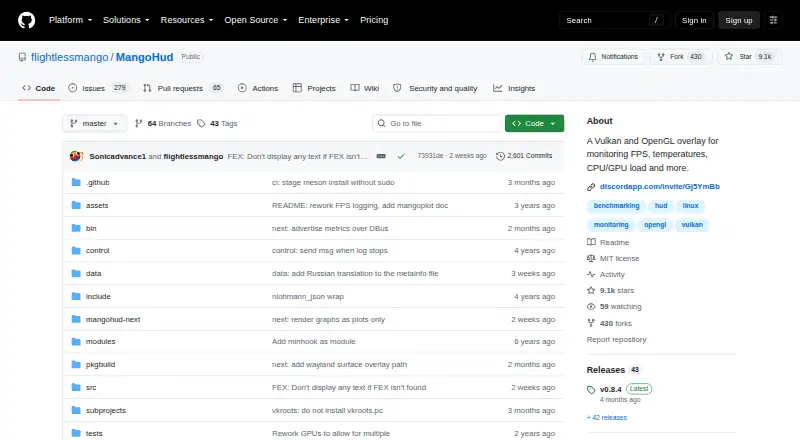
MangoHud is an open-source overlay for Vulkan and OpenGL games on Linux. It is designed for gamers who want detailed visibility into performance and hardware behavior while playing. The overlay can show FPS, frametime, CPU and GPU load, temperatures, RAM and VRAM usage, GPU clocks, fan speed, power, and throttling metrics. Users can configure settings globally or per application, making it suitable for both consistent system-wide monitoring and game-specific profiles.
Its strongest fit is Linux gaming across several common launch paths. MangoHud can be launched with applications, Steam, or Lutris, and it integrates with gamescope through mangoapp. This gives users flexibility across different parts of the Linux gaming ecosystem rather than tying the overlay to one launcher. Presets and hotkeys add control during play, while FPS limiting and VSync controls let users adjust presentation and performance behavior from the same tool. These capabilities make it a practical choice for users who value configuration depth over a minimal display.
MangoHud also extends beyond live metrics with performance logging and benchmark visualization through mangoplot. That combination suits users comparing runs, reviewing frametime behavior, or tracking hardware conditions over time. Its focus is intentionally narrow: performance overlays, system monitoring, logging, benchmarking, and related controls. Linux gamers seeking detailed diagnostics should pick MangoHud, particularly if they use Steam, Lutris, or gamescope. Users who need support beyond Linux or are looking for AI features should choose a different category option.
Your product? Our editors can test MangoHud in depth and publish a review, labelled as paid · from $149/mo →
MangoHud pricing
MangoHud fact sheet
| Free plan | Yes |
|---|---|
| Paid from | Free |
| Supported platforms | Linux |
| In-game chat | Not verified |
| Performance statistics | Yes |
| Recording controls | Not verified |
| Hardware monitoring | Yes |
| Supported games | Not verified |
| Deployment | Self-hosted, Desktop |
| Platforms | Linux |
| Support | Community, Docs |
| Built for | Solo, Small business (editorial estimate) |
| Integrations | 3 integrations: Steam, Lutris, gamescope |
| Pricing | Free plan |
| Website | github.com |
| Facts checked | 20 Sep 2026 |
MangoHud integrations
MangoHud lists 3 integrations on its own site.
- Steam
- Lutris
- gamescope
Alternatives to MangoHud
- RivaTuner Statistics ServerA free Windows overlay utility with broad API support and practical performance controls.9.4
- NVIDIA FrameViewA focused, free overlay for detailed FPS, latency, telemetry, and power benchmarking.9.2
- Intel PresentMonA free, open-source overlay and capture toolkit for detailed frame-time analysis.9.0



See all MangoHud alternatives →
MangoHud vs the competition
- MangoHud vs RivaTuner Statistics Server
- MangoHud vs NVIDIA FrameView
- MangoHud vs Intel PresentMon
- MangoHud vs Overwolf
- MangoHud vs ReShade
- MangoHud vs Special K


Compare MangoHud with any tool side by side →
Also Ranked In
MangoHud is ranked in 3 of our directories.
Used MangoHud? Be the first to review it
The editor score above is our own research. What this page doesn't have yet is a reader's view — what you used MangoHud for, what worked and what didn't. No stars are seeded and no review is paid for; an editor reads every one before it appears.
Write a reviewTwo minutes · verified accounts only · read by an editor before it appears
Featured on iTechGuides

MangoHud is listed in our Game Overlay Software directory. Add the badge to your site — it links back to this page.
<a href="https://www.itechguides.com/products/mangohud/"><img src="https://www.itechguides.com/best/badge/mangohud.svg" alt="Featured on iTechGuides" width="230" height="46"></a>
Reviewed by iTechGuides Editors · Editorial team · Updated Oct 2026
Advertiser disclosure: iTechGuides is reader-supported. Vendors can pay for top positions in our rankings and for a place on other products' pages, and we may earn a commission when you click some links. Bought places stand at the number bought; this page and our disclosure say so. Paying vendors may get a fuller, more detailed review from our editors, and that review can change their score. How we rank.
Last updated · How we research and update