
MangaMaker
MangaMaker: A focused web tool for manga creators who need layouts, references, and export. Ranked #17 of 26 in AI Comic Generators by our editors (6.3/10); pricing: Free plan; best for manga creators needing references and export.
At a glance
- Editor score6.3 / 10
- PricingFree plan
- Best forManga creators needing references and export
- Free planYes
- Paid from$19/mo
- Character consistencyYes
- Facts checked20 Sep 2026
Where it wins
- Character consistency and reference images support recurring designs
- Panel layouts, lettering, fonts, and batch page generation in one tool
- PNG and PDF export, with commercial licensing on selected paid plans
Where it doesn't
- The free plan adds watermarks to exports
- Hobby is for personal use only
- Paid access starts at $19 per month
Our verdict on MangaMaker
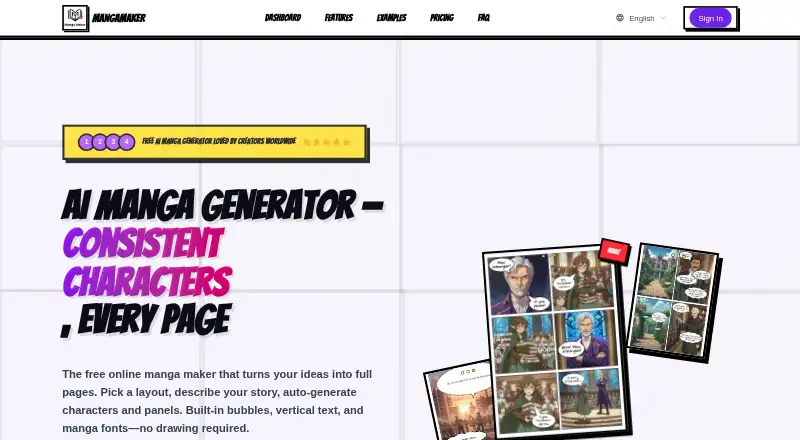
MangaMaker is a browser-based AI tool for creating manga, comics, and webtoon pages. It combines AI-generated artwork with a canvas editor, drag-and-drop panel layouts, character references, speech bubbles, thought clouds, sound-effect text, and manga and webtoon font presets. It suits creators who want to generate panels or pages, keep character appearances consistent, and refine compositions before exporting. The web-only format makes it a focused option for browser-based comic production.
Its free plan includes core templates, standard-quality 300 DPI export, community support, and watermarked exports. Hobby costs $19 per month and adds all templates, no watermark, standard-quality 300 DPI export, and personal use rights. Pro costs $29.90 per month and adds high-quality 300 and 600 DPI export, no watermark, commercial licensing, PDF export, and priority email support. Creator costs $59 per month and includes the same export options, no watermark, PDF export, full commercial licensing, and dedicated support. The paid tiers create a clear split between personal publishing and commercial work, while the entry price is higher than a free trial alone may suggest.
The standout feature set is its combination of image generation and page construction. Users can prompt individual panels or generate pages in batches, then add lettering and sound effects within the same workflow. Character libraries, consistency across panels, and reference-image support are particularly relevant for manga creators working with recurring faces and outfits. Choose MangaMaker if browser-based creation, manga-specific layout tools, references, and export matter most. It is less suitable for creators who need a desktop application, unrestricted commercial rights on the lowest paid tier, or watermark-free exports without a subscription.
Your product? Our editors can test MangaMaker in depth and publish a review, labelled as paid · from $149/mo →
MangaMaker pricing
All 4 MangaMaker plans and prices →
MangaMaker fact sheet
| Free plan | Yes |
|---|---|
| Paid from | $19/mo |
| Script to panels | Not verified |
| Character consistency | Yes |
| Page layouts | Yes |
| Reference images | Yes |
| Commercial use | Yes |
| Maximum panels | Not verified |
| Export formats | Png |
| Deployment | Cloud |
| Platforms | Web |
| Support | Email, Community |
| Built for | Solo, Small business (editorial estimate) |
| Pricing | Free plan (source) |
| Website | mangamaker.app |
| Facts checked | 20 Sep 2026 |
Alternatives to MangaMaker
- GenToonA flexible AI comic maker for social formats, with character consistency and mobile access.8.8
- ComicsAIA web-based comic studio with strong layout, character, and editing controls.7.9
- TaleAtelierA flexible web comic generator with strong character consistency and export options.7.8



See all MangaMaker alternatives →
Used MangaMaker? Be the first to review it
The editor score above is our own research. What this page doesn't have yet is a reader's view — what you used MangaMaker for, what worked and what didn't. No stars are seeded and no review is paid for; an editor reads every one before it appears.
Write a reviewTwo minutes · verified accounts only · read by an editor before it appears
Featured on iTechGuides

MangaMaker is listed in our AI Comic Generators directory. Add the badge to your site — it links back to this page.
<a href="https://www.itechguides.com/products/mangamaker/"><img src="https://www.itechguides.com/best/badge/mangamaker.svg" alt="Featured on iTechGuides" width="230" height="46"></a>
Reviewed by iTechGuides Editors · Editorial team · Updated Sep 2026
Advertiser disclosure: iTechGuides is reader-supported. Vendors can pay for top positions in our rankings and for a place on other products' pages, and we may earn a commission when you click some links. Bought places stand at the number bought; this page and our disclosure say so. Paying vendors may get a fuller, more detailed review from our editors, and that review can change their score. How we rank.
Last updated · How we research and update