
MakeUI
MakeUI: A focused prompt-to-mobile-screen tool with editable outputs and generous export access. Ranked #17 of 22 in AI UI Design Generators by our editors (7.1/10); pricing: Paid; best for developers generating editable mobile screens.
At a glance
- Editor score7.1 / 10
- PricingPaid
- Best forDevelopers generating editable mobile screens
- Free planNo
- Paid from$9.99/mo
- Facts checked22 Sep 2026
Where it wins
- Generates editable mobile screens from natural-language prompts
- Exports editable Figma frames and HTML/CSS code
- Offers Google, Anthropic, and OpenAI model selection
Where it doesn't
- No permanent free plan
- Monthly credits limit iterative generation and editing
- Focused on mobile-screen workflows rather than broader design work
Our verdict on MakeUI
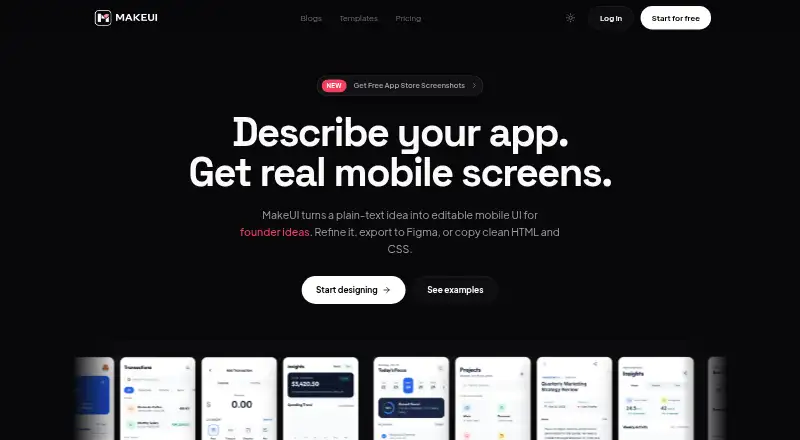
MakeUI is a web-based AI design generation platform for founders, solo builders, product teams, and agencies creating mobile app interfaces. Users describe an app, audience, and flow in natural language, then generate editable screens with navigation, cards, forms, and empty states. It is particularly suited to developers who want a starting point they can refine and export, rather than teams looking only for static visual concepts.
Pricing is subscription-based with monthly credits. The Indie plan costs $9.99 per month and includes 100 monthly credits, unlimited projects, access to all models, unlimited code export, unlimited Figma export, and priority support. Pro costs $19.99 per month and raises the allowance to 300 monthly credits, while Power costs $39.99 per month and provides 700 monthly credits. The paid tiers share the same project, model, export, and support features; the main plan difference is the monthly credit allocation. There is no permanent $0 plan.
MakeUI’s strongest workflow combines prompt-driven generation with iterative screen and design editing. Figma export produces editable frames, while HTML/CSS output supports handoff toward implementation. Model selection spans Google, Anthropic, and OpenAI, giving teams a choice among supported model providers within the product. Private projects use row-level data isolation. Choose MakeUI if your work centers on generating and refining mobile screens with direct Figma and code export. Consider an alternative if you need a broader design-system workflow, native desktop access, or a product without recurring credit limits.
Your product? Our editors can test MakeUI in depth and publish a review, labelled as paid · from $149/mo →
MakeUI pricing
All 3 MakeUI plans and prices →
MakeUI fact sheet
| Free plan | No |
|---|---|
| Paid from | $9.99/mo |
| Prompt-to-UI generation | Yes |
| Design-system support | Not verified |
| Multi-screen generation | Not verified |
| Responsive layouts | Not verified |
| Figma export | Yes |
| Code export | Yes |
| Deployment | Cloud |
| Platforms | Web |
| Built for | Solo, Small business, Mid-market (editorial estimate) |
| Integrations | 4 integrations: Figma, Google Gemini, Anthropic Claude, OpenAI Codex |
| Pricing | Paid (source) |
| Website | makeui.design |
| Facts checked | 22 Sep 2026 |
MakeUI integrations
MakeUI lists 4 integrations on its own site.
- Figma
- Google Gemini
- Anthropic Claude
- OpenAI Codex
Alternatives to MakeUI
- Figma MakeA broad prompt-to-code workspace for teams moving from ideas to interactive products.9.4
- UX PilotA broad AI UI workflow for teams moving from ideas to prototypes and handoff.9.2
- VisilyAn affordable, collaborative AI prototyping workspace with broad design-to-code workflows.9.0



Used MakeUI? Be the first to review it
The editor score above is our own research. What this page doesn't have yet is a reader's view — what you used MakeUI for, what worked and what didn't. No stars are seeded and no review is paid for; an editor reads every one before it appears.
Write a reviewTwo minutes · verified accounts only · read by an editor before it appears
Featured on iTechGuides

MakeUI is listed in our AI UI Design Generators directory. Add the badge to your site — it links back to this page.
<a href="https://www.itechguides.com/products/makeui/"><img src="https://www.itechguides.com/best/badge/makeui.svg" alt="Featured on iTechGuides" width="230" height="46"></a>
Reviewed by iTechGuides Editors · Editorial team · Updated Oct 2026
Advertiser disclosure: iTechGuides is reader-supported. Vendors can pay for top positions in our rankings and for a place on other products' pages, and we may earn a commission when you click some links. Bought places stand at the number bought; this page and our disclosure say so. Paying vendors may get a fuller, more detailed review from our editors, and that review can change their score. How we rank.
Last updated · How we research and update