
makegif
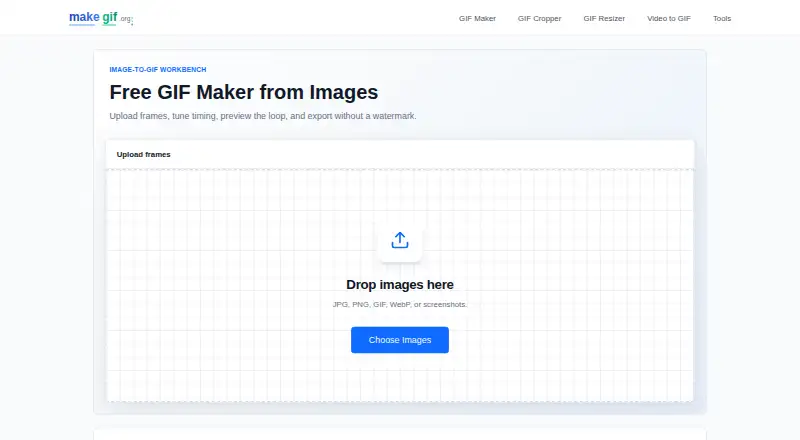
makegif: A free web utility for detailed image-to-GIF and video-to-GIF control. Ranked #14 of 23 in AI GIF Makers by our editors (8.0/10); pricing: Free plan; best for free precise frame and video GIF controls.
At a glance
- Editor score8.0 / 10
- PricingFree plan
- Best forFree precise frame and video GIF controls
- Free planYes
- Paid fromFree
- Facts checked22 Sep 2026
Where it wins
- Free image and video conversion with no watermark on exports
- Precise frame delays, ordering, duration, FPS, size, and quality controls
- Crop and resize animated GIFs with adjustable dimensions and aspect ratios
Where it doesn't
- Web-only access requires a browser-based workflow
- Its published feature set focuses on GIF utilities rather than AI creation
- Advanced controls may be more detail than users need for quick conversions
Our verdict on makegif
makegif is a browser-based utility for creating and editing animated GIFs from image frames or video. It suits people who want a straightforward web workflow without installing desktop software, including users assembling frame-based animations, converting short video clips, or adjusting existing GIFs. The image maker supports drag-and-drop frame reordering, global and individual frame delays, previews, size fitting, custom dimensions, and watermark-free export. The video converter accepts common video formats and direct video URLs.
Control depth is the main reason to choose makegif. Image workflows can set timing for every frame, while mixed-size images can be fitted using presets or custom dimensions. Video conversions add controls for duration, frame rate, dimensions, and quality. Separate crop and resize tools extend the workflow beyond initial creation, with adjustable aspect ratios and custom width and height settings for animated GIFs. This combination makes the product more suitable for users who care about output dimensions and animation timing than for people seeking a one-click converter.
The pricing model is free, and the published tools cover the core workflows without a paid tier distinction. Access is web-only, so the product fits users who prefer browser-based utilities and do not need a desktop application. Buyers specifically looking for AI-assisted or generative GIF creation should choose a product built around those capabilities instead; makegif is focused on manual frame, conversion, crop, resize, and export controls. For precise GIF assembly at no listed cost, it is a focused option.
Your product? Our editors can test makegif in depth and publish a review, labelled as paid · from $149/mo →
makegif pricing
makegif fact sheet
| Free plan | Yes |
|---|---|
| Paid from | Free |
| Prompt to GIF | Not verified |
| Image to GIF | Yes |
| Video to GIF | Yes |
| GIF templates | Not verified |
| Maximum GIF length | Not verified |
| Watermark-free export | Yes |
| Deployment | Cloud |
| Platforms | Web |
| Support | |
| Built for | Solo, Small business (editorial estimate) |
| Pricing | Free plan |
| Website | makegif.org |
| Facts checked | 22 Sep 2026 |
Alternatives to makegif
- MoxionA broad browser-based GIF toolkit with free previews, one-time packs, and monthly plans.9.4
- HagifA low-cost GIF toolkit covering AI generation, conversion, editing, and optimization.9.3
- GifGenA paid GIF and sticker maker with prompt generation, editing, templates, and exports.9.2



See all makegif alternatives →
Used makegif? Be the first to review it
The editor score above is our own research. What this page doesn't have yet is a reader's view — what you used makegif for, what worked and what didn't. No stars are seeded and no review is paid for; an editor reads every one before it appears.
Write a reviewTwo minutes · verified accounts only · read by an editor before it appears
Featured on iTechGuides

makegif is listed in our AI GIF Makers directory. Add the badge to your site — it links back to this page.
<a href="https://www.itechguides.com/products/makegif/"><img src="https://www.itechguides.com/best/badge/makegif.svg" alt="Featured on iTechGuides" width="230" height="46"></a>
Reviewed by iTechGuides Editors · Editorial team · Updated Oct 2026
Advertiser disclosure: iTechGuides is reader-supported. Vendors can pay for top positions in our rankings and for a place on other products' pages, and we may earn a commission when you click some links. Bought places stand at the number bought; this page and our disclosure say so. Paying vendors may get a fuller, more detailed review from our editors, and that review can change their score. How we rank.
Last updated · How we research and update