Mac2FA
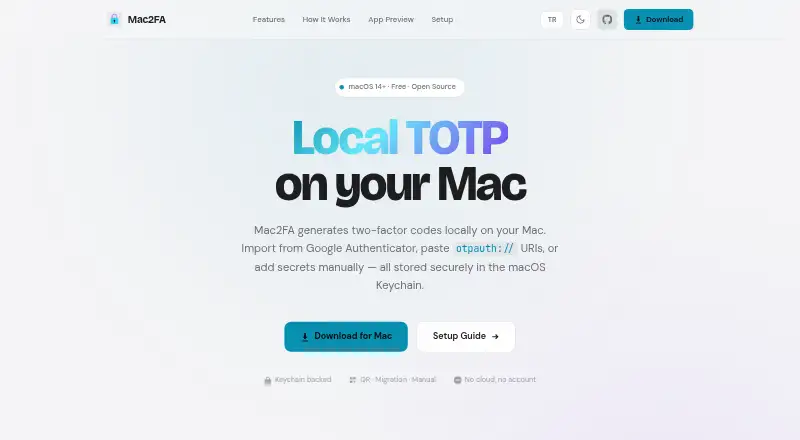
Mac2FA: Free, open-source TOTP for Mac with local storage and several account import options. Ranked #102 of 111 in Authenticator Apps by our editors (3.0/10); pricing: Free plan; best for mac users wanting local TOTP with migration support.
At a glance
- Editor score3.0 / 10
- PricingFree plan
- Best forMac users wanting local TOTP with migration support
- Free planYes
- Paid fromFree
- Push approvalsNo
- Facts checked23 Sep 2026
Where it wins
- Generates TOTP codes locally and stores secrets in the macOS Keychain
- Imports Google Authenticator migration links, QR codes and otpauth URIs
- Searches accounts by issuer or label and copies codes from the account list
Where it doesn't
- Runs only on macOS 14 or later
- Does not provide encrypted backup or multi-device sync
- Does not support push approvals or team administration
Our verdict on Mac2FA
Mac2FA is a free, open-source desktop authenticator from Azrapps for generating TOTP codes locally on macOS. It suits solo Mac users who want to move accounts into a local app or add them individually, rather than manage authentication across a team or several device platforms. Accounts can be added with Base32 secrets, standard otpauth TOTP URIs, or Google Authenticator migration links and QR codes. The app also accepts OTP QR codes from images or drag-and-drop, giving users several routes for bringing existing TOTP accounts in.
Account secrets are stored in the macOS Keychain, while account metadata stays local. Codes can be copied from the account list, which can be searched by issuer or account label. That focused workflow is useful when the main need is retrieving TOTP codes on a Mac; it does not extend to push approvals. Mac2FA can check GitHub releases for updates, and email is the listed support channel. Its platform scope is specific: it requires macOS 14 or later and is offered for macOS, so it is not a fit for buyers seeking a cross-platform authenticator.
There is no paid tier to compare: Mac2FA is free, and its published description identifies it as open source. The trade-off is that encrypted backup and multi-device sync are not part of its feature set, so users who need account recovery or continuity across devices should choose an authenticator with those capabilities. Team administration is also outside its scope. Pick Mac2FA for local TOTP on a compatible Mac, especially if migration options and Keychain storage matter; look elsewhere if you need synchronization, backup, push-based approval, or team controls.
Your product? Our editors can test Mac2FA in depth and publish a review, labelled as paid · from $149/mo →
Mac2FA pricing
Mac2FA fact sheet
| Free plan | Yes |
|---|---|
| Paid from | Free |
| Code type | Totp |
| Push approvals | No |
| Encrypted backup | No |
| Multi-device sync | No |
| Team administration | No |
| Supported platforms | macOS |
| Deployment | Desktop |
| Platforms | macOS |
| Support | |
| Built for | Solo (editorial estimate) |
| Integrations | 2 integrations: Google Authenticator, standard otpauth TOTP providers |
| Pricing | Free plan |
| Website | app.azrapps.com |
| Facts checked | 23 Sep 2026 |
Mac2FA integrations
Mac2FA lists 2 integrations on its own site.
- Google Authenticator
- standard otpauth TOTP providers
Alternatives to Mac2FA
- Proton AuthenticatorA mature free option for secure 2FA codes across mobile and desktop platforms.9.4
- Google AuthenticatorA free, straightforward authenticator with offline codes, sync, and QR transfers.9.2
- AuthyA focused free authenticator for mobile users who need synced TOTP tokens.9.1


Used Mac2FA? Be the first to review it
The editor score above is our own research. What this page doesn't have yet is a reader's view — what you used Mac2FA for, what worked and what didn't. No stars are seeded and no review is paid for; an editor reads every one before it appears.
Write a reviewTwo minutes · verified accounts only · read by an editor before it appears
Featured on iTechGuides

Mac2FA is listed in our Authenticator Apps directory. Add the badge to your site — it links back to this page.
<a href="https://www.itechguides.com/products/mac2fa/"><img src="https://www.itechguides.com/best/badge/mac2fa.svg" alt="Featured on iTechGuides" width="230" height="46"></a>
Reviewed by iTechGuides Editors · Editorial team · Updated Oct 2026
Advertiser disclosure: iTechGuides is reader-supported. Vendors can pay for top positions in our rankings and for a place on other products' pages, and we may earn a commission when you click some links. Bought places stand at the number bought; this page and our disclosure say so. Paying vendors may get a fuller, more detailed review from our editors, and that review can change their score. How we rank.
Last updated · How we research and update