LitPads
LitPads: A soundboard with flexible playback and cue controls, plus a free tier for smaller setups. Ranked #14 of 26 in Soundboard Software by our editors (8.0/10); pricing: Free plan; best for mac and iOS users wanting configurable sound pads.
At a glance
- Editor score8.0 / 10
- PricingFree plan
- Best forMac and iOS users wanting configurable sound pads
- Free planYes
- Paid from$29.99 one-time
- Desktop appYes
- Facts checked23 Sep 2026
Where it wins
- Free plan includes 6 boards with 20 pads each and all four play modes
- Pro adds per-pad EQ, pitch shifting, MIDI support, and Mac hotkeys
- Setlist mode, audio ducking, and board sharing support live cue workflows
Where it doesn't
- Unlimited boards and pads require the $29.99 Pro purchase
- LitPads Studio is a Mac-only direct download
- No voice effects or browser app
Our verdict on LitPads
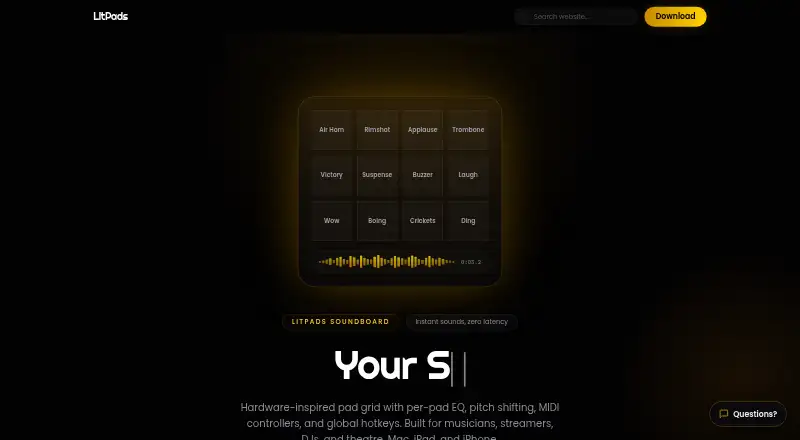
LitPads is a soundboard app for musicians, streamers, DJs, and theatre professionals using Mac, iPad, or iPhone. Sounds can be imported or recorded from a microphone, arranged across boards, and triggered by touch, keyboard shortcuts, or MIDI controllers. Four playback modes, retrigger options, and setlist mode give it a performance-oriented shape, while board export and sharing help move cue layouts between setups.
The free LitPads plan is a useful entry point: it includes 6 boards with 20 pads each, audio import and microphone recording, and all four play modes. The $29.99 one-time LitPads Pro purchase removes the board and pad limits and adds iCloud sync, per-pad EQ and pitch shifting, MIDI controller support, global Mac hotkeys, and audio ducking. At $49.99 one-time, LitPads Studio bundles Pro with LitLink Pro and adds per-app audio routing, EQ, and recording; it is a Mac-only direct download. The tiers make the choice clear: start free for basic board use, then pay for expanded performance controls or the Studio routing bundle.
Its strongest fit is a solo performer or small team that wants sound pads and cue management across Apple devices, with external MIDI controls or system-wide Mac shortcuts in the workflow. Integrations listed include OBS, Discord, Zoom, Stream Deck, and LitLink. The feature set also reaches beyond simple playback through a spectrum analyzer, stereo pan, audio ducking, and setlists. Choose another option if browser access or voice effects are central requirements; LitPads is focused on sound playback and routing rather than those capabilities.
Your product? Our editors can test LitPads in depth and publish a review, labelled as paid · from $149/mo →
LitPads pricing
All 3 LitPads plans and prices →
LitPads fact sheet
| Free plan | Yes |
|---|---|
| Paid from | $29.99 one-time |
| Desktop app | Yes |
| Browser app | No |
| Hotkey triggering | Yes |
| Streaming integrations | Yes |
| Voice effects | No |
| Multiple soundboards | Yes |
| Deployment | Desktop, Mobile |
| Platforms | macOS, iOS |
| Support | Email, Community |
| Built for | Solo, Small business (editorial estimate) |
| Integrations | 5 integrations: OBS, Discord, Zoom, Stream Deck, LitLink |
| Pricing | Free plan (source) |
| Website | litpads.app |
| Facts checked | 23 Sep 2026 |
LitPads integrations
LitPads lists 5 integrations on its own site.
- OBS
- Discord
- Zoom
- Stream Deck
- LitLink
Alternatives to LitPads
- AudioPadA strong free choice for desktop sound triggers, routing, and voice-chat playback.9.4
- ResananceA free, flexible soundboard for hotkeys, voice effects, and streaming audio.9.2
- Sound ShowA flexible cross-platform soundboard for live shows, streaming, and multimedia cues.9.1

See all LitPads alternatives →
Used LitPads? Be the first to review it
The editor score above is our own research. What this page doesn't have yet is a reader's view — what you used LitPads for, what worked and what didn't. No stars are seeded and no review is paid for; an editor reads every one before it appears.
Write a reviewTwo minutes · verified accounts only · read by an editor before it appears
Featured on iTechGuides

LitPads is listed in our Soundboard Software directory. Add the badge to your site — it links back to this page.
<a href="https://www.itechguides.com/products/litpads/"><img src="https://www.itechguides.com/best/badge/litpads.svg" alt="Featured on iTechGuides" width="230" height="46"></a>
Reviewed by iTechGuides Editors · Editorial team · Updated Oct 2026
Advertiser disclosure: iTechGuides is reader-supported. Vendors can pay for top positions in our rankings and for a place on other products' pages, and we may earn a commission when you click some links. Bought places stand at the number bought; this page and our disclosure say so. Paying vendors may get a fuller, more detailed review from our editors, and that review can change their score. How we rank.
Last updated · How we research and update