Resanance
Resanance: A free, flexible soundboard for hotkeys, voice effects, and streaming audio. Ranked #2 of 26 in Soundboard Software by our editors (9.2/10); pricing: Free plan; best for gamers and streamers needing voice effects.
At a glance
- Editor score9.2 / 10
- PricingFree plan
- Best forGamers and streamers needing voice effects
- Free planYes
- Paid fromFree
- Desktop appYes
- Facts checked20 Sep 2026
Where it wins
- Free access with hotkeys, MIDI, text-to-speech, and random playback
- Routes audio to multiple devices with separate volume controls
- Integrates with Discord, Zoom, Teams, Twitch, and other platforms
Where it doesn't
- Audio playback depends on applications accepting microphone input
- The voice-changer application is separate from the soundboard
- Some website and documentation content is dated
Our verdict on Resanance
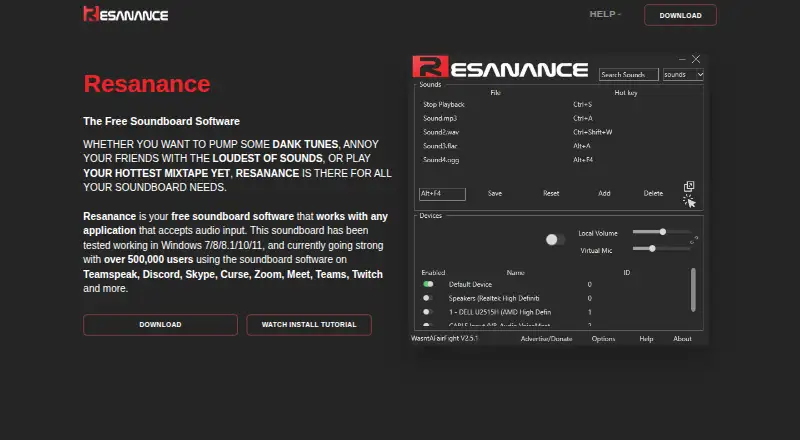
Resanance is free soundboard software for gamers, streamers, and people who trigger audio in voice or communication applications. Its Windows application supports keyboard hotkeys, per-sound and per-button volume controls, multiple audio devices, MIDI input, text-to-speech, searchable sound collections, and random playback. A browser interface and Android companion app extend access beyond the desktop, while the separate voice-changer application adds pitch, distortion, delay, flange, and ring modulation effects.
Platform fit is a central strength. Resanance can play audio through applications that accept microphone input and integrates with TeamSpeak, Discord, Skype, Curse, Zoom, Google Meet, Microsoft Teams, and Twitch. The published platform options cover web, Windows, and Android. Multiple-device routing helps users direct sound to more than one destination, and separate microphone and local sound controls provide additional control during calls, streams, or games. Buyers looking for a soundboard that fits across voice chat, meetings, and streaming platforms should find this combination useful.
The feature set goes beyond simple button-triggered clips. Users can search and sort sounds, assign effects to keyboard hotkeys, trigger random playback, connect MIDI soundboards, and generate text-to-speech audio. Resanance is therefore suited to users who want a free tool with several input and routing options rather than a minimal clip launcher. Its main boundary is the microphone-input workflow: playback is designed for applications that accept that type of audio input. The voice effects are also provided through a separate application, and some website and documentation content is dated. Choose Resanance for broad free soundboard functionality; consider an alternative if you need a single combined voice-effects and soundboard application.
Your product? Our editors can test Resanance in depth and publish a review, labelled as paid · from $149/mo →
Resanance pricing
Resanance fact sheet
| Free plan | Yes |
|---|---|
| Paid from | Free |
| Desktop app | Yes |
| Browser app | Yes |
| Hotkey triggering | Yes |
| Streaming integrations | Yes |
| Voice effects | Yes |
| Multiple soundboards | Not verified |
| Deployment | Cloud, Desktop, Mobile |
| Platforms | Web, Windows, Android |
| Support | Community, Docs, Email |
| Built for | Solo, Small business (editorial estimate) |
| Integrations | 8 integrations: TeamSpeak, Discord, Skype, Curse, Zoom, Google Meet … |
| Pricing | Free plan |
| Website | resanance.com |
| Facts checked | 20 Sep 2026 |
Resanance integrations
Resanance lists 8 integrations on its own site.
- TeamSpeak
- Discord
- Skype
- Curse
- Zoom
- Google Meet
- Microsoft Teams
- Twitch
Alternatives to Resanance
- AudioPadA strong free choice for desktop sound triggers, routing, and voice-chat playback.9.4
- Sound ShowA flexible cross-platform soundboard for live shows, streaming, and multimedia cues.9.1
- LivePlayA capable open-source soundboard for cue-driven live production.9.0



See all Resanance alternatives →
Resanance vs the competition
- Resanance vs AudioPad
- Resanance vs Sound Show
- Resanance vs LivePlay
- Resanance vs Stadium Sound
- Resanance vs Linux Show Player
- Resanance vs Soundplant



Compare Resanance with any tool side by side →
Used Resanance? Be the first to review it
The editor score above is our own research. What this page doesn't have yet is a reader's view — what you used Resanance for, what worked and what didn't. No stars are seeded and no review is paid for; an editor reads every one before it appears.
Write a reviewTwo minutes · verified accounts only · read by an editor before it appears
Featured on iTechGuides

Resanance is listed in our Soundboard Software directory. Add the badge to your site — it links back to this page.
<a href="https://www.itechguides.com/products/resanance/"><img src="https://www.itechguides.com/best/badge/resanance.svg" alt="Featured on iTechGuides" width="230" height="46"></a>
Reviewed by iTechGuides Editors · Editorial team · Updated Oct 2026
Advertiser disclosure: iTechGuides is reader-supported. Vendors can pay for top positions in our rankings and for a place on other products' pages, and we may earn a commission when you click some links. Bought places stand at the number bought; this page and our disclosure say so. Paying vendors may get a fuller, more detailed review from our editors, and that review can change their score. How we rank.
Last updated · How we research and update