
Limner
Limner: A capable free Windows art studio with paid animation, vector, and comic upgrades. Ranked #14 of 46 in Digital Painting Software by our editors (8.0/10); pricing: Free plan; best for windows illustrators needing animation and comics.
At a glance
- Editor score8.0 / 10
- PricingFree plan
- Best forWindows illustrators needing animation and comics
- Free planYes
- Layer supportYes
- Facts checked20 Sep 2026
Where it wins
- Free raster workspace with brushes, layers, masks, and PSD workflows
- Pressure, tilt, stabilization, rulers, symmetry, and advanced painting tools
- Plus adds animation, vector export, timelapse, and multi-page comics
Where it doesn't
- Windows-only, with no listed support for other platforms
- Basic color management lacks ICC profiles for print-accurate CMYK proofing
- Limner is currently offered as beta software
Our verdict on Limner
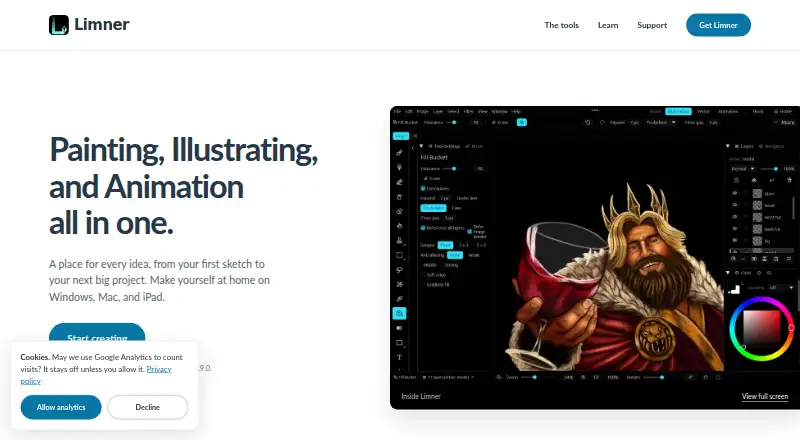
Limner is a Windows-native digital painting application for illustrators, pen-display artists, animators, and comic creators. Its main Illustration workspace covers raster painting, custom brushes, nested layers, folders, blend modes, clipping, masks, selections, filters, adjustments, rulers, symmetry, mesh warp, and liquefy. Native pen pressure and tilt support, real-time stroke stabilization, autosave, and crash recovery make its feature set relevant to artists working with tablets and pen displays. File workflows include layered PSD, PNG, and JPEG, with additional SVG, GIF, MP4, and PNG-sequence support across the application.
The plan structure gives Limner a clear entry point. Limner Free includes raster painting, brush and layer tools, blend modes, masks, selections, filters, adjustments, PNG, JPEG, and PSD import and export, plus autosave and crash recovery. Limner Plus adds a vector workspace with SVG export, Brush Studio with .abr import and export, frame-by-frame animation, animation export, comic and manga Book projects, and advanced timelapse and pro export. Built-in 4K timelapse recording, onion skin, and keyframed camera and layers make the Plus tier more relevant to motion and sequential-art workflows than a painting-only application.
Limner’s strongest fit is for Windows-based creators who want painting, animation, and comics in one application while retaining Photoshop brush and PSD compatibility. Its platform scope is narrow: the listed platform is Windows, so artists working across operating systems should look elsewhere. Color management is also basic; the documented CMYK controls do not use an ICC color profile and are not print-accurate proofs. Limner is currently beta software, which matters for teams seeking a settled production tool. Choose it for a broad Windows illustration workflow and choose an alternative when cross-platform access or print-focused color management is essential.
Your product? Our editors can test Limner in depth and publish a review, labelled as paid · from $99/mo →
Limner pricing
All 2 Limner plans and prices →
Limner fact sheet
| Free plan | Yes |
|---|---|
| Paid from | Not verified |
| Brush customization | Yes |
| Layer support | Yes |
| Pressure sensitivity | Yes |
| Supported platforms | Windows |
| Color management | Basic |
| Stroke stabilization | Yes |
| Deployment | Desktop |
| Platforms | Windows |
| Integrations | 2 integrations: Photoshop .abr, PSD |
| Pricing | Free plan (source) |
| Website | limnerart.com |
| Facts checked | 20 Sep 2026 |
Limner integrations
Limner lists 2 integrations on its own site.
- Photoshop .abr
- PSD
Alternatives to Limner
- KritaA broad, professional-grade painting toolkit with no paid plan and wide platform coverage.9.4
- Clip Studio PaintA broad digital art workspace spanning illustration, comics, 3D, animation, and cloud tools.9.3
- ProcreateA polished iPad painting workflow with broad creative tools and limited platform coverage.9.1



Used Limner? Be the first to review it
The editor score above is our own research. What this page doesn't have yet is a reader's view — what you used Limner for, what worked and what didn't. No stars are seeded and no review is paid for; an editor reads every one before it appears.
Write a reviewTwo minutes · verified accounts only · read by an editor before it appears
Featured on iTechGuides

Limner is listed in our Digital Painting Software directory. Add the badge to your site — it links back to this page.
<a href="https://www.itechguides.com/products/limner/"><img src="https://www.itechguides.com/best/badge/limner.svg" alt="Featured on iTechGuides" width="230" height="46"></a>
Reviewed by iTechGuides Editors · Editorial team · Updated Oct 2026
Advertiser disclosure: iTechGuides is reader-supported. Vendors can pay for top positions in our rankings and for a place on other products' pages, and we may earn a commission when you click some links. How we rank.
Last updated · How we research and update