
Lightscreen
Lightscreen: A focused, free screenshot utility for Windows and Linux desktops. Ranked #38 of 39 in Screenshot Software by our editors (5.5/10); pricing: Free plan; best for windows and Linux users wanting minimal capture.
At a glance
- Editor score5.5 / 10
- PricingFree plan
- Best forWindows and Linux users wanting minimal capture
- Free planYes
- Paid fromFree
- Facts checked21 Sep 2026
Where it wins
- Configurable global hotkeys for fast screenshot actions
- Area, window, and preview-based capture options
- History, naming rules, portable mode, and image-host uploads
Where it doesn't
- No verified scrolling capture
- No OCR features
- Limited integrations beyond Imgur and compatible image hosts
Our verdict on Lightscreen
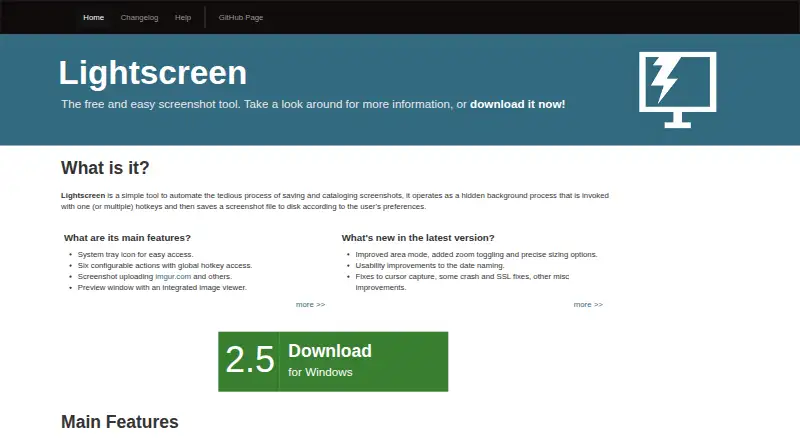
Lightscreen is a free, open-source desktop screenshot utility for Windows and Linux. It runs in the background and supports configurable global hotkeys for capturing the full screen, selected areas, or individual windows. The product fits individuals who want a focused local capture workflow rather than a hosted collaboration platform. System tray access, a window picker, and resizing and zoom controls keep the core process centered on quick desktop capture.
Its strongest area is the balance between capture and lightweight organization. Area capture includes resizing and zoom controls, while the screenshot preview window provides an integrated viewer. Screenshot history makes previous captures accessible, and automatic sequential or date-and-time naming helps keep files orderly. Portable mode and configuration export also suit users who want to carry settings between environments. Upload support extends the workflow to Imgur and pomf-compatible hosts, although the integration set remains narrow.
Lightscreen is a good choice for Windows and Linux users who value simplicity, configurable hotkeys, local saving, and basic upload options without a commercial plan. It is less suitable for workflows that require scrolling capture, OCR, or a broader ecosystem of integrations. Users seeking a compact screenshot tool with history and naming controls should find its feature set well aligned; teams needing collaboration features or advanced capture analysis should choose a more specialized alternative.
Your product? Our editors can test Lightscreen in depth and publish a review, labelled as paid · from $149/mo →
Lightscreen pricing
Lightscreen fact sheet
| Free plan | Yes |
|---|---|
| Paid from | Free |
| Scrolling capture | Not verified |
| OCR text extraction | Not verified |
| Supported platforms | Windows, Linux |
| Export formats | Not verified |
| Cloud storage | Not verified |
| Shareable links | Not verified |
| Deployment | Desktop |
| Platforms | Windows, Linux |
| Support | Docs |
| Built for | Solo, Small business (editorial estimate) |
| Integrations | 2 integrations: Imgur, pomf-compatible hosts |
| Pricing | Free plan |
| Website | lightscreen.com.ar |
| Facts checked | 21 Sep 2026 |
Lightscreen integrations
Lightscreen lists 2 integrations on its own site.
- Imgur
- pomf-compatible hosts
Alternatives to Lightscreen
- SnagitA mature screenshot and recording suite for teams that need more than basic captures.9.3
- ShareXA powerful free Windows capture tool with automation, editing, OCR, recording and uploads.9.2
- GyazoA versatile capture tool with broad platform support and useful Pro upgrades.9.1



See all Lightscreen alternatives →
Used Lightscreen? Be the first to review it
The editor score above is our own research. What this page doesn't have yet is a reader's view — what you used Lightscreen for, what worked and what didn't. No stars are seeded and no review is paid for; an editor reads every one before it appears.
Write a reviewTwo minutes · verified accounts only · read by an editor before it appears
Featured on iTechGuides

Lightscreen is listed in our Screenshot Software directory. Add the badge to your site — it links back to this page.
<a href="https://www.itechguides.com/products/lightscreen/"><img src="https://www.itechguides.com/best/badge/lightscreen.svg" alt="Featured on iTechGuides" width="230" height="46"></a>
Reviewed by iTechGuides Editors · Editorial team · Updated Oct 2026
Advertiser disclosure: iTechGuides is reader-supported. Vendors can pay for top positions in our rankings and for a place on other products' pages, and we may earn a commission when you click some links. Bought places stand at the number bought; this page and our disclosure say so. Paying vendors may get a fuller, more detailed review from our editors, and that review can change their score. How we rank.
Last updated · How we research and update