
Lightning AI Studios
Lightning AI Studios: AI-focused cloud Studios combine GPU compute, persistent storage, collaboration, and deployment. Ranked #26 of 137 in Coding Playgrounds by our editors (6.8/10); pricing: Free plan; best for AI developers needing persistent GPU cloud workspaces.
At a glance
- Editor score6.8 / 10
- PricingFree plan
- Best forAI developers needing persistent GPU cloud workspaces
- Free planYes
- Real-time collaborationYes
- Facts checked23 Sep 2026
Where it wins
- GPU and CPU compute with persistent storage for AI development
- Live Studio collaboration and shared files across Studios
- Deploy monitored services with autoscaling and logging
Where it doesn't
- Studios are focused on AI and machine learning, not general coding
- Free Studio restarts every four hours
- Pro and Teams credits are annual, which may not suit every usage pattern
Our verdict on Lightning AI Studios
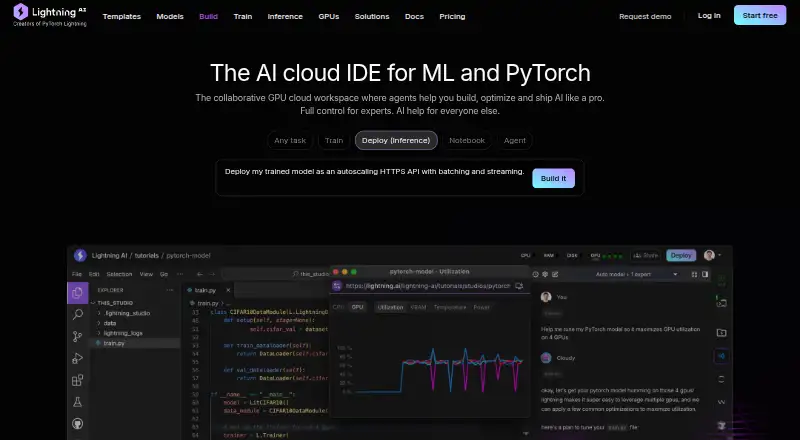
Lightning AI Studios provide persistent cloud workspaces for AI and machine-learning development. Developers, researchers, and teams can work in preconfigured environments with GPU or CPU compute, train models, run inference, and build applications. The product also supports live collaboration, shared teamspace files, and publishing Studios for public or organization-only duplication. Its AI focus suits people whose coding work centers on model development and related applications more than general-purpose playground use.
The standout breadth is in the workspace lifecycle: a Studio can be used for development, connected to a local IDE or SSH, and deployed as a monitored service with autoscaling and logging. AWS, Google Cloud Platform, Amazon S3, and GitHub are listed integrations. The web and API platforms, along with team collaboration and duplication controls, give individuals and groups several ways to work with Studios. Choose it when persistent compute, AI copilots, and a path from experimentation to service deployment matter together; a simpler playground may be a better fit for general coding.
The Free plan includes 15 monthly credits, one active Studio with four-hour restarts, 50 GB of persistent storage, and multiplayer live collaboration. Pro lists 240 annual credits, one active Studio without restarts, 200 GB of storage, and up to 6 concurrent GPUs. Teams adds 600 annual credits, real-time cost controls, spending limits, and a 2 TB storage limit. Enterprise supports bringing AWS or GCP cloud credits, deployment in your own VPC, a 99.95% uptime SLA, and SOC 2 Type 2 compliance. The tier structure makes the free option a way to start, while organizations needing deployment control and an SLA should look at Enterprise. Those seeking a general coding playground rather than AI/ML workspaces should consider another product.
Your product? Our editors can test Lightning AI Studios in depth and publish a review, labelled as paid · from $149/mo →
Lightning AI Studios pricing
All 4 Lightning AI Studios plans and prices →
Lightning AI Studios fact sheet
| Free plan | Yes |
|---|---|
| Paid from | Not verified |
| Real-time collaboration | Yes |
| Private projects | Yes |
| Full-stack runtime | Yes |
| Deployment options | Full_stack |
| Project limit | Not verified |
| Runtime languages | Not verified |
| Sharing controls | Access_control |
| Deployment | Cloud |
| Platforms | Web |
| Compliance & security | SOC 2 |
| Support | Email, Docs |
| Built for | Solo, Small business, Mid-market, Enterprise (editorial estimate) |
| Integrations | 4 integrations: AWS, Google Cloud Platform, Amazon S3, GitHub |
| Pricing | Free plan (source) |
| Website | lightning.ai |
| Facts checked | 23 Sep 2026 |
Lightning AI Studios integrations
Lightning AI Studios lists 4 integrations on its own site.
- AWS
- Google Cloud Platform
- Amazon S3
- GitHub
Alternatives to Lightning AI Studios
- ReplitA mature browser-based workspace with persistence, publishing, AI assistance, and team features.9.3
- CodeSandboxA flexible coding playground for collaborative development, automation, and AI workflows.9.2
- Firebase StudioA free, AI-assisted cloud workspace for prototyping and deploying full-stack apps.9.1


See all Lightning AI Studios alternatives →
Also Ranked In
Lightning AI Studios is ranked in 2 of our directories.
Used Lightning AI Studios? Be the first to review it
The editor score above is our own research. What this page doesn't have yet is a reader's view — what you used Lightning AI Studios for, what worked and what didn't. No stars are seeded and no review is paid for; an editor reads every one before it appears.
Write a reviewTwo minutes · verified accounts only · read by an editor before it appears
Featured on iTechGuides

Lightning AI Studios is listed in our Coding Playgrounds directory. Add the badge to your site — it links back to this page.
<a href="https://www.itechguides.com/products/lightning-ai-studios/"><img src="https://www.itechguides.com/best/badge/lightning-ai-studios.svg" alt="Featured on iTechGuides" width="230" height="46"></a>
Reviewed by iTechGuides Editors · Editorial team · Updated Oct 2026
Advertiser disclosure: iTechGuides is reader-supported. Vendors can pay for top positions in our rankings and for a place on other products' pages, and we may earn a commission when you click some links. Bought places stand at the number bought; this page and our disclosure say so. Paying vendors may get a fuller, more detailed review from our editors, and that review can change their score. How we rank.
Last updated · How we research and update