
Life Lapse
Life Lapse: A capable iPhone stop-motion editor with strong capture tools and broad social exports. Ranked #12 of 29 in Stop Motion Software by our editors (7.8/10); pricing: Free plan · 7-day trial; best for iPhone creators focused on social video.
At a glance
- Editor score7.8 / 10
- PricingFree plan · 7-day trial
- Best foriPhone creators focused on social video
- Free planYes
- Onion skinningYes
- Founded2017 · Vancouver, British Columbia, Canada
- Facts checked20 Sep 2026
Where it wins
- Onion skinning, interval capture, and camera controls support precise frame work
- Timeline editing includes moving, duplicating, freezing, and deleting clips
- Audio tools plus GIF and MP4 export support social video production
Where it doesn't
- Available only on iOS
- Paid pricing varies by storefront and region
- Android app was removed from Google Play
Our verdict on Life Lapse
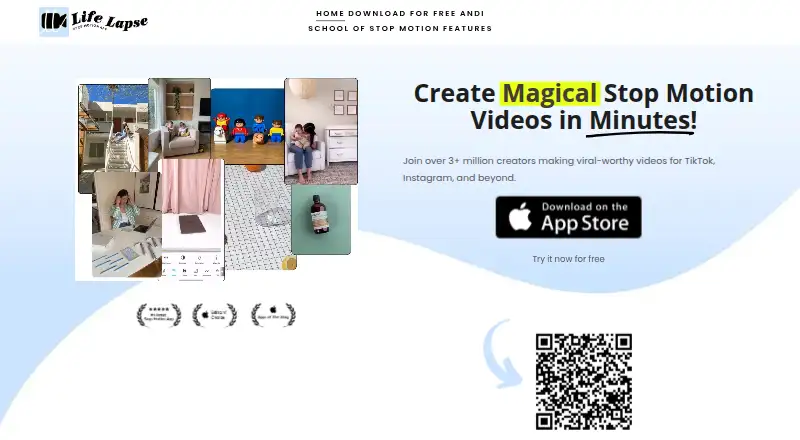
Life Lapse is an iOS app for creating stop-motion videos from photos and short clips. It combines an in-app camera with a ghosted-image onion-skin overlay, self and interval timers, exposure and white-balance locking, and a timeline editor. The product is aimed at small businesses, creators, influencers, and beginners who want to produce social video with a phone. Its social ecosystem fit includes Instagram, TikTok, and YouTube, while Bluetooth remote support adds another option for capture control.
The free access covers a substantial part of the stop-motion workflow, including onion skinning, live frame capture, exposure control, white-balance locking, interval capture, timeline editing, audio, effects, and GIF or MP4 export. Editing tools include speed adjustment, reverse, boomerang, filters, crop controls, music, sound effects, imported audio, and audio recording. Paid options include Stop Motion Pro Weekly, Stop Motion Pro Monthly, Stop Motion Pro, Life Lapse Pro, and Lifetime Access. Life Lapse Pro includes additional editing features and a 7-day free trial; the published plans also include a 7-day free trial for the relevant subscription offer.
The main trade-off is platform coverage. Life Lapse is built for iPhone creators, and the Android app was removed from Google Play, so it is not a practical choice for Android-based production. Paid costs can vary by storefront and region, which is worth considering when comparing plans. Choose Life Lapse if your workflow centers on iOS capture, frame-by-frame control, and short-form social publishing. Consider an alternative if Android support or a more consistent cross-platform setup is essential.
Your product? Our editors can test Life Lapse in depth and publish a review, labelled as paid · from $149/mo →
Life Lapse pricing
All 5 Life Lapse plans and prices →
Life Lapse fact sheet
| Free plan | Yes |
|---|---|
| Paid from | Not verified |
| Onion skinning | Yes |
| Live frame capture | Yes |
| Exposure controls | Yes |
| Timeline editing | Yes |
| Audio support | Yes |
| Supported platforms | iOS |
| Free trial | 7 days |
| Deployment | Mobile |
| Platforms | iOS |
| Support | Email, Docs |
| Built for | Solo, Small business (editorial estimate) |
| Integrations | 3 integrations: Instagram, TikTok, YouTube |
| Pricing | Free plan · 7-day trial (source) |
| Website | stopmotionapp.com |
| Facts checked | 20 Sep 2026 |
Life Lapse integrations
Life Lapse lists 3 integrations on its own site.
- TikTok
- YouTube
Alternatives to Life Lapse
- DragonframeA deep professional toolkit with broad hardware support and a high one-time price.9.4
- MOTK ShootA capable open-source capture studio with camera control, editing, audio, and recovery tools.9.2
- Stop Motion StudioA broad stop-motion toolkit with capture, editing, camera controls, audio, and compositing.8.9


See all Life Lapse alternatives →
Used Life Lapse? Be the first to review it
The editor score above is our own research. What this page doesn't have yet is a reader's view — what you used Life Lapse for, what worked and what didn't. No stars are seeded and no review is paid for; an editor reads every one before it appears.
Write a reviewTwo minutes · verified accounts only · read by an editor before it appears
Featured on iTechGuides

Life Lapse is listed in our Stop Motion Software directory. Add the badge to your site — it links back to this page.
<a href="https://www.itechguides.com/products/life-lapse/"><img src="https://www.itechguides.com/best/badge/life-lapse.svg" alt="Featured on iTechGuides" width="230" height="46"></a>
Reviewed by iTechGuides Editors · Editorial team · Updated Oct 2026
Advertiser disclosure: iTechGuides is reader-supported. Vendors can pay for top positions in our rankings and for a place on other products' pages, and we may earn a commission when you click some links. Bought places stand at the number bought; this page and our disclosure say so. Paying vendors may get a fuller, more detailed review from our editors, and that review can change their score. How we rank.
Last updated · How we research and update