
LEXI Text
LEXI Text: A live-captioning specialist for broadcasters that need synchronized, speaker-aware output. Ranked #62 of 99 in AI Video Caption Generators by our editors (3.0/10); pricing: Pricing on request; best for live captioning for established broadcasters.
At a glance
- Editor score3.0 / 10
- PricingPricing on request
- Best forLive captioning for established broadcasters
- Caption stylingYes
- Founded2003 · Chatswood, New South Wales, Australia
- Facts checked22 Sep 2026
Where it wins
- Real-time captioning with speaker identification and intelligent placement
- Supports 48 caption languages and custom vocabulary topic models
- Connects with AI-Media encoders, EEG Cloud and iCap Cloud Network
Where it doesn't
- Contact-sales pricing makes direct cost comparison difficult
- Its strongest fit is live media rather than general video captioning
- Workflow integration centers on AI-Media’s encoder and delivery ecosystem
Our verdict on LEXI Text
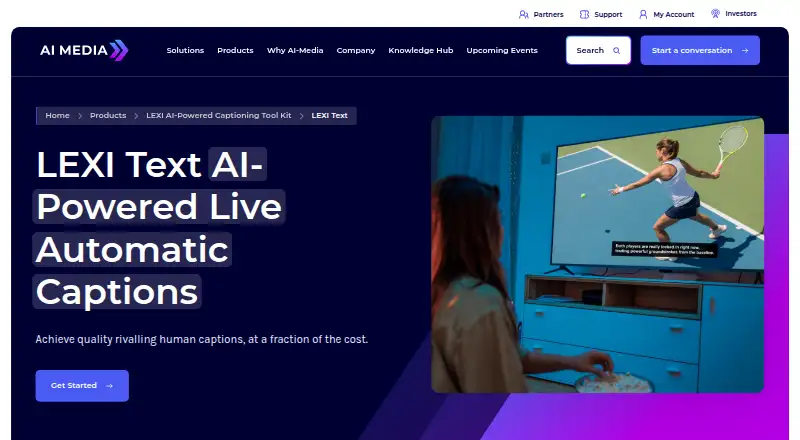
LEXI Text is an AI-powered automatic speech recognition product for live captioning across television, streaming, meetings, events and other live content workflows. AI-Media positions it for professional live-media, enterprise, government and institutional teams that need captions generated during a broadcast or session. It runs through web and API access, and can be managed through physical encoders or an EEG Cloud account. The product combines caption generation with speaker identification, placement, synchronization and scheduling rather than focusing only on transcript creation.
Its feature depth is concentrated in live production. Real-time automatic captioning is supported by automated speaker identification, intelligent caption placement and synchronization with video and audio. Topic models allow specialized vocabulary to be tailored to a subject area, while Safe Language profanity filtering adds an editorial control for live output. Multi-language caption support covers 48 caption languages, and the category specifications include caption styling and speaker identification. These capabilities make LEXI Text a practical fit for broadcasters and event teams managing recurring, time-sensitive captioning sessions.
The ecosystem is clearest for organizations already working with AI-Media infrastructure. LEXI Text integrates with AI-Media encoders, EEG Cloud and the iCap Cloud Network, giving professional live workflows defined connection points for caption delivery. Scheduling supports planned sessions, while the web and API options provide management and workflow flexibility. AI-Media uses subscription options with contact-sales pricing, so buyers should evaluate requirements with the vendor rather than compare published tier costs. Choose LEXI Text for established live-captioning operations that value synchronization, speaker handling and specialized vocabulary; teams seeking a broadly positioned, self-serve video captioning tool should consider alternatives.
Your product? Our editors can test LEXI Text in depth and publish a review, labelled as paid · from $149/mo →
LEXI Text pricing
LEXI Text fact sheet
| Free plan | Not verified |
|---|---|
| Paid from | Not verified |
| Max video length | Not verified |
| Caption languages | 48 languages |
| Caption styling | Yes |
| Subtitle export | Not verified |
| Burn-in captions | Not verified |
| Speaker identification | Yes |
| Brand caption presets | Not verified |
| Deployment | Cloud |
| Platforms | Web |
| Support | Phone, Tickets, Docs · 24/7 |
| Built for | Mid-market, Enterprise (editorial estimate) |
| Integrations | 3 integrations: AI-Media encoders, EEG Cloud, iCap Cloud Network |
| Pricing | Pricing on request |
| Website | ai-media.tv |
| Facts checked | 22 Sep 2026 |
LEXI Text integrations
LEXI Text lists 3 integrations on its own site.
- AI-Media encoders
- EEG Cloud
- iCap Cloud Network
Alternatives to LEXI Text
- WhisperA flexible local transcription engine, but not a complete caption-editing product.9.2
- CaptionHubA workflow-rich caption and localization platform for enterprise video teams.8.8
- SubmagicAn all-in-one caption editor with styling, text editing, B-roll, and publishing tools.8.7


See all LEXI Text alternatives →
Used LEXI Text? Be the first to review it
The editor score above is our own research. What this page doesn't have yet is a reader's view — what you used LEXI Text for, what worked and what didn't. No stars are seeded and no review is paid for; an editor reads every one before it appears.
Write a reviewTwo minutes · verified accounts only · read by an editor before it appears
Featured on iTechGuides

LEXI Text is listed in our AI Video Caption Generators directory. Add the badge to your site — it links back to this page.
<a href="https://www.itechguides.com/products/lexi-text/"><img src="https://www.itechguides.com/best/badge/lexi-text.svg" alt="Featured on iTechGuides" width="230" height="46"></a>
Reviewed by iTechGuides Editors · Editorial team · Updated Oct 2026
Advertiser disclosure: iTechGuides is reader-supported. Vendors can pay for top positions in our rankings and for a place on other products' pages, and we may earn a commission when you click some links. Bought places stand at the number bought; this page and our disclosure say so. Paying vendors may get a fuller, more detailed review from our editors, and that review can change their score. How we rank.
Last updated · How we research and update