Lenscap
Lenscap: A capable local capture toolkit for Mac, with experimental scrolling and optional cloud sharing. Ranked #30 of 61 in Screen Capture Software by our editors (5.3/10); pricing: Free plan; best for open-source Mac users needing local capture.
At a glance
- Editor score5.3 / 10
- PricingFree plan
- Best forOpen-source Mac users needing local capture
- Free planYes
- Paid fromFree
- Annotation toolsYes
- Facts checked19 Sep 2026
Where it wins
- Captures areas, windows, full screens, timed shots, and OCR text.
- Adds annotation, blur or pixelation, crop, pinning, and local history.
- Records H.264 MP4 with optional system audio, plus GIFs capped at 30 seconds.
Where it doesn't
- Scrolling capture is explicitly experimental.
- Requires macOS 14 or later; the prebuilt release supports Apple Silicon only.
- Cloud sharing requires a Neon project and a bring-your-own backend.
Our verdict on Lenscap
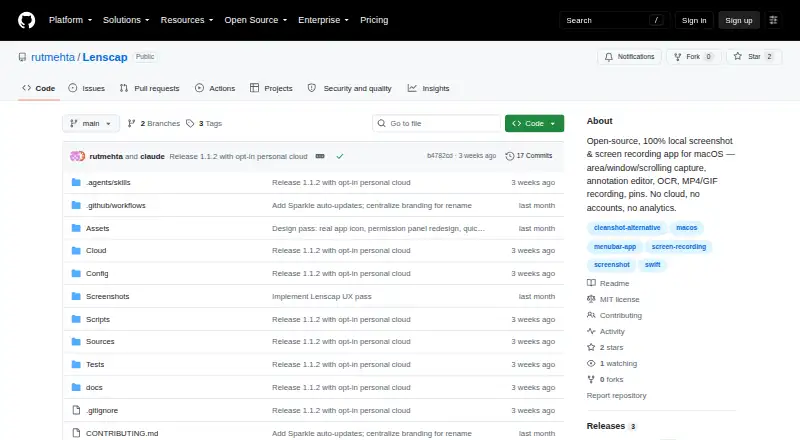
Lenscap is an open-source macOS menu-bar app for screenshots and screen recording, aimed at Mac users who want capture tools that can save locally. It covers area, window, fullscreen, and timed screenshots, plus OCR text capture through the Vision framework. Its prebuilt release supports Apple Silicon Macs, and the project requires macOS 14 or later, so it is a fit for users already on that platform rather than people seeking a cross-platform capture tool.
The feature set extends beyond taking a still image. The editor includes arrows, shapes, text, blur or pixelation, crop, and background controls; captures can also be pinned as always-on-top panels. Local capture history includes filtering and per-item actions, and customizable global hotkeys support a quick capture workflow. Screen recording exports H.264 MP4 with optional system audio, while GIF recording has a 30-second cap. PNG and JPEG are listed as screenshot output formats. Scrolling capture offers automatic scrolling and image stitching, but it is explicitly experimental, so users who depend on reliable long-page capture should weigh that limitation.
Lenscap keeps local capture as its core use and makes cloud sharing optional. Its personal cloud library supports private uploads and share links, but requires a Neon project and a bring-your-own backend; Neon is the listed integration. That arrangement may suit users comfortable managing their own cloud setup, while those seeking ready-to-use hosted sharing or broad platform coverage should consider another option. Choose Lenscap for a Mac-focused, open-source toolkit combining screenshots, annotation, OCR, and recording; look elsewhere if experimental scrolling, the macOS requirement, or Apple Silicon-only prebuilt release conflicts with your setup.
Your product? Our editors can test Lenscap in depth and publish a review, labelled as paid · from $149/mo →
Lenscap pricing
Lenscap fact sheet
| Free plan | Yes |
|---|---|
| Paid from | Free |
| Scrolling capture | Yes |
| Annotation tools | Yes |
| OCR | Yes |
| Browser extension | Not verified |
| Desktop platforms | Macos |
| Cloud sharing | Yes |
| Export formats | PNG, JPEG, MP4, GIF |
| Deployment | Desktop |
| Platforms | macOS |
| Integrations | 1 integrations: Neon |
| Pricing | Free plan |
| Website | github.com |
| Facts checked | 19 Sep 2026 |
Lenscap integrations
Lenscap lists 1 integrations on its own site.
- Neon
Alternatives to Lenscap
- SnagitA polished capture and editing toolkit for teams that can budget for an annual subscription.9.3
- ShareXA flexible Windows capture toolkit with scrolling screenshots, OCR, recording and upload workflows.9.1
- ZightA cross-platform capture tool with team workflows, integrations, and a free plan.9.0



See all Lenscap alternatives →
Used Lenscap? Be the first to review it
The editor score above is our own research. What this page doesn't have yet is a reader's view — what you used Lenscap for, what worked and what didn't. No stars are seeded and no review is paid for; an editor reads every one before it appears.
Write a reviewTwo minutes · verified accounts only · read by an editor before it appears
Featured on iTechGuides

Lenscap is listed in our Screen Capture Software directory. Add the badge to your site — it links back to this page.
<a href="https://www.itechguides.com/products/lenscap/"><img src="https://www.itechguides.com/best/badge/lenscap.svg" alt="Featured on iTechGuides" width="230" height="46"></a>
Reviewed by iTechGuides Editors · Editorial team · Updated Oct 2026
Advertiser disclosure: iTechGuides is reader-supported. Vendors can pay for top positions in our rankings and for a place on other products' pages, and we may earn a commission when you click some links. Bought places stand at the number bought; this page and our disclosure say so. Paying vendors may get a fuller, more detailed review from our editors, and that review can change their score. How we rank.
Last updated · How we research and update