Lenovo Legion Accessory Central
Lenovo Legion Accessory Central: A free Windows utility for configuring compatible Lenovo Legion mice, keyboards, and combos. Ranked #11 of 38 in Gaming Peripheral Software by our editors (7.9/10); pricing: Free plan; best for lenovo Legion mouse and keyboard owners.
At a glance
- Editor score7.9 / 10
- PricingFree plan
- Best forLenovo Legion mouse and keyboard owners
- Free planYes
- Paid fromFree
- Desktop platformsWindows only
- Facts checked20 Sep 2026
Where it wins
- Free Windows software for compatible Legion accessories
- Supports macros, remapping, RGB controls, and profiles
- Includes surface tuning for compatible Legion mice
Where it doesn't
- Works only with compatible Lenovo Legion devices
- Requires Windows rather than broader platform support
- Version 2.0 resets settings from the older 1.0 release
Our verdict on Lenovo Legion Accessory Central
Lenovo Legion Accessory Central is Windows software for configuring selected Lenovo Legion gaming peripherals. It supports compatible Legion gaming mice, gaming keyboards, and keyboard-and-mouse combo devices. The main audience is Lenovo Legion owners who want to adjust programmable controls, lighting, macros, profiles, and supported mouse settings from one utility.
The software is free, with no paid tiers described. Its feature set covers practical configuration tasks: users can remap programmable buttons and keys, assign macros, control programmable RGB lighting, and create or switch device profiles. Compatible mice can also receive device-specific surface tuning. For Legion owners, that makes the utility suitable for organizing common peripheral settings without a separate paid plan.
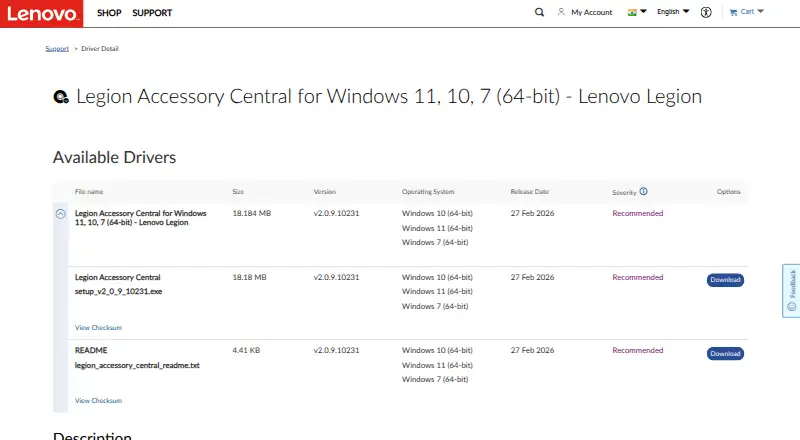
Platform and ecosystem fit are the main boundaries. Lenovo distributes the software through its support download pages, and the current listed release supports 64-bit Windows 7, Windows 10, and Windows 11. Its scope is tied to compatible Lenovo Legion mice, keyboards, and combo devices, so it is a focused choice rather than a general utility for mixed-brand gaming hardware. Lenovo states that release 2.0 replaces release 1.0 and resets previous settings. Choose it if your peripherals are compatible Legion models and you need Windows-based control over macros, remapping, RGB, profiles, or mouse surface tuning. Owners of other brands or users seeking broader device coverage should look elsewhere.
Your product? Our editors can test Lenovo Legion Accessory Central in depth and publish a review, labelled as paid · from $149/mo →
Lenovo Legion Accessory Central pricing
Lenovo Legion Accessory Central fact sheet
| Free plan | Yes |
|---|---|
| Paid from | Free |
| Desktop platforms | Windows only |
| Macro support | Yes |
| Button remapping | Yes |
| Lighting control | Yes |
| Profile storage | Not verified |
| Supported device types | gaming mice; gaming keyboards; keyboard-and-mouse combos |
| Deployment | Desktop |
| Platforms | Windows |
| Support | Docs |
| Built for | Solo, Small business (editorial estimate) |
| Pricing | Free plan |
| Website | support.lenovo.com |
| Facts checked | 20 Sep 2026 |
Alternatives to Lenovo Legion Accessory Central
- Razer SynapseA free control hub for remapping, macros, profiles, and Chroma lighting across Razer devices.9.3
- Logitech G HUBA free desktop hub for cross-platform Logitech G lighting and peripheral profiles.9.2
- be quiet! IO CenterFree peripheral tuning with web access across Windows, macOS, and Linux via Chromium.8.8


See all Lenovo Legion Accessory Central alternatives →
Used Lenovo Legion Accessory Central? Be the first to review it
The editor score above is our own research. What this page doesn't have yet is a reader's view — what you used Lenovo Legion Accessory Central for, what worked and what didn't. No stars are seeded and no review is paid for; an editor reads every one before it appears.
Write a reviewTwo minutes · verified accounts only · read by an editor before it appears
Featured on iTechGuides

Lenovo Legion Accessory Central is listed in our Gaming Peripheral Software directory. Add the badge to your site — it links back to this page.
<a href="https://www.itechguides.com/products/lenovo-legion-accessory-central/"><img src="https://www.itechguides.com/best/badge/lenovo-legion-accessory-central.svg" alt="Featured on iTechGuides" width="230" height="46"></a>
Reviewed by iTechGuides Editors · Editorial team · Updated Oct 2026
Advertiser disclosure: iTechGuides is reader-supported. Vendors can pay for top positions in our rankings and for a place on other products' pages, and we may earn a commission when you click some links. Bought places stand at the number bought; this page and our disclosure say so. Paying vendors may get a fuller, more detailed review from our editors, and that review can change their score. How we rank.
Last updated · How we research and update