LaneDraws
LaneDraws: A texture-focused brush library spanning Photoshop and Procreate workflows. Ranked #18 of 23 in Digital Brush Libraries by our editors (7.5/10); pricing: Paid; best for photoshop and Procreate texture-focused artists.
At a glance
- Editor score7.5 / 10
- PricingPaid
- Best forPhotoshop and Procreate texture-focused artists
- Commercial licenseYes
- Facts checked21 Sep 2026
Where it wins
- Includes Photoshop and Procreate brush collections for multiple workflows
- Offers paper, canvas, overlay textures, smudge tools, and erasers
- Provides installation guides, brush guide videos, and commercial-use licenses
Where it doesn't
- Product licenses and included formats vary by pack
- The collection combines brush packs with reference products and coaching
- Photoshop and Procreate are the supported creative applications
Our verdict on LaneDraws
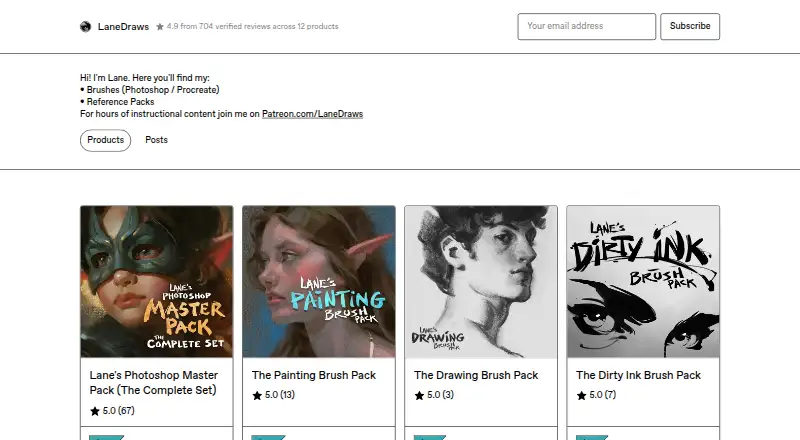
LaneDraws is a downloadable collection of digital brush packs and related art resources from Lane Brown. It is aimed at artists working in Adobe Photoshop or Procreate, particularly those focused on painting, drawing, inking, charcoal, pastel, and textured finishes. The library supports both Photoshop brush files and Procreate brush sets, with downloads delivered in ABR and brushset formats. Its commercial-use licensing options make it relevant to freelance, personal, indie, and studio work, depending on the selected product and license.
The strongest aspect is the range of texture-oriented resources. The Drawing Brush Pack includes 120+ dry media drawing brushes, 40 paper and canvas surfaces, and 30 overlay textures. The Dirty Ink Brush Pack offers 120+ inking brushes with the same surface and overlay elements, while the Painting Brush Pack includes 350+ painting and illustration brushes, including mixer brushes, watercolor, gouache, and special effects. Procreate users get dedicated options such as the Charcoal Master Pack, with 44 brushes and tools, and the Pastel Pro Pack, with 48 brushes and tools plus 35 natural paper textures.
LaneDraws also provides practical support material through installation guides, a PDF walkthrough, brush guide videos, smudge tools, and erasers. The published license plans include Freelance & Personal Use License, Indie License, and Studio License, with the listed plan highlights including 18 Photoshop brushes and a PDF walkthrough. Because licenses and included formats vary by pack, buyers should match the specific product to their application and intended use. Artists seeking Photoshop or Procreate texture resources should consider LaneDraws; those working outside these applications should look elsewhere.
Questions about LaneDraws
What does LaneDraws run on? Web, Windows, macOS and iOS. It runs as a desktop app and as a mobile app.
What does LaneDraws integrate with? 2 integrations: Adobe Photoshop and Procreate.
Who is LaneDraws built for? Solo users and small businesses (our editorial estimate).
Your product? Our editors can test LaneDraws in depth and publish a review, labelled as paid · from $149/mo →
LaneDraws pricing
All 9 LaneDraws plans and prices →
LaneDraws fact sheet
| Free plan | Not verified |
|---|---|
| Paid from | Not verified |
| Supported apps | Adobe Photoshop, Procreate |
| Brush file formats | abr, brushset |
| Commercial license | Yes |
| Brushes included | 18 brushes |
| Delivery method | Download |
| License scope | Commercial |
| Deployment | Desktop, Mobile |
| Platforms | Web, Windows, macOS, iOS |
| Support | |
| Built for | Solo, Small business (editorial estimate) |
| Integrations | 2 integrations: Adobe Photoshop, Procreate |
| Pricing | Paid (source) |
| Website | lane339.gumroad.com |
| Facts checked | 21 Sep 2026 |
LaneDraws integrations
LaneDraws lists 2 integrations on its own site.
- Adobe Photoshop
- Procreate
Alternatives to LaneDraws
- Brushapes StudioA flexible brush library spanning five major creative applications and multiple art workflows.9.4
- Frankentoon StudioA flexible free starter library for illustrators working across several creative apps.9.2
- Bardot BrushA focused Procreate brush library with flexible one-time bundles and lifetime updates.9.0



See all LaneDraws alternatives →
Used LaneDraws? Be the first to review it
The editor score above is our own research. What this page doesn't have yet is a reader's view — what you used LaneDraws for, what worked and what didn't. No stars are seeded and no review is paid for; an editor reads every one before it appears.
Write a reviewTwo minutes · verified accounts only · read by an editor before it appears
Featured on iTechGuides

LaneDraws is listed in our Digital Brush Libraries directory. Add the badge to your site — it links back to this page.
<a href="https://www.itechguides.com/products/lanedraws/"><img src="https://www.itechguides.com/best/badge/lanedraws.svg" alt="Featured on iTechGuides" width="230" height="46"></a>
Reviewed by iTechGuides Editors · Editorial team · Updated Nov 2026
Advertiser disclosure: iTechGuides is reader-supported. Vendors can pay for top positions in our rankings and for a place on other products' pages, and we may earn a commission when you click some links. Bought places stand at the number bought; this page and our disclosure say so. Paying vendors may get a fuller, more detailed review from our editors, and that review can change their score. How we rank.
Last updated · How we research and update