
KTouch
KTouch: A mature open-source typing tutor with adaptive lessons, diagnostics, and course customization. Ranked #26 of 36 in Typing Tutor Software by our editors (6.7/10); pricing: Open source; best for linux users wanting mature open-source lessons.
At a glance
- Editor score6.7 / 10
- PricingOpen source
- Best forLinux users wanting mature open-source lessons
- Paid fromFree
- Adaptive practiceYes
- Founded1999
- Facts checked20 Sep 2026
Where it wins
- Progressive lessons adapt unlocking to typing performance
- Detailed statistics cover speed, accuracy, lessons, and history
- Supports languages, layouts, custom courses, and arbitrary text
Where it doesn't
- Desktop platform coverage is limited to Linux and Windows
- Its focus is touch typing rather than broader study tools
- Course and layout customization may require additional setup
Our verdict on KTouch
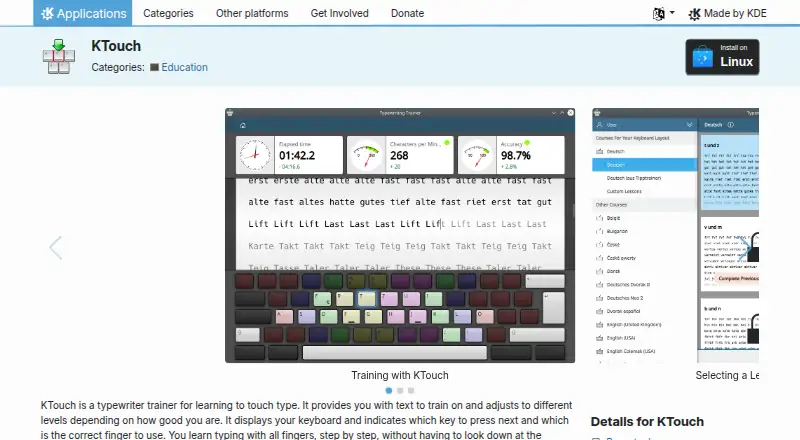
KTouch is a desktop typing tutor for learners who want structured practice rather than a general writing application. KDE positions it for personal use, schools, and universities. Its core workflow combines guided lessons with keyboard visualization, showing the next key and recommended finger while learners build touch-typing skills. Multiple user profiles also make it suitable for different learners or skill levels on the same installation.
The strongest part of KTouch is its progression and feedback model. Lessons unlock progressively according to typing performance, while statistics record speed, accuracy, lesson results, and historical progress. That gives learners a clearer basis for deciding what to practice next than a simple collection of drills. Support for multiple languages and keyboard layouts broadens its usefulness beyond a single keyboard setup, and the included course and layout editors allow instructors or advanced learners to adjust the learning environment.
KTouch also favors control over a service-based experience. Users can create custom lessons from arbitrary text, define courses, and maintain separate profiles, making it a practical fit for classrooms or personalized practice. Its tradeoff is scope: this is focused desktop software for touch typing, with platform coverage centered on Linux and Windows rather than a broader learning ecosystem. Choose KTouch if open-source licensing, adaptive progression, diagnostics, and customization matter most. Consider another option if you want typing practice outside those desktop platforms or a wider set of study features.
Your product? Our editors can test KTouch in depth and publish a review, labelled as paid · from $149/mo →
KTouch pricing
KTouch fact sheet
| Free plan | Not verified |
|---|---|
| Paid from | Free |
| Guided lessons | Yes |
| Adaptive practice | Yes |
| Skill diagnostics | Yes |
| Personalized drills | Yes |
| Offline mode | Not verified |
| Keyboard layouts | Not verified |
| Deployment | Desktop |
| Platforms | Linux, Windows |
| Support | Email, Community, Docs |
| Built for | Solo, Small business, Enterprise (editorial estimate) |
| Pricing | Open source |
| Website | apps.kde.org |
| Facts checked | 20 Sep 2026 |
Alternatives to KTouch
- Typing.comA broad, school-ready typing tutor with adaptive practice and a capable free edition.9.4
- TIPP10A capable typing tutor for individual learners and connected school programs.9.3
- Typing AgentA school-focused typing platform with diagnostics, adaptive practice, and accessibility options.9.2



Used KTouch? Be the first to review it
The editor score above is our own research. What this page doesn't have yet is a reader's view — what you used KTouch for, what worked and what didn't. No stars are seeded and no review is paid for; an editor reads every one before it appears.
Write a reviewTwo minutes · verified accounts only · read by an editor before it appears
Featured on iTechGuides

KTouch is listed in our Typing Tutor Software directory. Add the badge to your site — it links back to this page.
<a href="https://www.itechguides.com/products/ktouch/"><img src="https://www.itechguides.com/best/badge/ktouch.svg" alt="Featured on iTechGuides" width="230" height="46"></a>
Reviewed by iTechGuides Editors · Editorial team · Updated Oct 2026
Advertiser disclosure: iTechGuides is reader-supported. Vendors can pay for top positions in our rankings and for a place on other products' pages, and we may earn a commission when you click some links. Bought places stand at the number bought; this page and our disclosure say so. Paying vendors may get a fuller, more detailed review from our editors, and that review can change their score. How we rank.
Last updated · How we research and update