Ksnip
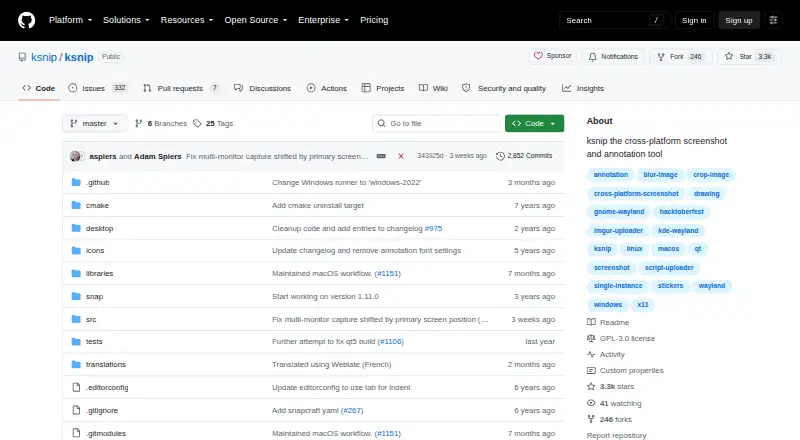
Ksnip: A free, open-source desktop tool for capturing, editing, and annotating screenshots. Ranked #31 of 61 in Screen Capture Software by our editors (5.2/10); pricing: Open source; best for open-source multi-platform annotation users.
At a glance
- Editor score5.2 / 10
- PricingOpen source
- Best forOpen-source multi-platform annotation users
- Paid fromFree
- Annotation toolsYes
- Facts checked19 Sep 2026
Where it wins
- Captures screen areas, windows, screens, or the full desktop on three platforms
- Combines annotation, cropping, blur, pixelation, and image effects
- Supports Imgur, FTP, custom upload scripts, command-line actions, and OCR
Where it doesn't
- OCR depends on a separate Tesseract-based plugin
- Upload options center on Imgur, FTP, and user-defined scripts
- Its workflow is focused on desktop screenshots and image editing
Our verdict on Ksnip
Ksnip is an open-source desktop screenshot tool for Windows, macOS, and Linux. It suits people who want to capture screen regions, windows, or full screens and then mark up the resulting images without switching to a separate editor. Capture can be delayed, and the mouse cursor can optionally be included. For users who value local desktop tools and annotation controls across operating systems, Ksnip covers a broad set of everyday screenshot tasks.
Its editing range is a central strength: annotations include pen, marker, shapes, text, stickers, and pointers, while image tools cover cropping, vertical or horizontal slice removal, blur, pixelation, drop shadow, grayscale, inversion, borders, and watermarks. Screenshots can also be pinned in frameless windows. This mix makes Ksnip useful for preparing explanatory images, obscuring sensitive regions, and making quick visual adjustments. Output formats include BMP, GIF, JPEG, JPG, PNG, PDF, and PS. OCR is available through a separate plugin based on Tesseract, so it is an optional extension rather than part of the core capture-and-annotate workflow.
Sharing and automation are oriented toward configurable desktop workflows rather than a broad collaboration suite. Ksnip supports uploads to Imgur, FTP, and custom user-defined scripts, along with command-line capture and post-processing actions. Those options will appeal to users comfortable choosing or configuring an upload route, and the command-line actions give a path to automate capture tasks. Choose Ksnip if cross-platform desktop capture, detailed annotation, and open-source software are the priorities. It is a less natural fit for buyers seeking a dedicated team-sharing platform or a capture workflow centered on features beyond the listed desktop and image-editing tools.
Your product? Our editors can test Ksnip in depth and publish a review, labelled as paid · from $149/mo →
Ksnip pricing
Ksnip fact sheet
| Free plan | Not verified |
|---|---|
| Paid from | Free |
| Scrolling capture | Not verified |
| Annotation tools | Yes |
| OCR | Yes |
| Browser extension | Not verified |
| Desktop platforms | Both |
| Cloud sharing | Yes |
| Export formats | BMP, GIF, JPEG, JPG, PNG, PDF, PS |
| Deployment | Desktop |
| Platforms | Windows, macOS, Linux |
| Integrations | 4 integrations: Imgur, FTP, custom upload scripts, Tesseract |
| Pricing | Open source |
| Website | github.com |
| Facts checked | 19 Sep 2026 |
Ksnip integrations
Ksnip lists 4 integrations on its own site.
- Imgur
- FTP
- custom upload scripts
- Tesseract
Alternatives to Ksnip
- SnagitA polished capture and editing toolkit for teams that can budget for an annual subscription.9.3
- ShareXA flexible Windows capture toolkit with scrolling screenshots, OCR, recording and upload workflows.9.1
- ZightA cross-platform capture tool with team workflows, integrations, and a free plan.9.0



Also Ranked In
Ksnip is ranked in 3 of our directories.
Used Ksnip? Be the first to review it
The editor score above is our own research. What this page doesn't have yet is a reader's view — what you used Ksnip for, what worked and what didn't. No stars are seeded and no review is paid for; an editor reads every one before it appears.
Write a reviewTwo minutes · verified accounts only · read by an editor before it appears
Featured on iTechGuides

Ksnip is listed in our Screen Capture Software directory. Add the badge to your site — it links back to this page.
<a href="https://www.itechguides.com/products/ksnip/"><img src="https://www.itechguides.com/best/badge/ksnip.svg" alt="Featured on iTechGuides" width="230" height="46"></a>
Reviewed by iTechGuides Editors · Editorial team · Updated Oct 2026
Advertiser disclosure: iTechGuides is reader-supported. Vendors can pay for top positions in our rankings and for a place on other products' pages, and we may earn a commission when you click some links. Bought places stand at the number bought; this page and our disclosure say so. Paying vendors may get a fuller, more detailed review from our editors, and that review can change their score. How we rank.
Last updated · How we research and update