
KOrganizer
KOrganizer: A capable Linux group calendar for users who value open standards and source freedom. Ranked #8 of 193 in Calendar Apps by our editors (8.6/10); pricing: Free plan; best for linux users needing open-source group calendaring.
At a glance
- Editor score8.6 / 10
- PricingFree plan
- Best forLinux users needing open-source group calendaring
- Free planYes
- Paid fromFree
- Facts checked20 Sep 2026
Where it wins
- Free and open source under the GPL-2.0-or-later license
- Group scheduling includes invitations, responses, and free/busy data
- Supports CalDAV, Google Calendar, Nextcloud, Kolab, and more
Where it doesn't
- Officially available only as a Linux desktop application
- No mobile apps for calendar access away from the desktop
- Does not include verified booking links or time-blocking tools
Our verdict on KOrganizer
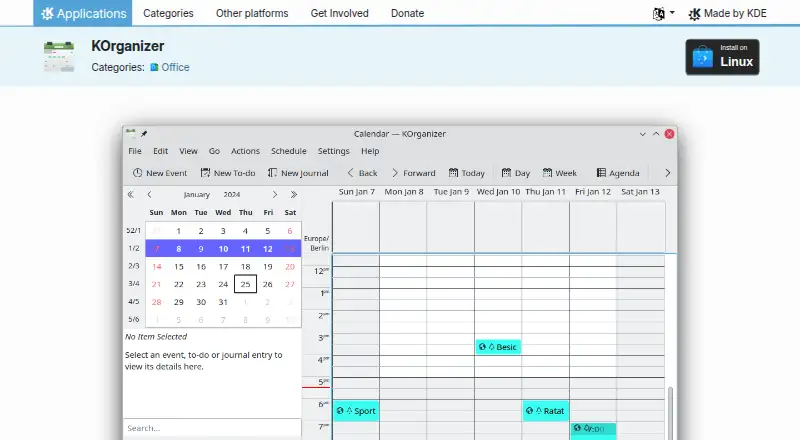
KOrganizer is KDE’s calendar and scheduling component for Kontact, designed for Linux desktop users who need more than basic event entry. It brings together events, to-dos, journals, reminders, recurring appointments, multiple calendars, attendee management, and group scheduling. Its agenda, month, timeline, and to-do views support both personal organization and shared calendar work. The product is particularly suited to people who prefer open-source software, local calendar management, and standards-based connectivity.
The pricing model is straightforward: KOrganizer is free and open source, distributed under the GPL-2.0-or-later license rather than through paid subscription tiers. That makes the full feature set available without a plan upgrade. Core scheduling capabilities include invitations and responses, free/busy publishing and retrieval, attachments, calendar printing, and recurring events. Import and export use iCalendar and vCalendar, while support for local files and network resources gives administrators flexibility in how calendars are stored and shared.
Its strongest fit is within Linux and groupware ecosystems. Integrations include Nextcloud, Kolab, Google Calendar, CalDAV, GroupDAV, Open-Xchange, and KMail, with two-way calendar synchronization listed as a category capability. Email-based group scheduling is supported, which helps teams coordinate attendees without requiring a separate booking workflow. The trade-off is platform scope: KOrganizer is a Linux desktop application and has no mobile apps. Choose it for open-source group calendaring with broad standards support; choose another calendar app if mobile access, booking links, or a more platform-spanning experience is central to the workflow.
Your product? Our editors can test KOrganizer in depth and publish a review, labelled as paid · from $149/mo →
KOrganizer pricing
KOrganizer fact sheet
| Free plan | Yes |
|---|---|
| Paid from | Free |
| Shared calendars | Yes |
| Time blocking | Not verified |
| Scheduling links | Not verified |
| Calendar sync | Two_way |
| Mobile apps | Not verified |
| Video meeting support | Not verified |
| Deployment | Desktop |
| Platforms | Linux |
| Support | Community, Docs, Email |
| Built for | Solo, Small business, Mid-market (editorial estimate) |
| Integrations | 8 integrations: NextCloud, Kolab, Google Calendar, DAV/CalDAV, GroupDAV, Open-Xchange … |
| Pricing | Free plan |
| Website | apps.kde.org |
| Facts checked | 20 Sep 2026 |
KOrganizer integrations
KOrganizer lists 8 integrations on its own site.
- NextCloud
- Kolab
- Google Calendar
- DAV/CalDAV
- GroupDAV
- Open-Xchange
- KMail
- Kontact
Alternatives to KOrganizer
- Google CalendarA versatile calendar for personal schedules and Google Workspace collaboration.9.4
- Microsoft OutlookA flexible calendar choice for people and teams already working in Microsoft’s ecosystem.9.2
- Zoho CalendarA low-cost calendar with booking, sync, room reservations, and broad integrations.9.1


See all KOrganizer alternatives →
KOrganizer vs the competition
- KOrganizer vs Google Calendar
- KOrganizer vs Microsoft Outlook
- KOrganizer vs Zoho Calendar
- KOrganizer vs Notion Calendar
- KOrganizer vs Nextcloud Calendar
- KOrganizer vs Proton Calendar



Compare KOrganizer with any tool side by side →
Used KOrganizer? Be the first to review it
The editor score above is our own research. What this page doesn't have yet is a reader's view — what you used KOrganizer for, what worked and what didn't. No stars are seeded and no review is paid for; an editor reads every one before it appears.
Write a reviewTwo minutes · verified accounts only · read by an editor before it appears
Featured on iTechGuides

KOrganizer is listed in our Calendar Apps directory. Add the badge to your site — it links back to this page.
<a href="https://www.itechguides.com/products/korganizer/"><img src="https://www.itechguides.com/best/badge/korganizer.svg" alt="Featured on iTechGuides" width="230" height="46"></a>
Reviewed by iTechGuides Editors · Editorial team · Updated Oct 2026
Advertiser disclosure: iTechGuides is reader-supported. Vendors can pay for top positions in our rankings and for a place on other products' pages, and we may earn a commission when you click some links. Bought places stand at the number bought; this page and our disclosure say so. Paying vendors may get a fuller, more detailed review from our editors, and that review can change their score. How we rank.
Last updated · How we research and update