
KolourPaint
KolourPaint: A free, focused desktop tool for basic shapes, touch-ups, selections, and image effects. Ranked #46 of 46 in Digital Painting Software by our editors (5.1/10); pricing: Free plan; best for basic free shape and image editing.
At a glance
- Editor score5.1 / 10
- PricingFree plan
- Best forBasic free shape and image editing
- Free planYes
- Paid fromFree
- Facts checked21 Sep 2026
Where it wins
- Free and open source with no paid tiers
- Useful shape, text, selection, brush, and color tools
- Supports Linux and macOS desktop workflows
Where it doesn't
- Focused on basic raster editing rather than advanced painting
- No documented layers or pressure-sensitive input
- Available on Linux and macOS only
Our verdict on KolourPaint
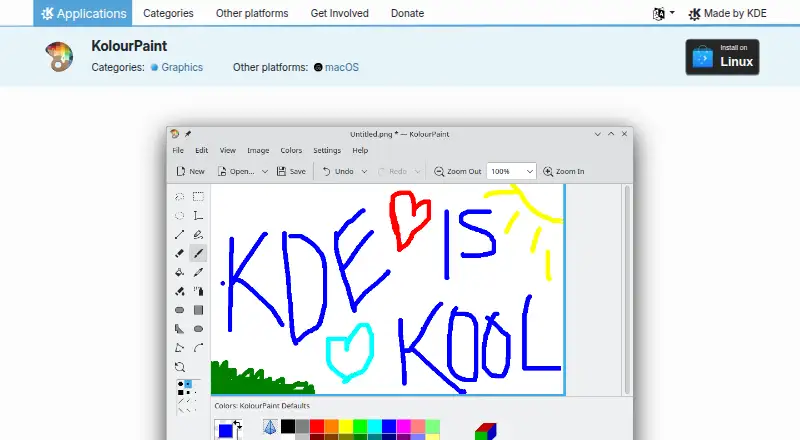
KolourPaint is KDE’s desktop application for creating raster images, touching up existing artwork, and handling simple image-editing tasks. It suits people who need a straightforward tool for drawing shapes, adding text, selecting areas, adjusting colors, or applying basic effects without a paid plan. The application is free software, open source, and available for Linux, with macOS installers also provided by KDE.
Its main strength is a compact set of practical editing tools. Users can draw lines, rectangles, rounded rectangles, ovals, polygons, curves, and text; pick colors; and work with rectangular, elliptical, or free-form selections. The brush supports circular, square, slash, and backslash shapes. For image cleanup and quick adjustments, KolourPaint includes rotation, monochrome conversion, color similarity controls, flood fill, color eraser, and autocrop. This gives it useful breadth for simple raster work while keeping the focus narrow and accessible.
The trade-off is that KolourPaint is better suited to basic editing than to detailed digital painting workflows. Its published feature set does not document layers, pressure-sensitive input, color-profile management, stroke stabilization, or user-created or modified brushes. Artists who need layered compositions, pen-pressure control, or more advanced brush customization should choose a different application. KolourPaint is a sensible pick for Linux or macOS users who want free shape drawing, image touch-ups, and uncomplicated effects; it is less suitable for professional illustration or feature-heavy painting.
Your product? Our editors can test KolourPaint in depth and publish a review, labelled as paid · from $149/mo →
KolourPaint pricing
KolourPaint fact sheet
| Free plan | Yes |
|---|---|
| Paid from | Free |
| Brush customization | Not verified |
| Layer support | Not verified |
| Pressure sensitivity | Not verified |
| Supported platforms | linux, macos |
| Color management | Not verified |
| Stroke stabilization | Not verified |
| Deployment | Desktop |
| Platforms | Linux, macOS |
| Support | Community, Docs |
| Built for | Solo, Small business (editorial estimate) |
| Pricing | Free plan |
| Website | apps.kde.org |
| Facts checked | 21 Sep 2026 |
Alternatives to KolourPaint
- KritaA broad, professional-grade painting toolkit with no paid plan and wide platform coverage.9.4
- Clip Studio PaintA broad digital art workspace spanning illustration, comics, 3D, animation, and cloud tools.9.3
- ProcreateA polished iPad painting workflow with broad creative tools and limited platform coverage.9.1



See all KolourPaint alternatives →
Also Ranked In
KolourPaint is ranked in 2 of our directories.
Used KolourPaint? Be the first to review it
The editor score above is our own research. What this page doesn't have yet is a reader's view — what you used KolourPaint for, what worked and what didn't. No stars are seeded and no review is paid for; an editor reads every one before it appears.
Write a reviewTwo minutes · verified accounts only · read by an editor before it appears
Featured on iTechGuides

KolourPaint is listed in our Digital Painting Software directory. Add the badge to your site — it links back to this page.
<a href="https://www.itechguides.com/products/kolourpaint/"><img src="https://www.itechguides.com/best/badge/kolourpaint.svg" alt="Featured on iTechGuides" width="230" height="46"></a>
Reviewed by iTechGuides Editors · Editorial team · Updated Oct 2026
Advertiser disclosure: iTechGuides is reader-supported. Vendors can pay for top positions in our rankings and for a place on other products' pages, and we may earn a commission when you click some links. Bought places stand at the number bought; this page and our disclosure say so. Paying vendors may get a fuller, more detailed review from our editors, and that review can change their score. How we rank.
Last updated · How we research and update