
Kinoslide
Kinoslide: A document-to-video tool with animated formats, AI narration, and presentation exports. Ranked #16 of 25 in Animated Presentation Software by our editors (7.1/10); pricing: Free plan; best for document-to-narrated presentation videos.
At a glance
- Editor score7.1 / 10
- PricingFree plan
- Best forDocument-to-narrated presentation videos
- Free planYes
- Paid from$30/mo
- Facts checked20 Sep 2026
Where it wins
- Converts PDFs and source documents into narrated videos
- Exports MP4, PDF, and PowerPoint presentations
- Offers presentation, whiteboard, and explainer formats
Where it doesn't
- Paid plans start at $30 per month
- Team workspace with five seats is limited to Scale
- Free videos are limited to two minutes
Our verdict on Kinoslide
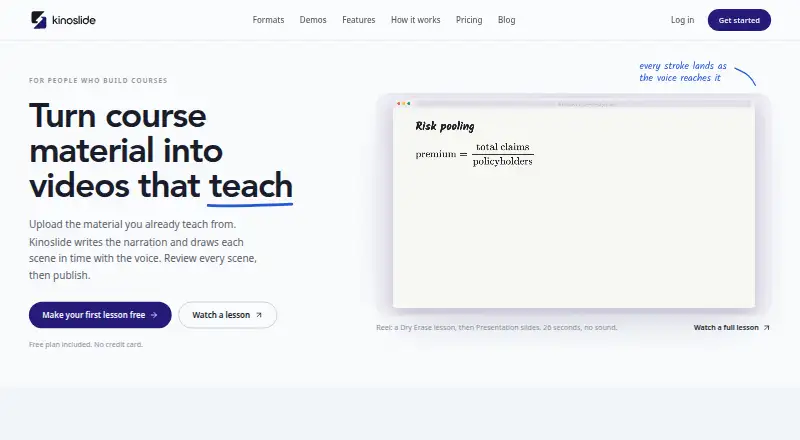
Kinoslide converts PDFs, reports, manuals, course materials, and other source documents into narrated animated videos. It is designed for creators, educators, training teams, compliance teams, and organizations that need to turn documentation into presentation, whiteboard, or explainer content. AI-generated scripts, visuals, and voiceovers support the conversion process, while built-in themes, animated text, and charts help shape presentation-style projects.
The freemium pricing structure starts with a Free plan that includes five credits to start, videos up to two minutes, and no credit card requirement. Basic costs $30 per month and adds 50 credits monthly, 720p video quality, and presentation and whiteboard formats. Pro costs $150 per month and provides 150 credits, 1080p video, storyboard review, scene edits, and multilingual videos. Scale costs $600 per month and raises the allowance to 500 credits, keeps 1080p quality, and adds a team workspace with five seats and premium voices. Paid access therefore expands both production capacity and editing control, while collaboration is reserved for the highest tier.
Kinoslide’s standout capability is its document-to-narrated-video workflow. Users can review generated storyboards, edit scenes or narration on Pro and Scale, and export MP4 videos alongside PDF and PowerPoint presentations. Multilingual output covers English, French, and Spanish variants, giving training and educational teams additional publishing options. The product is a strong fit when the starting material is already organized in documents and the desired result combines narration with animated slides, charts, or whiteboard visuals. Teams needing shared workspaces must choose Scale, and users seeking broader collaboration or lower-cost paid access should consider whether the plan structure matches their production needs.
Your product? Our editors can test Kinoslide in depth and publish a review, labelled as paid · from $149/mo →
Kinoslide pricing
All 4 Kinoslide plans and prices →
Kinoslide fact sheet
| Free plan | Yes |
|---|---|
| Paid from | $30/mo |
| Character animation | Not verified |
| Motion graphics | Yes |
| Custom asset upload | Not verified |
| Video export | Yes |
| Presentation export | Yes |
| Team collaboration | Yes |
| Maximum video length | 5 min |
| Deployment | Cloud |
| Platforms | Web |
| Support | |
| Built for | Solo, Small business, Mid-market, Enterprise (editorial estimate) |
| Pricing | Free plan (source) |
| Website | kinoslide.ai |
| Facts checked | 20 Sep 2026 |
Alternatives to Kinoslide
- PowtoonA broad web-based toolkit for animated presentations, videos, branding, and AI creation.9.4
- AnimakerA broad animation toolkit with AI creation, collaboration, and flexible export options.9.1
- PreziA flexible visual storytelling platform built around interactive, zoomable presentations.8.9


See all Kinoslide alternatives →
Used Kinoslide? Be the first to review it
The editor score above is our own research. What this page doesn't have yet is a reader's view — what you used Kinoslide for, what worked and what didn't. No stars are seeded and no review is paid for; an editor reads every one before it appears.
Write a reviewTwo minutes · verified accounts only · read by an editor before it appears
Featured on iTechGuides

Kinoslide is listed in our Animated Presentation Software directory. Add the badge to your site — it links back to this page.
<a href="https://www.itechguides.com/products/kinoslide/"><img src="https://www.itechguides.com/best/badge/kinoslide.svg" alt="Featured on iTechGuides" width="230" height="46"></a>
Reviewed by iTechGuides Editors · Editorial team · Updated Oct 2026
Advertiser disclosure: iTechGuides is reader-supported. Vendors can pay for top positions in our rankings and for a place on other products' pages, and we may earn a commission when you click some links. Bought places stand at the number bought; this page and our disclosure say so. Paying vendors may get a fuller, more detailed review from our editors, and that review can change their score. How we rank.
Last updated · How we research and update