
Kinocut
Kinocut: A privacy-focused, open-source toolkit for technical teams repurposing video locally. Ranked #33 of 50 in AI Video Repurposing Tools by our editors (5.5/10); pricing: Free plan; best for privacy-focused technical video teams.
At a glance
- Editor score5.5 / 10
- PricingFree plan
- Best forPrivacy-focused technical video teams
- Free planYes
- Paid fromFree
- AI highlight detectionYes
- Facts checked19 Sep 2026
Where it wins
- Local processing with no required upload, account, or core API key
- MCP, Python, and CLI interfaces support agent-driven workflows
- Speaker-tracked reframing and quality checks support short-form production
Where it doesn't
- Not a hosted collaborative editor
- The verified feature set is narrower for general repurposing
- Designed around existing video rather than broader content production
Our verdict on Kinocut
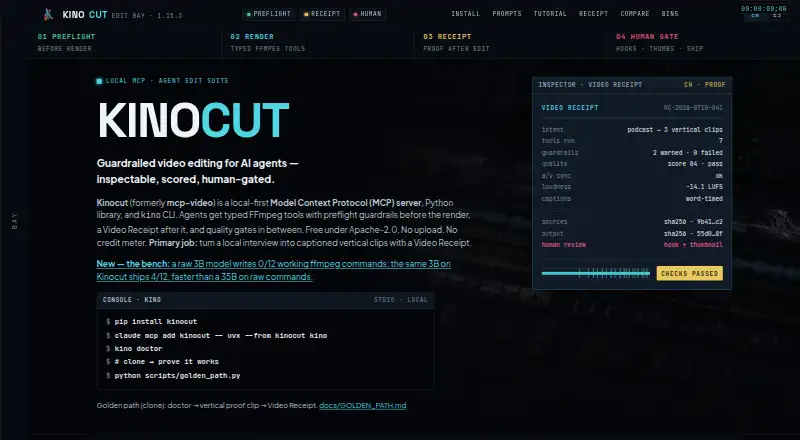
Kinocut is a free, open-source video-editing MCP server, Python library, and command-line interface for AI agents. It runs locally with FFmpeg and is aimed at developers and teams building agent-driven media workflows, particularly local podcast-to-short-form pipelines. The toolkit can trim, caption, reframe, repurpose, and quality-check existing video, with support for YouTube Shorts, TikTok, and Instagram Reels. Its local design also suits teams that want processing without a required upload, account, or core API key.
Its strongest differentiator is the technical workflow. Typed FFmpeg-based editing tools are exposed through MCP, Python, and CLI interfaces, with compatibility for Claude Code, Cursor, Windsurf, Cline, and other MCP-compatible clients. Preflight validation and guardrails run before rendering, while Video Receipt artifacts document workflow intent, tool calls, quality results, and human review. Speaker-tracked 9:16 reframing supports vertical output, and optional Whisper transcription can produce burned-in captions. Quality checks cover loudness, black frames, VMAF, and audio/video synchronization.
Kinocut favors controlled local pipelines over a broad hosted repurposing suite. It does not present a hosted collaborative editor, and its verified feature set is narrower for general repurposing than for technically managed video workflows. The product fits teams comfortable with MCP, Python, CLI tools, FFmpeg, and local processing, especially when review checkpoints and quality records matter. Teams seeking a hosted collaborative workspace or a wider set of general repurposing capabilities should consider a different type of product.
Your product? Our editors can test Kinocut in depth and publish a review, labelled as paid · from $149/mo →
Kinocut pricing
Kinocut fact sheet
| Free plan | Yes |
|---|---|
| Paid from | Free |
| Max source length | Not verified |
| AI highlight detection | Yes |
| Automatic reframing | Yes |
| Social platform presets | Yes |
| Transcript-to-post output | Not verified |
| Brand templates | Not verified |
| Monthly clip limit | Not verified |
| Deployment | Desktop, Self-hosted |
| Platforms | macOS, Linux, Windows |
| Integrations | 7 integrations: Claude Code, Cursor, Windsurf, Cline, MCP-compatible clients, FFmpeg … |
| Pricing | Free plan |
| Website | kinocut.dev |
| Facts checked | 19 Sep 2026 |
Kinocut integrations
Kinocut lists 7 integrations on its own site.
- Claude Code
- Cursor
- Windsurf
- Cline
- MCP-compatible clients
- FFmpeg
- Whisper
Alternatives to Kinocut
- OpusClipA broad AI workflow for turning long videos into branded, social-ready clips.9.9
- HeadlinerA broad, affordable toolkit for turning long-form media into social-ready clips.8.9
- quso.aiA broad AI repurposing suite with scheduling and analytics, though paid access starts at $29 monthly.8.7



See all Kinocut alternatives →
Used Kinocut? Be the first to review it
The editor score above is our own research. What this page doesn't have yet is a reader's view — what you used Kinocut for, what worked and what didn't. No stars are seeded and no review is paid for; an editor reads every one before it appears.
Write a reviewTwo minutes · verified accounts only · read by an editor before it appears
Featured on iTechGuides

Kinocut is listed in our AI Video Repurposing Tools directory. Add the badge to your site — it links back to this page.
<a href="https://www.itechguides.com/products/kinocut/"><img src="https://www.itechguides.com/best/badge/kinocut.svg" alt="Featured on iTechGuides" width="230" height="46"></a>
Reviewed by iTechGuides Editors · Editorial team · Updated Sep 2026
Advertiser disclosure: iTechGuides is reader-supported. Vendors can pay for top positions in our rankings and for a place on other products' pages, and we may earn a commission when you click some links. Bought places stand at the number bought; this page and our disclosure say so. Paying vendors may get a fuller, more detailed review from our editors, and that review can change their score. How we rank.
Last updated · How we research and update