
keybr
keybr: A focused, free tutor for adaptive key-by-key typing practice. Ranked #10 of 36 in Typing Tutor Software by our editors (8.3/10); pricing: Free plan; best for free adaptive key-by-key training.
At a glance
- Editor score8.3 / 10
- PricingFree plan
- Best forFree adaptive key-by-key training
- Free planYes
- Paid fromFree
- Adaptive practiceYes
- Facts checked20 Sep 2026
Where it wins
- Automatically targets weaker keys with personalized lessons
- Tracks individual-key statistics, goals, and progress graphs
- Supports multiple keyboard layouts and custom configurations
Where it doesn't
- Focused on touch-typing practice rather than broader learning content
- Self-hosting requires a local deployment
- Generated practice centers on the learner’s current skill level
Our verdict on keybr
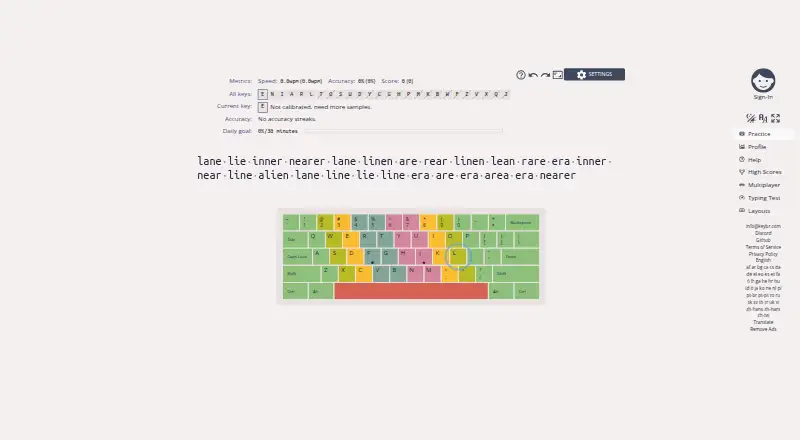
keybr is a free, browser-based touch-typing tutor for learners who want to improve speed and accuracy through focused practice. It records statistics for individual keys, generates readable practice text, and adjusts lessons to the learner’s current ability. As performance improves, keybr progressively introduces additional letters. Target speed goals, progress tracking, and profile graphs give learners a clear way to follow development over time. It is a strong fit for independent learners who prefer adaptive drills over a fixed lesson sequence.
Its standout feature is key-level adaptation. The software computes statistics for individual keys, identifies weaker areas, and automatically generates lessons around them. Generated words adjust to the learner’s skill level, while difficulty changes as typing performance improves. This creates a focused practice loop: learners work on specific weaknesses rather than repeating the same material equally. The combination of diagnostics, personalized drills, and target-speed tracking makes keybr particularly suitable for users who want measurable, incremental touch-typing practice.
keybr is available on the web and as AGPL-licensed open-source software that can be run locally. Support for multiple keyboard layouts, custom layouts, configurable keyboard geometries, and layout emulation makes it adaptable to different typing environments. Its narrow focus is an advantage for learners seeking direct practice, but it may be less suitable for people who want a broader course structure or more varied learning formats. Choose keybr for free adaptive training and detailed key-level progress; choose another tutor if you need a wider instructional program.
Your product? Our editors can test keybr in depth and publish a review, labelled as paid · from $149/mo →
keybr pricing
keybr fact sheet
| Free plan | Yes |
|---|---|
| Paid from | Free |
| Guided lessons | Yes |
| Adaptive practice | Yes |
| Skill diagnostics | Yes |
| Personalized drills | Yes |
| Offline mode | Not verified |
| Keyboard layouts | Not verified |
| Deployment | Cloud, Self-hosted |
| Platforms | Web |
| Support | Community, Docs |
| Built for | Solo, Small business (editorial estimate) |
| Pricing | Free plan |
| Website | keybr.com |
| Facts checked | 20 Sep 2026 |
Alternatives to keybr
- Typing.comA broad, school-ready typing tutor with adaptive practice and a capable free edition.9.4
- TIPP10A capable typing tutor for individual learners and connected school programs.9.3
- Typing AgentA school-focused typing platform with diagnostics, adaptive practice, and accessibility options.9.2



Also Ranked In
keybr is ranked in 2 of our directories.
Used keybr? Be the first to review it
The editor score above is our own research. What this page doesn't have yet is a reader's view — what you used keybr for, what worked and what didn't. No stars are seeded and no review is paid for; an editor reads every one before it appears.
Write a reviewTwo minutes · verified accounts only · read by an editor before it appears
Featured on iTechGuides

keybr is listed in our Typing Tutor Software directory. Add the badge to your site — it links back to this page.
<a href="https://www.itechguides.com/products/keybr/"><img src="https://www.itechguides.com/best/badge/keybr.svg" alt="Featured on iTechGuides" width="230" height="46"></a>
Reviewed by iTechGuides Editors · Editorial team · Updated Oct 2026
Advertiser disclosure: iTechGuides is reader-supported. Vendors can pay for top positions in our rankings and for a place on other products' pages, and we may earn a commission when you click some links. Bought places stand at the number bought; this page and our disclosure say so. Paying vendors may get a fuller, more detailed review from our editors, and that review can change their score. How we rank.
Last updated · How we research and update