
KBibTeX
KBibTeX: A focused, free BibTeX editor for Linux-based TeX and LaTeX workflows. Ranked #8 of 23 in Citation Management Software by our editors (8.0/10); pricing: Free plan; best for linux users needing a lightweight BibTeX editor.
At a glance
- Editor score8.0 / 10
- PricingFree plan
- Best forLinux users needing a lightweight BibTeX editor
- Free planYes
- Paid fromFree
- Facts checked20 Sep 2026
Where it wins
- Imports BibTeX, RIS and ISI bibliography data
- Detects duplicates and supports merging or fixing entries
- Integrates with Kile, LyX and Zotero libraries
Where it doesn't
- Available for Linux only
- No word-processor support is listed
- No mobile or collaboration support is listed
Our verdict on KBibTeX
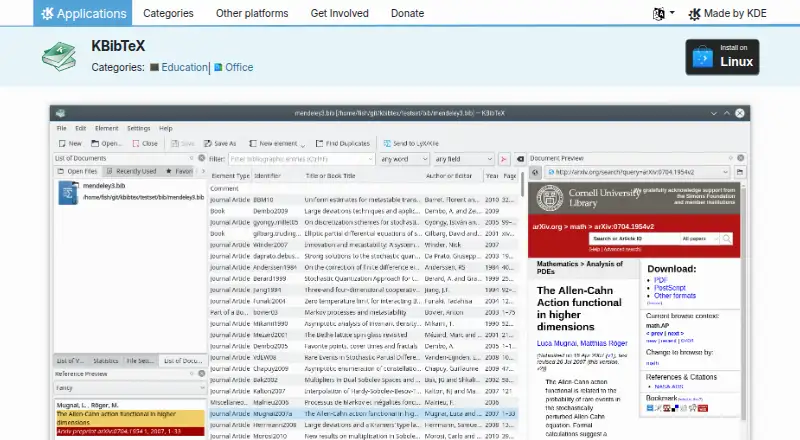
KBibTeX is a free, open-source Linux desktop application for collecting and editing TeX and LaTeX bibliographies. It is aimed at researchers, students and technical writers who work with BibTeX and want a focused reference manager rather than a broad, cross-platform research suite. The application supports BibTeX bibliography editing, imports BibTeX, RIS and ISI files, searches online bibliography databases, and imports Zotero libraries. It is distributed under the GNU General Public License.
Its strongest fit is the LaTeX ecosystem. Integration with Kile and LyX connects bibliography management with two LaTeX editors, while linked local and remote document previews help users inspect associated material from the reference workflow. KBibTeX also provides previews in BibTeX, RIS, Wikipedia and XML/XSLT formats, giving technically oriented users several ways to review reference data. Duplicate-entry detection with options to merge or fix records adds a practical cleanup function for growing bibliographies.
The product’s narrow platform focus is also its clearest boundary. Published details identify Linux as its platform, with no word-processor support listed and no mobile or collaboration support listed. That makes KBibTeX a sensible choice for Linux users whose work centers on BibTeX, Kile or LyX, especially when open-source software and local desktop editing matter. Users who need broader platform coverage, mobile access, collaborative workflows or direct word-processor support should consider an alternative built around those requirements. KBibTeX is free, with no commercial pricing or paid plans shown.
Your product? Our editors can test KBibTeX in depth and publish a review, labelled as paid · from $149/mo →
KBibTeX pricing
KBibTeX fact sheet
| Free plan | Yes |
|---|---|
| Paid from | Free |
| PDF annotation | Not verified |
| Browser extension | Not verified |
| Citation styles | Not verified |
| Word processor support | None |
| Mobile apps | Not verified |
| Import formats | BibTeX, RIS, ISI |
| Team collaboration | Not verified |
| Deployment | Desktop |
| Platforms | Linux |
| Support | Docs, Community |
| Built for | Solo, Small business (editorial estimate) |
| Integrations | 3 integrations: Kile, LyX, Zotero |
| Pricing | Free plan |
| Website | apps.kde.org |
| Facts checked | 20 Sep 2026 |
KBibTeX integrations
KBibTeX lists 3 integrations on its own site.
- Kile
- LyX
- Zotero
Alternatives to KBibTeX
- ZoteroA flexible, free citation manager with strong capture, annotation, and writing-tool support.9.4
- EndNoteA mature citation suite with broad writing support, PDF tools, collaboration, and AI assistance.9.2
- Mendeley Reference ManagerA flexible, cross-platform reference manager with PDF tools, Word integration, and tiered AI features.9.0



See all KBibTeX alternatives →
KBibTeX vs the competition
- KBibTeX vs Zotero
- KBibTeX vs EndNote
- KBibTeX vs Mendeley Reference Manager
- KBibTeX vs Citavi
- KBibTeX vs RefWorks
- KBibTeX vs JabRef


Compare KBibTeX with any tool side by side →
Also Ranked In
KBibTeX is ranked in 2 of our directories.
Used KBibTeX? Be the first to review it
The editor score above is our own research. What this page doesn't have yet is a reader's view — what you used KBibTeX for, what worked and what didn't. No stars are seeded and no review is paid for; an editor reads every one before it appears.
Write a reviewTwo minutes · verified accounts only · read by an editor before it appears
Featured on iTechGuides

KBibTeX is listed in our Citation Management Software directory. Add the badge to your site — it links back to this page.
<a href="https://www.itechguides.com/products/kbibtex/"><img src="https://www.itechguides.com/best/badge/kbibtex.svg" alt="Featured on iTechGuides" width="230" height="46"></a>
Reviewed by iTechGuides Editors · Editorial team · Updated Oct 2026
Advertiser disclosure: iTechGuides is reader-supported. Vendors can pay for top positions in our rankings and for a place on other products' pages, and we may earn a commission when you click some links. Bought places stand at the number bought; this page and our disclosure say so. Paying vendors may get a fuller, more detailed review from our editors, and that review can change their score. How we rank.
Last updated · How we research and update