KawaiiDraw
KawaiiDraw: A free, focused web tool for personalized kawaii coloring pages. Ranked #26 of 37 in AI Coloring Page Generators by our editors (5.5/10); pricing: Free plan; best for free kawaii-style pages.
At a glance
- Editor score5.5 / 10
- PricingFree plan
- Best forFree kawaii-style pages
- Free planYes
- Paid fromFree
- Input modesPrompt
- Facts checked20 Sep 2026
Where it wins
- Generates kawaii coloring pages, characters, and full-color illustrations
- Adds multilingual text overlays and emoji support in the browser
- Free to use with no account required and downloadable images
Where it doesn't
- Prompt input is the only listed input mode
- Web access limits it to browser-based workflows
- Its focus is narrower than tools for photos, books, or print exports
Our verdict on KawaiiDraw
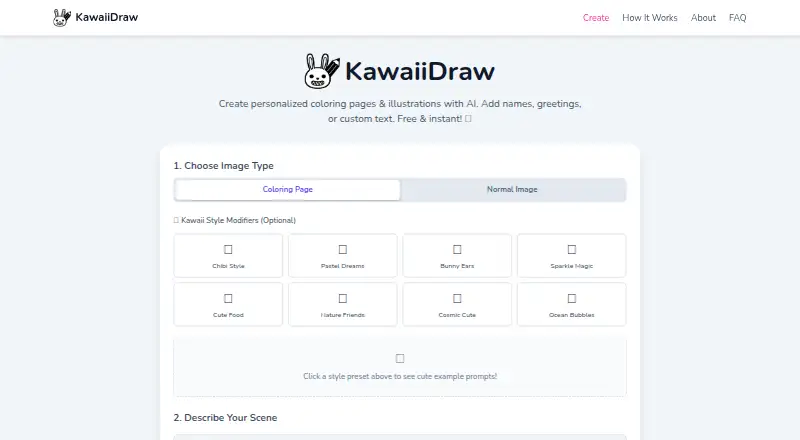
KawaiiDraw is a free, browser-based AI generator for kawaii coloring pages, cute characters, and personalized illustrations. It is aimed at parents, teachers, artists, and creative projects that need custom artwork without an account. Users enter text descriptions to generate either black-and-white coloring pages or full-color illustrations, then download the results for printing, sharing, or commercial use.
The product’s strongest distinction is its text and illustration workflow. KawaiiDraw supports custom overlays in multiple languages, emoji, and browser-based text rendering, making it useful for personalized pages, classroom materials, or themed creative projects. The service also supports cute character generation and full-color artwork alongside its coloring-page mode, so it can cover more than line-art output while remaining centered on a kawaii visual style. Generated images are downloadable, and the published product specifications classify the files as print-ready.
KawaiiDraw is most suitable for people who want a quick, focused way to create kawaii-style pages from prompts. Its free pricing, web delivery, and lack of account requirement keep the starting process straightforward. The trade-off is scope: prompt input is the listed generation method, and the product is specialized rather than a broad coloring-page suite. People seeking photo-based inputs, book-oriented workflows, or a wider range of print-specific options should choose a different type of generator. For kawaii pages with personalized text, however, KawaiiDraw offers a clear fit.
Your product? Our editors can test KawaiiDraw in depth and publish a review, labelled as paid · from $149/mo →
KawaiiDraw pricing
KawaiiDraw fact sheet
| Free plan | Yes |
|---|---|
| Paid from | Free |
| Input modes | Prompt |
| Output formats | Not verified |
| Commercial use | Yes |
| Print-ready files | Yes |
| Monthly generation limit | Not verified |
| Paper size options | Not verified |
| Deployment | Cloud |
| Platforms | Web |
| Built for | Solo, Small business (editorial estimate) |
| Pricing | Free plan |
| Website | kawaiidraw.com |
| Facts checked | 20 Sep 2026 |
Alternatives to KawaiiDraw
- Mimi PandaTurns text prompts and photos into printable coloring pages, with a paint-by-numbers generator alongside.8.7
- ColorBlissA broad web tool for creating, editing, and packaging print-ready coloring pages.7.9
- ColoringMeA flexible coloring-page generator with broad device coverage and creator-focused paid plans.7.8


See all KawaiiDraw alternatives →
Used KawaiiDraw? Be the first to review it
The editor score above is our own research. What this page doesn't have yet is a reader's view — what you used KawaiiDraw for, what worked and what didn't. No stars are seeded and no review is paid for; an editor reads every one before it appears.
Write a reviewTwo minutes · verified accounts only · read by an editor before it appears
Featured on iTechGuides

KawaiiDraw is listed in our AI Coloring Page Generators directory. Add the badge to your site — it links back to this page.
<a href="https://www.itechguides.com/products/kawaiidraw/"><img src="https://www.itechguides.com/best/badge/kawaiidraw.svg" alt="Featured on iTechGuides" width="230" height="46"></a>
Reviewed by iTechGuides Editors · Editorial team · Updated Oct 2026
Advertiser disclosure: iTechGuides is reader-supported. Vendors can pay for top positions in our rankings and for a place on other products' pages, and we may earn a commission when you click some links. Bought places stand at the number bought; this page and our disclosure say so. Paying vendors may get a fuller, more detailed review from our editors, and that review can change their score. How we rank.
Last updated · How we research and update