Kaspersky Virus Removal Tool
Kaspersky Virus Removal Tool: A focused free scanner for deep manual disinfection, not continuous protection. Ranked #3 of 30 in Malware Removal Software by our editors (9.1/10); pricing: Free plan; best for free Windows malware removal with deep disinfection.
At a glance
- Editor score9.1 / 10
- PricingFree plan
- Best forFree Windows malware removal with deep disinfection
- Free planYes
- Paid fromFree
- Bootable rescue mediaNo
- Founded1997 · Moscow, Russia
- Facts checked23 Sep 2026
Where it wins
- Quick, full and custom scans cover varied malware types
- Advanced restart-assisted disinfection handles active infections
- Portable Windows and Linux operation requires no installation
Where it doesn't
- No continuous background protection
- No scheduled scan support
- Manual scanning is required rather than automatic ongoing coverage
Our verdict on Kaspersky Virus Removal Tool
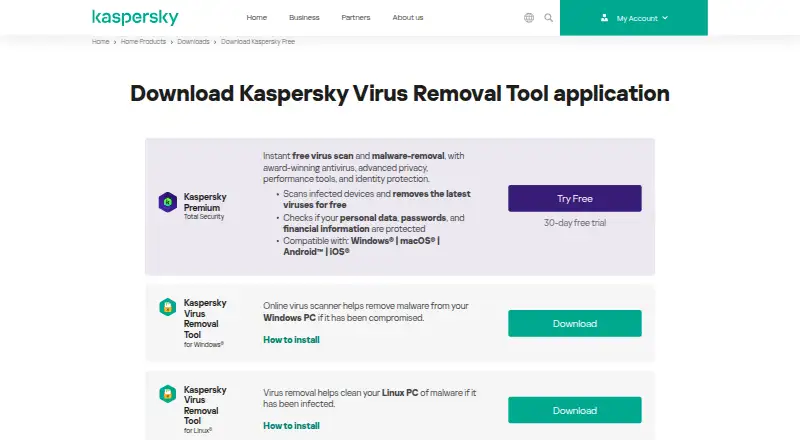
Kaspersky Virus Removal Tool is a free, portable malware scanner for computers that may already be infected. It is designed for manual, on-demand use rather than continuous background protection, making it suitable for Windows users who need a focused disinfection tool or a second-opinion scan alongside installed security software. Kaspersky also provides a Linux variant with command-line and graphical interfaces, extending the tool beyond a single operating system.
Its strongest area is malware detection and remediation depth. Quick scans check system memory, startup objects and boot sectors, while full and custom scans let users define broader or narrower scopes. The tool detects and removes viruses, adware, riskware, Trojans and rootkits. Detected objects can be disinfected, deleted or placed in quarantine, with options to restore or permanently delete quarantined items. For active infections, advanced disinfection can assist with remediation after a restart, and the portable design allows execution without installation. Command-line operation adds another way to run scans, particularly on supported Linux environments.
The published Free plan includes on-demand malware scanning, threat disinfection, deletion and quarantine, plus portable operation without installation. That focused scope keeps the tool useful for targeted cleanup, but it also defines who should choose it: users seeking manual malware removal, flexible scan scopes and deep disinfection should find a good fit. Users who need continuous background protection or scheduled scans should choose a different security product instead. Kaspersky Virus Removal Tool works best as a purposeful cleanup utility, not as a complete always-on security layer.
Your product? Our editors can test Kaspersky Virus Removal Tool in depth and publish a review, labelled as paid · from $149/mo →
Kaspersky Virus Removal Tool pricing
All 1 Kaspersky Virus Removal Tool plans and prices →
Kaspersky Virus Removal Tool fact sheet
| Free plan | Yes |
|---|---|
| Paid from | Free |
| Scan modes | Not verified |
| Threat quarantine | Yes |
| Bootable rescue media | No |
| Scheduled scans | No |
| Operating systems | Windows_linux |
| Remediation automation | Assisted |
| Deployment | Desktop |
| Platforms | Windows, Linux |
| Support | Email, Community, Docs |
| Built for | Solo, Small business (editorial estimate) |
| Pricing | Free plan (source) |
| Website | kaspersky.com |
| Facts checked | 23 Sep 2026 |
Alternatives to Kaspersky Virus Removal Tool
- Microsoft Defender OfflineA free Windows scanner for persistent malware, rootkits, and offline remediation.9.4
- ESET Online ScannerA straightforward free scanner for periodic Windows malware checks and removal.9.2
- Dr.Web LiveDiskA free recovery environment for scanning, isolating, and restoring malware-affected systems.9.0



See all Kaspersky Virus Removal Tool alternatives →
Kaspersky Virus Removal Tool vs the competition
- Kaspersky Virus Removal Tool vs Microsoft Defender Offline
- Kaspersky Virus Removal Tool vs ESET Online Scanner
- Kaspersky Virus Removal Tool vs Dr.Web LiveDisk
- Kaspersky Virus Removal Tool vs Comodo Rescue Disk
- Kaspersky Virus Removal Tool vs Emsisoft Emergency Kit
- Kaspersky Virus Removal Tool vs Adlice Protect



Compare Kaspersky Virus Removal Tool with any tool side by side →
Used Kaspersky Virus Removal Tool? Be the first to review it
The editor score above is our own research. What this page doesn't have yet is a reader's view — what you used Kaspersky Virus Removal Tool for, what worked and what didn't. No stars are seeded and no review is paid for; an editor reads every one before it appears.
Write a reviewTwo minutes · verified accounts only · read by an editor before it appears
Featured on iTechGuides

Kaspersky Virus Removal Tool is listed in our Malware Removal Software directory. Add the badge to your site — it links back to this page.
<a href="https://www.itechguides.com/products/kaspersky-virus-removal-tool/"><img src="https://www.itechguides.com/best/badge/kaspersky-virus-removal-tool.svg" alt="Featured on iTechGuides" width="230" height="46"></a>
Reviewed by iTechGuides Editors · Editorial team · Updated Oct 2026
Advertiser disclosure: iTechGuides is reader-supported. Vendors can pay for top positions in our rankings and for a place on other products' pages, and we may earn a commission when you click some links. Bought places stand at the number bought; this page and our disclosure say so. Paying vendors may get a fuller, more detailed review from our editors, and that review can change their score. How we rank.
Last updated · How we research and update