jPDF Tweak
jPDF Tweak: A capable free PDF utility for page operations, document security, and metadata control. Ranked #95 of 102 in PDF Editors by our editors (3.0/10); pricing: Free plan; best for open-source PDF restructuring and security.
At a glance
- Editor score3.0 / 10
- PricingFree plan
- Best forOpen-source PDF restructuring and security
- Free planYes
- Paid fromFree
- Facts checked20 Sep 2026
Where it wins
- Combines, splits, reorders, rotates, crops, and scales PDF pages
- Creates booklet and N-up layouts with watermarks and page numbers
- Compresses, encrypts, decrypts, and digitally signs PDFs
Where it doesn't
- The supported platform list is limited to Windows and Linux
- The feature set centers on document operations rather than text editing or forms
- There are no AI-assisted features
Our verdict on jPDF Tweak
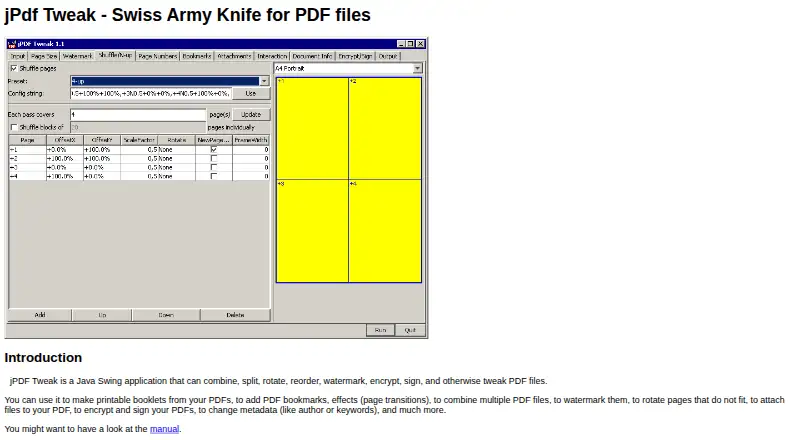
jPDF Tweak is a Java Swing desktop application for restructuring, transforming, and securing PDF files. It is suited to people who need detailed control over pages and document properties without moving to a paid PDF editor. Its core tools combine multiple PDFs, split or burst documents, reorder and shuffle pages, rotate, crop, scale, and create booklet or N-up layouts. It also supports watermarks, page numbers, bookmarks, metadata, file attachments, compression, encryption, decryption, and digital signatures.
Its strongest fit is workflow control around PDF structure. Booklet and N-up output support print-oriented layouts, while page reordering, rotation, cropping, and scaling address common document preparation tasks. Metadata and bookmark editing provide additional control over how files are organized, and attachments allow related files to travel with a PDF. The project provides platform-independent Java binaries as well as Windows and Linux distributions with bundled native libraries. That makes it a practical choice for users whose work is centered on desktop PDF manipulation across those operating systems.
jPDF Tweak is distributed as open-source software under the GNU Affero General Public License, and its free plan supports the full set of listed capabilities rather than dividing features across paid tiers. The trade-off is focus: the product is built around page restructuring, layout, file management, and security rather than a broader document-authoring workflow. Users who need text editing, forms, annotation, OCR, AI-assisted tools, or macOS support should choose a different PDF editor. For Windows and Linux users who value open-source software and need precise control over PDF structure and protection, jPDF Tweak is a focused option.
Your product? Our editors can test jPDF Tweak in depth and publish a review, labelled as paid · from $149/mo →
jPDF Tweak pricing
jPDF Tweak fact sheet
| Free plan | Yes |
|---|---|
| Paid from | Free |
| Text editing | Not verified |
| Annotation tools | Not verified |
| OCR | Not verified |
| PDF conversion | Yes |
| Form creation | Not verified |
| Supported platforms | Windows, Linux |
| Deployment | Desktop |
| Platforms | Windows, Linux |
| Support | Docs |
| Built for | Solo, Small business (editorial estimate) |
| Pricing | Free plan |
| Website | jpdftweak.sourceforge.io |
| Facts checked | 20 Sep 2026 |
Alternatives to jPDF Tweak
- Foxit PDF EditorA mature PDF workspace with deep editing, OCR, forms, security, and integrations.9.3
- iLovePDFA broad PDF toolkit with free access, offline desktop processing, and cross-device apps.9.2
- SmallpdfA broad PDF toolkit for simple editing across web, Windows, mobile, and Chrome.9.1



See all jPDF Tweak alternatives →
Used jPDF Tweak? Be the first to review it
The editor score above is our own research. What this page doesn't have yet is a reader's view — what you used jPDF Tweak for, what worked and what didn't. No stars are seeded and no review is paid for; an editor reads every one before it appears.
Write a reviewTwo minutes · verified accounts only · read by an editor before it appears
Featured on iTechGuides

jPDF Tweak is listed in our PDF Editors directory. Add the badge to your site — it links back to this page.
<a href="https://www.itechguides.com/products/jpdf-tweak/"><img src="https://www.itechguides.com/best/badge/jpdf-tweak.svg" alt="Featured on iTechGuides" width="230" height="46"></a>
Reviewed by iTechGuides Editors · Editorial team · Updated Oct 2026
Advertiser disclosure: iTechGuides is reader-supported. Vendors can pay for top positions in our rankings and for a place on other products' pages, and we may earn a commission when you click some links. Bought places stand at the number bought; this page and our disclosure say so. Paying vendors may get a fuller, more detailed review from our editors, and that review can change their score. How we rank.
Last updated · How we research and update