
Joystick AI
Joystick AI: A focused macOS tracker for turning work activity into AI summaries and reports. Ranked #35 of 36 in Screen Time Management Apps by our editors (6.0/10); pricing: Free plan; best for AI summaries of Mac work activity.
At a glance
- Editor score6.0 / 10
- PricingFree plan
- Best forAI summaries of Mac work activity
- Free planYes
- Paid from$19/mo
- Facts checked20 Sep 2026
Where it wins
- AI-generated daily summaries of work and accomplishments
- Application categorization and work-pattern insights
- Email and Slack accomplishment reports on paid plans
Where it doesn't
- Runs on Apple Silicon macOS
- Does not offer blocking, limits, or scheduling
- Pro starts at $19 per month
Our verdict on Joystick AI
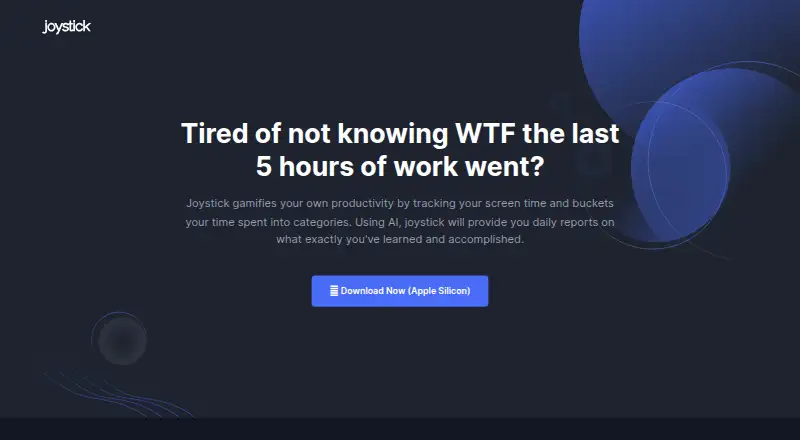
Joystick AI is a macOS productivity application for individuals, startups, small teams, and enterprises. It tracks screen time, categorizes application usage, and generates AI-assisted daily summaries of work and accomplishments. The product stores data on the user’s device, giving it a focused role in understanding work activity rather than controlling access to apps or websites. It is best suited to Apple Silicon Mac users who want an automated record of their work patterns and a concise summary of daily activity.
The published plans show a freemium structure. Free costs $0 per month and includes AI Summary for individuals and non-commercial use. Pro costs $19 per month and adds unlimited tracking, weekly accomplishment reports through email or Slack, and productivity data visible only from the user’s device. ProClarity costs $29 per month and includes AI Summary, unlimited tracking, weekly email or Slack reports, and configurable employee data visibility. The pricing structure separates individual use from team visibility controls, making ProClarity the relevant tier for enterprises that need configurable access to employee data.
Joystick AI’s strength is its narrow focus on activity interpretation: screen-time tracking, application categorization, AI summaries, and work-pattern insights. Email and Slack reporting extend those summaries beyond the app. It should appeal to people who want visibility into how work time is spent, as well as teams seeking accomplishment reporting and defined data-visibility controls. It is less suitable for buyers looking for a conventional screen-time restriction tool, because it does not offer blocking, limits, or scheduling. Buyers should also account for its Apple Silicon macOS scope before choosing it for a mixed-device environment.
Your product? Our editors can test Joystick AI in depth and publish a review, labelled as paid · from $149/mo →
Joystick AI pricing
All 3 Joystick AI plans and prices →
Joystick AI fact sheet
| Free plan | Yes |
|---|---|
| Paid from | $19/mo |
| Devices included | Not verified |
| Supported platforms | macOS Apple Silicon |
| Usage reports | Yes |
| Application limits | Not verified |
| Scheduled limits | Not verified |
| Focus sessions | Not verified |
| Usage history retention | Not verified |
| Deployment | Desktop |
| Platforms | macOS |
| Built for | Solo, Small business, Mid-market, Enterprise (editorial estimate) |
| Integrations | 2 integrations: Email, Slack |
| Pricing | Free plan (source) |
| Website | joystickai.com |
| Facts checked | 20 Sep 2026 |
Joystick AI integrations
Joystick AI lists 2 integrations on its own site.
- Slack
Alternatives to Joystick AI
- FreedomA flexible cross-device blocker with strong scheduling and session controls.9.4
- ScreenZenA free, broad screen-time toolkit for blocking apps and websites across four platforms.9.3
- AppBlockA flexible blocker for scheduled focus, stricter limits, and mobile-first screen-time control.9.2



See all Joystick AI alternatives →
Used Joystick AI? Be the first to review it
The editor score above is our own research. What this page doesn't have yet is a reader's view — what you used Joystick AI for, what worked and what didn't. No stars are seeded and no review is paid for; an editor reads every one before it appears.
Write a reviewTwo minutes · verified accounts only · read by an editor before it appears
Featured on iTechGuides

Joystick AI is listed in our Screen Time Management Apps directory. Add the badge to your site — it links back to this page.
<a href="https://www.itechguides.com/products/joystick-ai/"><img src="https://www.itechguides.com/best/badge/joystick-ai.svg" alt="Featured on iTechGuides" width="230" height="46"></a>
Reviewed by iTechGuides Editors · Editorial team · Updated Oct 2026
Advertiser disclosure: iTechGuides is reader-supported. Vendors can pay for top positions in our rankings and for a place on other products' pages, and we may earn a commission when you click some links. Bought places stand at the number bought; this page and our disclosure say so. Paying vendors may get a fuller, more detailed review from our editors, and that review can change their score. How we rank.
Last updated · How we research and update