
JOPDF
JOPDF: A capable free offline PDF editor with OCR, conversion, and local file processing. Ranked #57 of 102 in PDF Editors by our editors (3.4/10); pricing: Free plan; best for free offline editing on desktop operating systems.
At a glance
- Editor score3.4 / 10
- PricingFree plan
- Best forFree offline editing on desktop operating systems
- Free planYes
- Paid fromFree
- OCRYes
- Facts checked20 Sep 2026
Where it wins
- Fully free desktop editing with no subscriptions
- OCR, conversion, annotations, compression, and page tools
- Runs on Windows, macOS, and Linux with local processing
Where it doesn't
- Does not include AI features or integrations
- Focused on filling rather than creating fillable forms
- Desktop-focused rather than a broader collaborative workspace
Our verdict on JOPDF
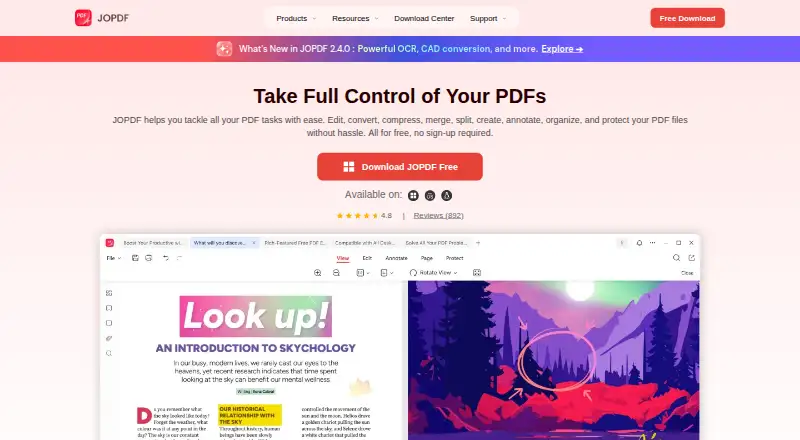
JOPDF is a free desktop PDF editor and reader for personal and professional use. It supports editing existing PDF text, images, and links, along with annotations, conversion, compression, page management, password protection, and printing. Windows, macOS, and Linux users can work with PDFs offline, while local file processing keeps document handling on the device. It fits people who want broad PDF utilities without a subscription or browser-dependent workflow.
The pricing structure is straightforward: the Free plan costs 0 and includes PDF editing, PDF conversion, annotation tools, page management, and password protection. The product is described as completely free with no subscriptions, so there are no paid tiers to compare or upgrade paths to evaluate. That makes JOPDF particularly suitable for individuals and organizations seeking a full desktop toolkit with a predictable cost structure across major desktop operating systems.
Its standout capability is the combination of OCR and offline editing. OCR can turn scanned PDFs into searchable or editable text, while conversion supports Word, Excel, PowerPoint, and image formats. Users can also batch-compress files, merge or split documents, reorder pages, and apply encryption or permission controls. JOPDF is a strong choice for practical document work performed locally. Choose another editor if your workflow depends on AI features, integrations, or creating fillable forms; JOPDF is better suited to editing, organizing, converting, and protecting existing PDF files.
Your product? Our editors can test JOPDF in depth and publish a review, labelled as paid · from $149/mo →
JOPDF pricing
All 1 JOPDF plans and prices →
JOPDF fact sheet
| Free plan | Yes |
|---|---|
| Paid from | Free |
| Text editing | Yes |
| Annotation tools | Yes |
| OCR | Yes |
| PDF conversion | Yes |
| Form creation | Not verified |
| Supported platforms | Windows, macOS, Linux |
| Deployment | Desktop |
| Platforms | Windows, macOS, Linux |
| Support | Email, Tickets, Docs |
| Built for | Solo, Small business (editorial estimate) |
| Pricing | Free plan (source) |
| Website | jopdf.com |
| Facts checked | 20 Sep 2026 |
Alternatives to JOPDF
- Foxit PDF EditorA mature PDF workspace with deep editing, OCR, forms, security, and integrations.9.3
- iLovePDFA broad PDF toolkit with free access, offline desktop processing, and cross-device apps.9.2
- SmallpdfA broad PDF toolkit for simple editing across web, Windows, mobile, and Chrome.9.1


Used JOPDF? Be the first to review it
The editor score above is our own research. What this page doesn't have yet is a reader's view — what you used JOPDF for, what worked and what didn't. No stars are seeded and no review is paid for; an editor reads every one before it appears.
Write a reviewTwo minutes · verified accounts only · read by an editor before it appears
Featured on iTechGuides

JOPDF is listed in our PDF Editors directory. Add the badge to your site — it links back to this page.
<a href="https://www.itechguides.com/products/jopdf/"><img src="https://www.itechguides.com/best/badge/jopdf.svg" alt="Featured on iTechGuides" width="230" height="46"></a>
Reviewed by iTechGuides Editors · Editorial team · Updated Oct 2026
Advertiser disclosure: iTechGuides is reader-supported. Vendors can pay for top positions in our rankings and for a place on other products' pages, and we may earn a commission when you click some links. Bought places stand at the number bought; this page and our disclosure say so. Paying vendors may get a fuller, more detailed review from our editors, and that review can change their score. How we rank.
Last updated · How we research and update