
JesRecap
JesRecap: A local-first recorder with detailed exports, but no integrations or permanent free tier. Ranked #24 of 34 in Meeting Recording Software by our editors (7.0/10); pricing: 2-day trial; best for users wanting local, export-heavy meeting recording.
At a glance
- Editor score7.0 / 10
- Pricing2-day trial
- Best forUsers wanting local, export-heavy meeting recording
- Free planNo
- Paid from€12.49/device one-time
- Recording scopeAudio and video
- Facts checked21 Sep 2026
Where it wins
- Local transcription, speaker labels, search, summaries, and action items
- Exports Markdown, plain text, JSON, SRT, VTT, and WAV
- Captures microphone and meeting audio separately on Mac and Windows
Where it doesn't
- No integrations or shared team workspace
- Costs €34.95 per device at the 1-device tier
- The preview release includes only a 2-day trial
Our verdict on JesRecap
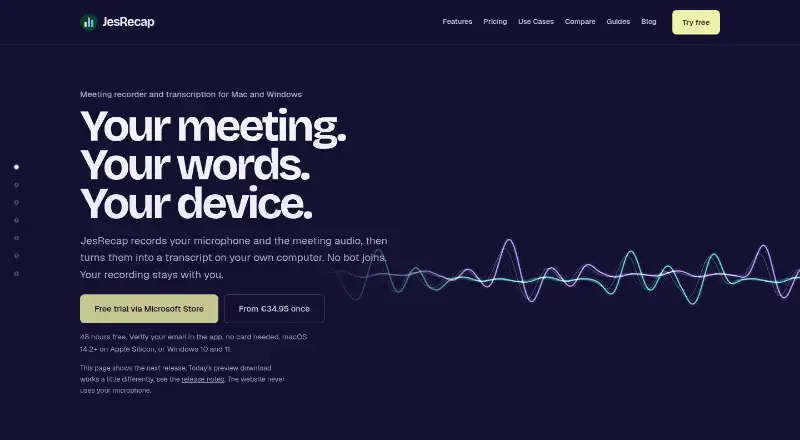
JesRecap is a desktop meeting recorder for macOS and Windows, designed for people who want recordings and transcripts kept on their device. It captures microphone and meeting audio as separate tracks, works with calls in Zoom, Microsoft Teams, Google Meet, Webex, Slack huddles, and other applications, and does not join meetings as a bot. Its audience is users who prioritize local processing, searchable meeting records, and control over exported files rather than a connected meeting workspace.
The standout feature is its export and transcript workflow. JesRecap provides on-device speech transcription, optional live transcripts, and speaker labels through local diarization. A searchable local meeting library supports retrieval, while summary, action-item, and custom-prompt actions help turn recordings into notes. Stored meetings can be retranscribed, and output can be saved as Markdown, plain text, JSON, SRT, VTT, or WAV. This combination suits users who need flexible files for captions, documentation, analysis, or further work in another AI tool.
Pricing is organized by device: the 1-device plan costs €34.95, 2 devices cost €49.95, 4 devices cost €74.95, and 8 devices cost €99.95. The Team plan costs €12.49 per device and adds device management with one license key for the team; Enterprise provides custom volume licensing, installers for macOS and Windows, and invoicing arrangements. A 2-day trial does not require a card, but there is no permanent free tier. JesRecap is a good fit for local, export-heavy recording; teams needing integrations or a shared workspace should choose an alternative.
Your product? Our editors can test JesRecap in depth and publish a review, labelled as paid · from $149/mo →
JesRecap pricing
All 6 JesRecap plans and prices →
JesRecap fact sheet
| Free plan | No |
|---|---|
| Paid from | €12.49/device one-time |
| Recording scope | Audio and video |
| Transcript search | Yes |
| Recording retention | Not verified |
| Meeting platforms | Zoom, Microsoft Teams, Google Meet, Webex, Slack |
| Sharing controls | Not verified |
| Recording limit | Not verified |
| Free trial | 2 days · no card needed |
| Deployment | Desktop |
| Platforms | Windows, macOS |
| Support | |
| Built for | Solo, Small business, Mid-market, Enterprise (editorial estimate) |
| Pricing | 2-day trial (source) |
| Website | jesrecap.com |
| Facts checked | 21 Sep 2026 |
Alternatives to JesRecap
- MeetGeekA broad meeting capture and follow-up suite with a useful free plan and wide integrations.9.3
- Fireflies.aiA broad meeting intelligence platform with strong integrations and flexible plans.9.2
- NottaA budget-friendly meeting notetaker with broad transcription, translation, and export tools.9.1



See all JesRecap alternatives →
Used JesRecap? Be the first to review it
The editor score above is our own research. What this page doesn't have yet is a reader's view — what you used JesRecap for, what worked and what didn't. No stars are seeded and no review is paid for; an editor reads every one before it appears.
Write a reviewTwo minutes · verified accounts only · read by an editor before it appears
Featured on iTechGuides

JesRecap is listed in our Meeting Recording Software directory. Add the badge to your site — it links back to this page.
<a href="https://www.itechguides.com/products/jesrecap/"><img src="https://www.itechguides.com/best/badge/jesrecap.svg" alt="Featured on iTechGuides" width="230" height="46"></a>
Reviewed by iTechGuides Editors · Editorial team · Updated Oct 2026
Advertiser disclosure: iTechGuides is reader-supported. Vendors can pay for top positions in our rankings and for a place on other products' pages, and we may earn a commission when you click some links. Bought places stand at the number bought; this page and our disclosure say so. Paying vendors may get a fuller, more detailed review from our editors, and that review can change their score. How we rank.
Last updated · How we research and update