
IRISPowerscan
IRISPowerscan: A Windows-focused choice for high-volume scanning, OCR, classification, and export. Ranked #17 of 27 in Document Scanning Software by our editors (6.9/10); pricing: Paid; best for high-volume Windows OCR and data extraction.
At a glance
- Editor score6.9 / 10
- PricingPaid
- Best forHigh-volume Windows OCR and data extraction
- Free planNo
- OCR languages130 languages
- Founded1987 · Mont-Saint-Guibert, Belgium
- Facts checked20 Sep 2026
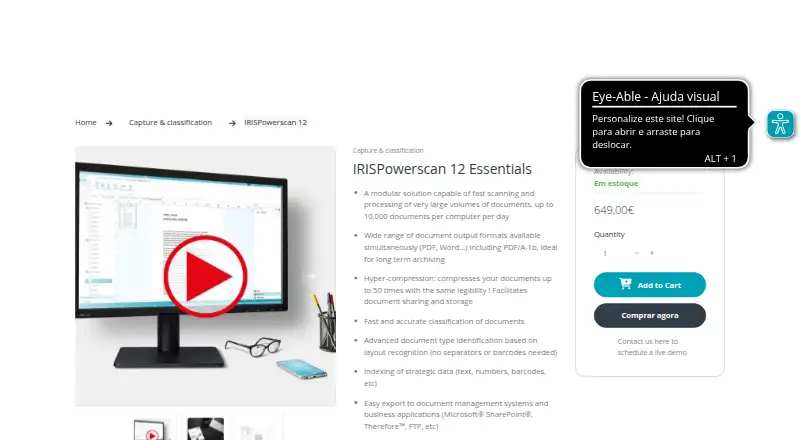
Where it wins
- Processes up to 10,000 documents per computer per day
- Combines OCR, barcode recognition, classification, and validation
- Exports to SharePoint, cloud storage, and business applications
Where it doesn't
- Windows-based deployment limits platform flexibility
- Paid plans start at 649
- Advanced document processing may exceed simple scanning needs
Our verdict on IRISPowerscan
IRISPowerscan is Windows-based document processing software for organizations handling high document volumes. It captures documents from scanners, files, folders, and cloud sources, then supports classification, separation, OCR-based data extraction, indexing, and export. The product is aimed at teams that need more than image capture: its published Essentials plan supports up to 10,000 documents per computer per day, along with scanner connectivity, database lookup, layout-based document identification, and PDF, Word, and PDF/A-1b output.
Its strongest fit is a batch-oriented workflow. Barcode recognition can separate documents, while OCR supports text recognition and data extraction across 130 languages. Searchable PDF and PDF/A output helps turn scanned content into usable digital files, and iHQC hyper-compression addresses storage and transfer efficiency. Layout-based classification adds structure for recurring document types. These capabilities make IRISPowerscan more suitable for centralized scanning operations, records processing, and document-heavy administrative workflows than for occasional desk-side scanning.
The integration range is broad for a Windows product, with connections to Microsoft SharePoint, Therefore, FTP, ODBC, CMIS, Box, Dropbox, Evernote, Google Drive, and OneDrive. Exports can reach document-management systems and business applications through IRISConnect connectors. The trade-off is platform scope: the product is designed around Windows, and its paid positioning starts at 649, so it is less suitable for buyers seeking a lightweight, low-cost, cross-platform scanner app. Choose IRISPowerscan when volume, OCR, classification, and downstream export matter; choose an alternative when simple capture or broader platform coverage is the priority.
Your product? Our editors can test IRISPowerscan in depth and publish a review, labelled as paid · from $149/mo →
IRISPowerscan pricing
All 1 IRISPowerscan plans and prices →
IRISPowerscan fact sheet
| Free plan | No |
|---|---|
| Paid from | Not verified |
| OCR languages | 130 languages |
| Scanner support | Yes |
| Camera capture | Not verified |
| Batch scanning | Yes |
| Searchable PDF | Yes |
| Supported platforms | Windows |
| Export formats | PDF, PDF/A-1b, Word, DOCX, RTF |
| Deployment | Desktop |
| Platforms | Windows |
| Support | Email, Docs · 24/7 |
| Built for | Small business, Mid-market, Enterprise (editorial estimate) |
| Integrations | 10 integrations: Microsoft SharePoint, Therefore, FTP, ODBC, CMIS, Box … |
| Pricing | Paid (source) |
| Website | irislink.com |
| Facts checked | 20 Sep 2026 |
IRISPowerscan integrations
IRISPowerscan lists 10 integrations on its own site.
- Microsoft SharePoint
- Therefore
- FTP
- ODBC
- CMIS
- Box
- Dropbox
- Evernote
- Google Drive
- OneDrive
Alternatives to IRISPowerscan
- NAPS2A capable no-cost scanner app with broad driver support, OCR, and automation.9.4
- ScanSnap HomeA free ScanSnap companion for organized scanning, OCR, search, and cloud export.9.2
- Brother iPrint&ScanA capable free companion app for Brother owners who need everyday scanning tools.9.0


See all IRISPowerscan alternatives →
Used IRISPowerscan? Be the first to review it
The editor score above is our own research. What this page doesn't have yet is a reader's view — what you used IRISPowerscan for, what worked and what didn't. No stars are seeded and no review is paid for; an editor reads every one before it appears.
Write a reviewTwo minutes · verified accounts only · read by an editor before it appears
Featured on iTechGuides

IRISPowerscan is listed in our Document Scanning Software directory. Add the badge to your site — it links back to this page.
<a href="https://www.itechguides.com/products/irispowerscan/"><img src="https://www.itechguides.com/best/badge/irispowerscan.svg" alt="Featured on iTechGuides" width="230" height="46"></a>
Reviewed by iTechGuides Editors · Editorial team · Updated Oct 2026
Advertiser disclosure: iTechGuides is reader-supported. Vendors can pay for top positions in our rankings and for a place on other products' pages, and we may earn a commission when you click some links. Bought places stand at the number bought; this page and our disclosure say so. Paying vendors may get a fuller, more detailed review from our editors, and that review can change their score. How we rank.
Last updated · How we research and update