
InTune Performer
InTune Performer: A focused DAW plugin for adjustable, real-time vocal tuning across common formats. Ranked #10 of 25 in Pitch Correction Software by our editors (8.1/10); pricing: 14-day trial; best for DAW-based real-time correction.
At a glance
- Editor score8.1 / 10
- Pricing14-day trial
- Best forDAW-based real-time correction
- Free planNo
- Paid from$149/yr
- Real-time correctionYes
- Facts checked20 Sep 2026
Where it wins
- Real-time correction with chromatic, major, and minor scale modes
- Adjustable correction strength and delay for different vocal effects
- VST3, AU, and AAX support across macOS and Windows
Where it doesn't
- No free plan; access starts at $14.95 per month
- The listed plans bundle 75+ plugins rather than only InTune Performer
- Requires a compatible DAW for native operation
Our verdict on InTune Performer
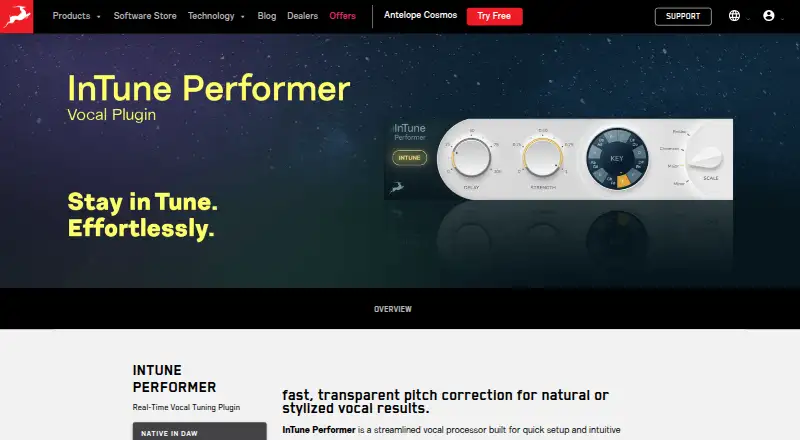
InTune Performer is a real-time vocal pitch-correction plugin for musicians, producers, and audio engineers working inside a DAW. It runs on macOS and Windows and supports chromatic, major, and minor scale modes, giving users a focused way to tune vocals without piano-roll editing or complex routing. Correction strength and delay controls support both transparent and more stylized results. Its fit is strongest for DAW-based vocal production where processing needs to happen during playback or recording.
The published plans show Antelope Cosmos Standard at $14.95 per month or $149 per year. Both plans include 75+ plugins, two licenses for activation on two machines, VST3, AU, and AAX formats, and Windows and macOS support. A 14-day free trial is available, while the product is not offered through a free plan. This structure may suit buyers who also want the broader plugin bundle, but it is less direct for someone seeking a standalone pitch-correction purchase.
Compatibility is a practical strength. InTune Performer operates natively in a DAW and is listed for use with Avid Pro Tools, Ableton Live, Image-Line FL Studio, PreSonus Studio One, Steinberg Cubase, Bitwig Studio, and Cockos Reaper. Its main focus is vocal correction rather than a wider editing workflow, with scale selection, correction strength, and smoothing delay forming the core controls. Choose it if you want real-time tuning in a supported DAW and value broad plugin-format coverage. Consider another option if you need a free plan or want a product sold independently from a larger plugin collection.
Questions about InTune Performer
Does InTune Performer have a free plan? No free plan is listed; paid plans start at $14.95/mo (Antelope Cosmos Standard).
Is there a free trial of InTune Performer? Yes: a 14-day free trial.
What does InTune Performer run on? Windows and macOS. It runs as a desktop app.
What does InTune Performer integrate with? 7 integrations, including Avid Pro Tools, Ableton Live, Image-Line FL Studio, PreSonus Studio One and Steinberg Cubase.
Who is InTune Performer built for? Solo users, small businesses and mid-market companies (our editorial estimate).
Your product? Our editors can test InTune Performer in depth and publish a review, labelled as paid · from $149/mo →
InTune Performer pricing
All 1 InTune Performer plans and prices →
InTune Performer fact sheet
| Free plan | No |
|---|---|
| Paid from | $149/yr |
| Real-time correction | Yes |
| Formant control | Not verified |
| MIDI pitch control | Not verified |
| Plugin formats | Not verified |
| Pitch-shift range | Not verified |
| Scale/key detection | Yes |
| Free trial | 14 days |
| Deployment | Desktop |
| Platforms | Windows, macOS |
| Compliance & security | GDPR |
| Support | Email, Live chat, Phone, Tickets, Docs |
| Built for | Solo, Small business, Mid-market (editorial estimate) |
| Integrations | 7 integrations: Avid Pro Tools, Ableton Live, Image-Line FL Studio, PreSonus Studio One, Steinberg Cubase, Bitwig Studio … |
| Pricing | 14-day trial (source) |
| Website | en.antelopeaudio.com |
| Facts checked | 20 Sep 2026 |
InTune Performer integrations
InTune Performer lists 7 integrations on its own site.
- Avid Pro Tools
- Ableton Live
- Image-Line FL Studio
- PreSonus Studio One
- Steinberg Cubase
- Bitwig Studio
- Cockos Reaper
Alternatives to InTune Performer
- OpenVoxTunerA free, full-featured pitch correction plugin for scale-aware vocal production.9.4
- OpenTuneA detailed free editor for vocal pitch, note, scale, and timbre control.9.2
- AutoTune Pro 11A full-featured pitch-correction plug-in for vocal production on macOS and Windows.9.0


See all InTune Performer alternatives →
Used InTune Performer? Be the first to review it
The editor score above is our own research. What this page doesn't have yet is a reader's view — what you used InTune Performer for, what worked and what didn't. No stars are seeded and no review is paid for; an editor reads every one before it appears.
Write a reviewTwo minutes · verified accounts only · read by an editor before it appears
Featured on iTechGuides

InTune Performer is listed in our Pitch Correction Software directory. Add the badge to your site — it links back to this page.
<a href="https://www.itechguides.com/products/intune-performer/"><img src="https://www.itechguides.com/best/badge/intune-performer.svg" alt="Featured on iTechGuides" width="230" height="46"></a>
Reviewed by iTechGuides Editors · Editorial team · Updated Nov 2026
Advertiser disclosure: iTechGuides is reader-supported. Vendors can pay for top positions in our rankings and for a place on other products' pages, and we may earn a commission when you click some links. Bought places stand at the number bought; this page and our disclosure say so. Paying vendors may get a fuller, more detailed review from our editors, and that review can change their score. How we rank.
Last updated · How we research and update