OpenTune
OpenTune: A detailed free editor for vocal pitch, note, scale, and timbre control. Ranked #2 of 25 in Pitch Correction Software by our editors (9.2/10); pricing: Free plan; best for free detailed vocal editing and resynthesis.
At a glance
- Editor score9.2 / 10
- PricingFree plan
- Best forFree detailed vocal editing and resynthesis
- Free planYes
- Paid fromFree
- Real-time correctionYes
- Facts checked20 Sep 2026
Where it wins
- Neural-vocoder resynthesis with formant-preserving pitch shifting
- Per-note EQ plus hand-drawn, note, and anchor editing
- Standalone, VST3, and ARA2 workflows on Windows and macOS
Where it doesn't
- Its focus is pitch correction rather than broader music production
- Plugin support centers on VST3 with ARA2 support
- Audio import is limited to WAV, FLAC, OGG, and MP3
Our verdict on OpenTune
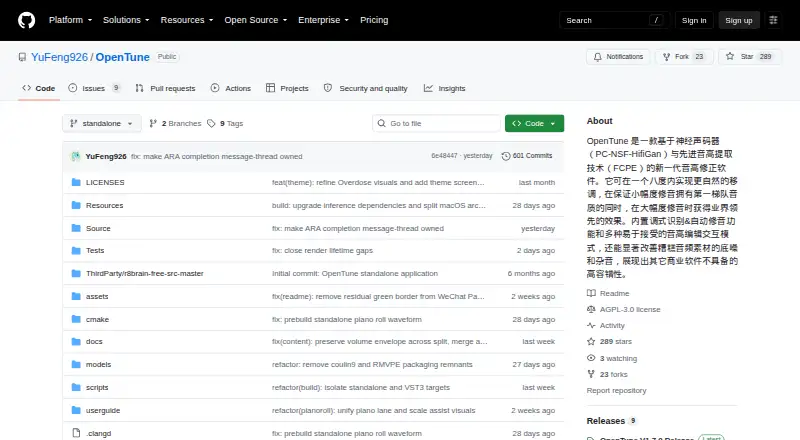
OpenTune is an open-source pitch correction tool for music creators and audio editors working with vocal recordings. It combines neural-vocoder resynthesis with FCPE pitch extraction and PC-NSF-HiFiGAN processing to adjust vocals while preserving formants. The workflow supports note-based, hand-drawn, and anchor editing, giving users several ways to shape individual corrections. Automatic musical key detection and correction options for chromatic, major, minor, pentatonic, Dorian, Mixolydian, and harmonic-minor scales make it suitable for detailed vocal editing rather than simple automatic tuning.
Its strongest fit is a flexible editing workflow that extends beyond pitch movement. Per-note EQ processing allows tonal adjustments within the correction process, while formant-preserving shifting helps retain vocal character as notes change. Real-time correction is available through the VST3 workflow, and ARA2 support connects the editor with compatible audio production environments. For creators who prefer a standalone application, OpenTune can also work outside a host. It runs on Windows and macOS and imports WAV, FLAC, OGG, and MP3 files.
OpenTune is free and open source, with no paid plan structure to compare. That makes it a clear option for creators who want detailed pitch editing without a subscription or license tier. Its trade-off is a narrow focus: the product is built around vocal correction, resynthesis, note editing, scales, and related processing rather than serving as a wider music-production environment. Choose OpenTune for granular, formant-aware vocal work and multiple correction methods. Choose an alternative if you need broader production features or a different plugin format.
Questions about OpenTune
What does OpenTune run on? Windows and macOS. It runs as a desktop app.
What does OpenTune integrate with? 2 integrations: VST3 and ARA2.
Who is OpenTune built for? Solo users and small businesses (our editorial estimate).
Your product? Our editors can test OpenTune in depth and publish a review, labelled as paid · from $149/mo →
OpenTune pricing
OpenTune fact sheet
| Free plan | Yes |
|---|---|
| Paid from | Free |
| Real-time correction | Yes |
| Formant control | Yes |
| MIDI pitch control | Not verified |
| Plugin formats | Not verified |
| Pitch-shift range | Not verified |
| Scale/key detection | Yes |
| Deployment | Desktop |
| Platforms | Windows, macOS |
| Support | Community, Docs |
| Built for | Solo, Small business (editorial estimate) |
| Integrations | 2 integrations: VST3, ARA2 |
| Pricing | Free plan |
| Website | github.com |
| Facts checked | 20 Sep 2026 |
OpenTune integrations
OpenTune lists 2 integrations on its own site.
- VST3
- ARA2
Alternatives to OpenTune
- OpenVoxTunerA free, full-featured pitch correction plugin for scale-aware vocal production.9.4
- AutoTune Pro 11A full-featured pitch-correction plug-in for vocal production on macOS and Windows.9.0
- MelodyneDeep note-level and polyphonic editing for detailed audio correction.8.8


See all OpenTune alternatives →
OpenTune vs the competition
- OpenTune vs OpenVoxTuner
- OpenTune vs AutoTune Pro 11
- OpenTune vs Melodyne
- OpenTune vs MeldaProduction MAutoPitch
- OpenTune vs Auburn Sounds Graillon 3
- OpenTune vs Brainworx bx_crispytuner


Compare OpenTune with any tool side by side →
Used OpenTune? Be the first to review it
The editor score above is our own research. What this page doesn't have yet is a reader's view — what you used OpenTune for, what worked and what didn't. No stars are seeded and no review is paid for; an editor reads every one before it appears.
Write a reviewTwo minutes · verified accounts only · read by an editor before it appears
Featured on iTechGuides

OpenTune is listed in our Pitch Correction Software directory. Add the badge to your site — it links back to this page.
<a href="https://www.itechguides.com/products/opentune/"><img src="https://www.itechguides.com/best/badge/opentune.svg" alt="Featured on iTechGuides" width="230" height="46"></a>
Reviewed by iTechGuides Editors · Editorial team · Updated Nov 2026
Advertiser disclosure: iTechGuides is reader-supported. Vendors can pay for top positions in our rankings and for a place on other products' pages, and we may earn a commission when you click some links. Bought places stand at the number bought; this page and our disclosure say so. Paying vendors may get a fuller, more detailed review from our editors, and that review can change their score. How we rank.
Last updated · How we research and update