
Infographic Maker AI
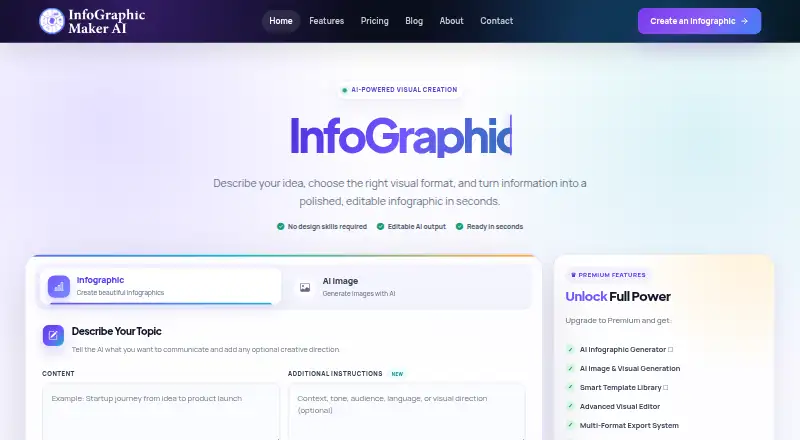
Infographic Maker AI: A web-based infographic tool for turning structured data and prompts into editable visuals. Ranked #7 of 26 in Infographic Makers by our editors (7.9/10); pricing: Free plan · 14-day trial; best for AI infographic teams using structured data.
At a glance
- Editor score7.9 / 10
- PricingFree plan · 14-day trial
- Best forAI infographic teams using structured data
- Free planYes
- Paid from$19/mo
- Data importYes
- Facts checked20 Sep 2026
Where it wins
- Generates editable infographics from prompts, reports, briefs, and data
- Supports CSV, JSON, Google Sheets, charts, brand kits, and version tracking
- Exports to PNG, JPG, PDF, and SVG across paid tiers
Where it doesn't
- Web-only access limits platform flexibility
- Free plan allows 3 exports per month
- Advanced analytics and API access require the Business plan
Our verdict on Infographic Maker AI
Infographic Maker AI is a web-based design platform for individuals, teams, agencies, educators, and enterprises creating data-rich visual content. It can turn prompts, notes, reports, briefs, and uploaded data into editable infographics, while providing controls to drag, resize, duplicate, and reorder elements. Its templates cover business, marketing, education, career, and other topics, making it suitable for both structured reporting and template-led design work.
The published monthly plans provide a clear progression. Free includes 50 AI credits, 3 exports per month, basic templates, 720p export, and a Brand Kit. Starter costs $19 per month and adds 500 AI credits, 50 exports, all templates, 1080p export, and 1 Brand Kit. Pro costs $49 per month with 2,000 AI credits, unlimited exports, premium templates, 4K export, 5 Brand Kits, and advanced analytics. Business costs $99 per month and adds 5,000 AI credits, all premium features, 4K and SVG export, unlimited Brand Kits, and API access. A 14-day free trial is also available.
Its strongest fit is for teams that need data-driven visuals rather than only static graphic layouts. Support for CSV, JSON, Google Sheets, and other data sources works alongside bar, line, pie, donut, and comparison charts. Real-time collaboration, comments, version tracking, reusable brand assets, and AI image generation extend the workflow beyond initial infographic creation. Choose it when editable outputs, structured data, brand consistency, and team review matter. Consider an alternative if you need a platform beyond the web or if three monthly exports are too restrictive for a free workflow.
Your product? Our editors can test Infographic Maker AI in depth and publish a review, labelled as paid · from $149/mo →
Infographic Maker AI pricing
All 4 Infographic Maker AI plans and prices →
Infographic Maker AI fact sheet
| Free plan | Yes |
|---|---|
| Paid from | $19/mo |
| Data import | Yes |
| Custom dimensions | Not verified |
| PDF export | Yes |
| SVG export | Yes |
| Animated output | Not verified |
| Brand kit | Yes |
| Free trial | 14 days · no card needed |
| Money-back guarantee | 14 days |
| Deployment | Cloud |
| Platforms | Web |
| Compliance & security | SOC 2, GDPR |
| Support | Email, Docs, Community, Live chat · 24/7 |
| Built for | Solo, Small business, Mid-market, Enterprise (editorial estimate) |
| Integrations | 30+ integrations: CSV, JSON, Google Sheets |
| Pricing | Free plan · 14-day trial (source) |
| Website | infographicmakerai.com |
| Facts checked | 20 Sep 2026 |
Infographic Maker AI integrations
Infographic Maker AI lists 30+ integrations on its own site — the 3 named here are the ones its pages call out.
- CSV
- JSON
- Google Sheets
Alternatives to Infographic Maker AI
- InfogramA strong choice for teams that need interactive visuals, live data, and collaboration.9.4
- PiktochartA broad browser-based visual editor for infographics, presentations, data graphics, and branded content.9.2
- VismeA broad visual-content suite for teams that need infographics, presentations, and brand control.9.0



See all Infographic Maker AI alternatives →
Infographic Maker AI vs the competition
- Infographic Maker AI vs Infogram
- Infographic Maker AI vs Piktochart
- Infographic Maker AI vs Visme
- Infographic Maker AI vs Venngage
- Infographic Maker AI vs Easel.ly
- Infographic Maker AI vs Napkin AI



Compare Infographic Maker AI with any tool side by side →
Used Infographic Maker AI? Be the first to review it
The editor score above is our own research. What this page doesn't have yet is a reader's view — what you used Infographic Maker AI for, what worked and what didn't. No stars are seeded and no review is paid for; an editor reads every one before it appears.
Write a reviewTwo minutes · verified accounts only · read by an editor before it appears
Featured on iTechGuides

Infographic Maker AI is listed in our Infographic Makers directory. Add the badge to your site — it links back to this page.
<a href="https://www.itechguides.com/products/infographic-maker-ai/"><img src="https://www.itechguides.com/best/badge/infographic-maker-ai.svg" alt="Featured on iTechGuides" width="230" height="46"></a>
Reviewed by iTechGuides Editors · Editorial team · Updated Oct 2026
Advertiser disclosure: iTechGuides is reader-supported. Vendors can pay for top positions in our rankings and for a place on other products' pages, and we may earn a commission when you click some links. Bought places stand at the number bought; this page and our disclosure say so. Paying vendors may get a fuller, more detailed review from our editors, and that review can change their score. How we rank.
Last updated · How we research and update