
Piktochart
Piktochart: A capable web-based choice for data-rich infographics, presentations, and branded visuals. Ranked #79 of 148 in Graphic Design Software by our editors (3.0/10); pricing: Free plan; best for data-rich infographics and presentations.
At a glance
- Editor score3.0 / 10
- PricingFree plan
- Best forData-rich infographics and presentations
- Free planYes
- Paid from$39/user/yr
- Brand kitYes
- Founded2011
- Facts checked20 Sep 2026
Where it wins
- Imports CSV/XLSX files and connects live Google Sheets data
- Exports visuals as PNG, PDF, and PowerPoint files
- Adds brand controls, team workspaces, comments, and permissions
Where it doesn't
- Works through the web rather than a desktop app
- The Free plan allows only 2 PNG downloads
- Live data connections are limited to Google Sheets
Our verdict on Piktochart
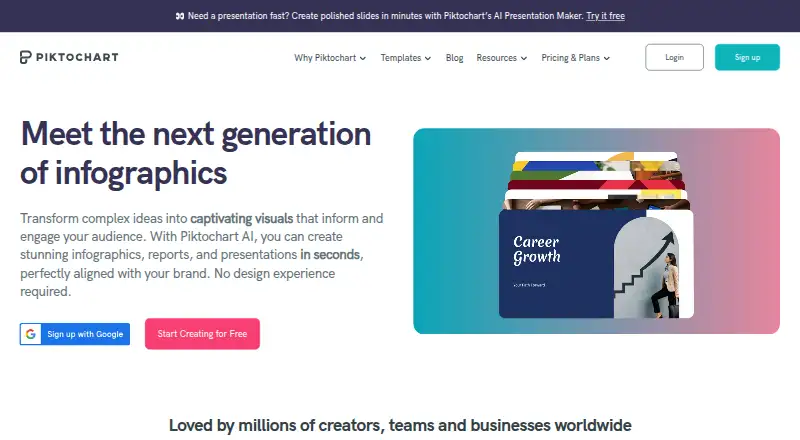
Piktochart is a browser-based visual design platform for individuals, educators, nonprofits, marketing and communications teams, and businesses. Its focus is structured visual communication: infographics, presentations, reports, documents, social graphics, videos, charts, maps, and related content. A drag-and-drop editor supports templates or blank canvases, while charts, graphs, interactive maps, data imports, presentation mode, and AI generation cover a broad range of content needs. Shared workspaces add collaboration through sharing, permissions, comments, and annotations.
Pricing separates a useful free entry point from plans aimed at heavier production and brand management. Free costs $0 per account and includes unlimited visual projects, 2 PNG downloads, 60 AI credits, free templates, and 1 GB of storage. Pro costs $10 per member per month when billed annually, adding unlimited PNG downloads, premium templates, 500 AI credits, and 100 GB of storage. Business costs $17 per member per month when billed annually and adds unlimited PNG, PDF, and PowerPoint downloads, unlimited brand colors, custom fonts and logos, branded templates, 1,000 AI credits, and 250 GB of storage. Enterprise uses custom pricing for 101+ team members and adds SSO/SAML, advanced security review and MSA support, and a dedicated account manager.
Piktochart fits teams that need presentation-ready visuals and data-led storytelling without relying on a desktop application. Google Sheets connectivity, CSV/XLSX import, reusable templates, brand controls, and team workspaces make it more suitable for recurring communications than a basic one-off design tool. Education, Campus, and Nonprofit plans provide additional purchasing paths, with Campus requiring a minimum of 3,000 seats. Choose it when infographic, presentation, and report creation are central to the workflow; consider another option if a desktop app or a wider integration ecosystem is essential.
Your product? Our editors can test Piktochart in depth and publish a review, labelled as paid · from $149/mo →
Piktochart pricing
All 7 Piktochart plans and prices →
Piktochart fact sheet
| Free plan | Yes |
|---|---|
| Paid from | $39/user/yr |
| Template library | Yes |
| Presentation design | Yes |
| Illustration tools | Yes |
| Brand kit | Yes |
| Real-time collaboration | Yes |
| Desktop app | No |
| Mobile app | No |
| Deployment | Cloud |
| Platforms | Web |
| Compliance & security | SSO/SAML, 2FA |
| Support | Email, Live chat, Docs |
| Built for | Solo, Small business, Mid-market, Enterprise (editorial estimate) |
| Integrations | 4 integrations: Google Sheets, Google Drive, Zoom, IconScout See all → |
| Pricing | Free plan (source) |
| Website | piktochart.com |
| Facts checked | 20 Sep 2026 |
Piktochart integrations
Piktochart lists 4 integrations on its own site.
- Google Sheets
- Google Drive
- Zoom
- IconScout
See all Piktochart integrations →
Alternatives to Piktochart
- Adobe Creative CloudA broad creative suite for teams that need design, video, collaboration, and asset management.9.4
- CanvaA broad template-based editor for creating and sharing varied visual content.9.3
- FigmaA shared workspace for interface design, prototyping, developer handoff and more.9.2



See all Piktochart alternatives →
Also Ranked In
Piktochart is ranked in 13 of our directories; the 6 strongest besides Graphic Design Software.
Used Piktochart? Be the first to review it
The editor score above is our own research. What this page doesn't have yet is a reader's view — what you used Piktochart for, what worked and what didn't. No stars are seeded and no review is paid for; an editor reads every one before it appears.
Write a reviewTwo minutes · verified accounts only · read by an editor before it appears
Featured on iTechGuides

Piktochart is listed in our Graphic Design Software directory. Add the badge to your site — it links back to this page.
<a href="https://www.itechguides.com/products/piktochart/"><img src="https://www.itechguides.com/best/badge/piktochart.svg" alt="Featured on iTechGuides" width="230" height="46"></a>
Reviewed by iTechGuides Editors · Editorial team · Updated Oct 2026
Advertiser disclosure: iTechGuides is reader-supported. Vendors can pay for top positions in our rankings and for a place on other products' pages, and we may earn a commission when you click some links. Bought places stand at the number bought; this page and our disclosure say so. Paying vendors may get a fuller, more detailed review from our editors, and that review can change their score. How we rank.
Last updated · How we research and update