Inbox Zero
Inbox Zero: Open-source inbox triage with voice-based drafts, follow-up tracking, and cleanup tools. Ranked #15 of 46 in AI Email Assistants by our editors (7.2/10); pricing: 7-day trial; best for professionals who want open-source Gmail inbox triage.
At a glance
- Editor score7.2 / 10
- Pricing7-day trial
- Best forProfessionals who want open-source Gmail inbox triage
- Free planNo
- Inbox triageYes
- Facts checked19 Sep 2026
Where it wins
- Sorts and labels email, with plain-English rules for inbox actions
- Drafts replies in the user's voice and tracks follow-ups
- Supports bulk cleanup and self-hosting of its open-source code
Where it doesn't
- No free plan; access starts with a paid plan
- Starter is limited to one email account per user
- Enterprise-only deployment options include on-premise hosting
Our verdict on Inbox Zero
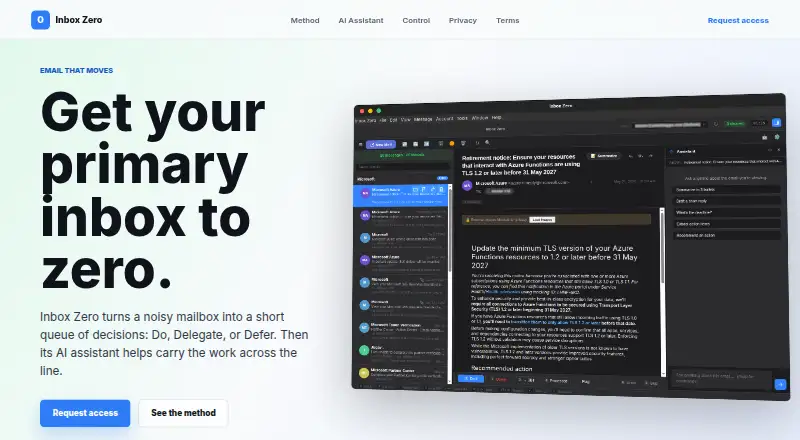
Inbox Zero helps founders, operators, and other professionals manage high email volume. It connects to Gmail, Google Workspace, and Microsoft Outlook to classify incoming messages, apply labels and actions, draft replies in the user's voice, and track conversations that need a response. Its open-source code can be self-hosted, while hosted access is available through web, iOS, and Android. It suits people who want an AI assistant for inbox organization and cleanup; those seeking a free plan should look elsewhere.
Inbox work extends beyond sorting: plain-English rules can set labels and actions, and bulk unsubscribe and archive tools help clear accumulated email. Thread summaries and action-item extraction, calendar-aware drafting, and reply and follow-up tracking address the next steps that can get buried in a busy inbox. Starter includes email analytics and pre-meeting briefings. The plans also show a seven-day free trial, but no free plan. Plus adds two email accounts per user, an AI meeting notetaker, Slack and app integrations, and email digests. Professional adds team-wide analytics, priority support, and a dedicated onboarding manager; Enterprise adds SSO, SCIM, on-premise deployment, and dedicated support.
The ecosystem spans Gmail, Google Workspace, Outlook, Slack, Telegram, and Google and Microsoft calendars. That makes it relevant to people working across email, messaging, and calendars, while the two-account allowance is specifically a Plus feature. The self-hosting option and open-source code may matter to teams that want deployment control; Enterprise is the tier that lists on-premise deployment. Choose Inbox Zero for triage, voice-based drafting, cleanup, and follow-up workflows. It is a less suitable fit for buyers who require a free plan or need multiple accounts on Starter. Enterprise buyers can also weigh its custom-priced tier against alternatives if its listed deployment and support features do not match their needs.
Your product? Our editors can test Inbox Zero in depth and publish a review, labelled as paid · from $149/mo →
Inbox Zero pricing
All 4 Inbox Zero plans and prices →
Inbox Zero fact sheet
| Free plan | No |
|---|---|
| Paid from | Not verified |
| Inbox triage | Yes |
| AI reply drafting | Yes |
| Automatic sending | Yes |
| Thread summaries | Yes |
| Follow-up actions | Yes |
| Email platforms | Gmail |
| Free trial | 7 days |
| Deployment | Cloud, Mobile |
| Platforms | Web, iOS, Android |
| Integrations | 7 integrations: Gmail, Google Workspace, Microsoft Outlook, Slack, Telegram, Google Calendar … |
| Pricing | 7-day trial (source) |
| Website | inbox-zero.ai |
| Facts checked | 19 Sep 2026 |
Inbox Zero integrations
Inbox Zero lists 7 integrations on its own site.
- Gmail
- Google Workspace
- Microsoft Outlook
- Slack
- Telegram
- Google Calendar
- Microsoft Outlook Calendar
Alternatives to Inbox Zero
- Spark +AIA broad AI email toolkit across four platforms, with paid AI features starting at $10 per user monthly.9.2
- Superhuman GoA cross-platform AI assistant with email help, connected apps, and custom automations.8.8
- Mailbutler Smart AssistantA broad email toolkit with AI assistance on Smart and Business plans.8.6



See all Inbox Zero alternatives →
Used Inbox Zero? Be the first to review it
The editor score above is our own research. What this page doesn't have yet is a reader's view — what you used Inbox Zero for, what worked and what didn't. No stars are seeded and no review is paid for; an editor reads every one before it appears.
Write a reviewTwo minutes · verified accounts only · read by an editor before it appears
Featured on iTechGuides

Inbox Zero is listed in our AI Email Assistants directory. Add the badge to your site — it links back to this page.
<a href="https://www.itechguides.com/products/inbox-zero/"><img src="https://www.itechguides.com/best/badge/inbox-zero.svg" alt="Featured on iTechGuides" width="230" height="46"></a>
Reviewed by iTechGuides Editors · Editorial team · Updated Oct 2026
Advertiser disclosure: iTechGuides is reader-supported. Vendors can pay for top positions in our rankings and for a place on other products' pages, and we may earn a commission when you click some links. Bought places stand at the number bought; this page and our disclosure say so. Paying vendors may get a fuller, more detailed review from our editors, and that review can change their score. How we rank.
Last updated · How we research and update