
Image Vectorizer
Image Vectorizer: A focused macOS tool for monochrome tracing from scans, drawings, and bitmap files. Ranked #24 of 26 in Image Vectorization Software by our editors (6.4/10); pricing: Paid; best for mac users converting scans and hand drawings.
At a glance
- Editor score6.4 / 10
- PricingPaid
- Best forMac users converting scans and hand drawings
- Free planNo
- Facts checked20 Sep 2026
Where it wins
- Imports common bitmap files and connected scanners
- Offers detailed preprocessing and adjustable tracing controls
- Exports vectors as EPS, PDF, SVG, and DXF
Where it doesn't
- Runs only on macOS
- Focuses on monochrome tracing
- Does not perform OCR on scanned documents
Our verdict on Image Vectorizer
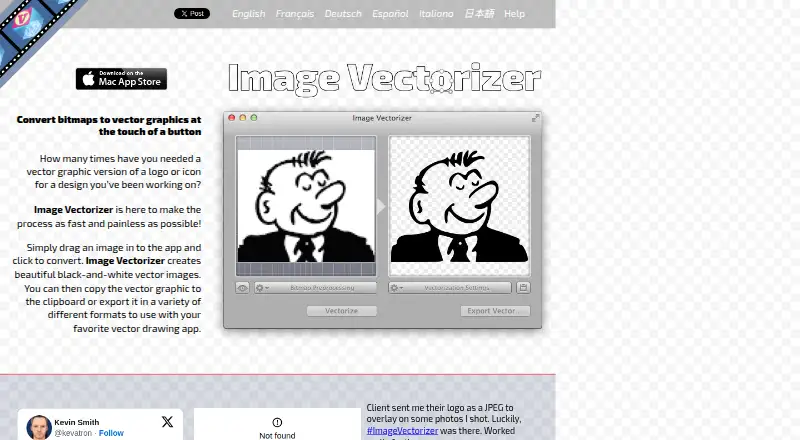
Image Vectorizer is a macOS desktop application for converting bitmap images into black-and-white vector graphics. It is suited to designers and other users working with logos, line art, pencil drawings, blueprints, photographs, and scanned documents. Common bitmap formats, including JPG, PNG, GIF, TIF, and TIFF, can be imported, while connected scanners provide a direct input path. The product is especially relevant for Mac users who want editable vector output from scans or hand-drawn artwork without relying on OCR.
Its main strength is control over the conversion process. Preprocessing options include rotation, flipping, color adjustment, blur, sharpening, median, outlining, and halftone effects. Vectorization settings cover path decomposition, speckle suppression, corner threshold, curve optimization, and conversion threshold. After tracing, users can adjust vector rotation, color, fill, and output size. These controls make the product a better fit for preparing varied source material than a basic one-click bitmap tracer, particularly when scans need cleanup before conversion.
The published product details show one paid plan named Image Vectorizer, with bitmap-to-vector conversion, scanner import, and EPS, PDF, SVG, and DXF export. Vector data can also be copied to the clipboard as PDF. Its platform scope is narrow, and the tracing mode is monochrome, so users needing broader color tracing or a non-macOS workflow should choose an alternative. For Mac users focused on black-and-white artwork, scanned documents, and line-based graphics, Image Vectorizer offers a focused desktop workflow with substantial preprocessing and output-format flexibility.
Your product? Our editors can test Image Vectorizer in depth and publish a review, labelled as paid · from $149/mo →
Image Vectorizer pricing
All 1 Image Vectorizer plans and prices →
Image Vectorizer fact sheet
| Free plan | No |
|---|---|
| Paid from | Not verified |
| Batch conversion | Not verified |
| Tracing modes | Monochrome |
| Available platforms | Desktop |
| Vector output formats | EPS, PDF, SVG, DXF |
| Batch file limit | Not verified |
| Maximum color count | Not verified |
| Deployment | Desktop |
| Platforms | macOS |
| Support | Email, Docs |
| Built for | Solo, Small business (editorial estimate) |
| Pricing | Paid (source) |
| Website | image-vectorizer.com |
| Facts checked | 20 Sep 2026 |
Alternatives to Image Vectorizer
- VectorItA free offline vectorizer with detailed tracing controls and broad desktop export options.9.4
- EdgeSVGA developer-focused engine for automated, measurable raster-to-SVG conversion.9.3
- Adobe CaptureA free mobile vectorization tool for Creative Cloud workflows, with broad Adobe integrations.9.2



See all Image Vectorizer alternatives →
Used Image Vectorizer? Be the first to review it
The editor score above is our own research. What this page doesn't have yet is a reader's view — what you used Image Vectorizer for, what worked and what didn't. No stars are seeded and no review is paid for; an editor reads every one before it appears.
Write a reviewTwo minutes · verified accounts only · read by an editor before it appears
Featured on iTechGuides

Image Vectorizer is listed in our Image Vectorization Software directory. Add the badge to your site — it links back to this page.
<a href="https://www.itechguides.com/products/image-vectorizer/"><img src="https://www.itechguides.com/best/badge/image-vectorizer.svg" alt="Featured on iTechGuides" width="230" height="46"></a>
Reviewed by iTechGuides Editors · Editorial team · Updated Oct 2026
Advertiser disclosure: iTechGuides is reader-supported. Vendors can pay for top positions in our rankings and for a place on other products' pages, and we may earn a commission when you click some links. Bought places stand at the number bought; this page and our disclosure say so. Paying vendors may get a fuller, more detailed review from our editors, and that review can change their score. How we rank.
Last updated · How we research and update