
Home Designer
Home Designer: A professional-grade home design tool with automated building systems and broad model sharing. Ranked #9 of 38 in 3D Home Design Software by our editors (8.0/10); pricing: Paid; best for home renovators needing professional-grade tools.
At a glance
- Editor score8.0 / 10
- PricingPaid
- Best forHome renovators needing professional-grade tools
- Free planNo
- Multi-floor designYes
- Founded1992 · Coeur d’Alene, Idaho, United States
- Facts checked24 Sep 2026
Where it wins
- Automates roofs, ceilings, foundations, framing, and stairs
- Combines multi-floor 2D plans with synchronized 3D modeling
- Supports DWG, DXF, image, and PDF floor-plan imports
Where it doesn't
- No free plan; access requires a paid subscription
- Home Designer authoring is desktop-based rather than browser-based
- Its listed integrations focus on Chief Architect products
Our verdict on Home Designer
Home Designer is a paid 3D home design and remodeling application for DIY homeowners planning new homes, renovations, kitchens, bathrooms, interiors, decks, and landscapes. It combines 2D floor-plan creation with synchronized 3D home and interior modeling, covering walls, windows, doors, dimensions, cabinets, countertops, appliances, fixtures, materials, lighting, and accessories. Multi-floor design with reference floors supports larger residential projects, while automated building tools reduce the work involved in roofs, ceilings, foundations, framing, and stairs.
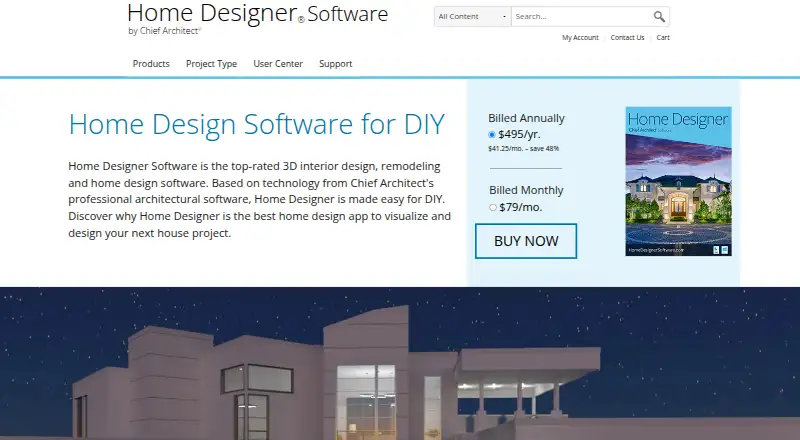
Pricing is available through two subscription options. The annual subscription costs $495 per year and includes software upgrades, free catalog downloads, and technical support. The monthly subscription costs $79 per month and includes the same listed benefits. There is no free plan. For renovators planning an ongoing project, the annual option has a lower displayed equivalent monthly figure than the monthly subscription, while the monthly plan offers a shorter billing commitment. Both plans include access to the core design workflow and support benefits listed by the vendor.
Home Designer stands out for combining design depth with practical project planning. Materials lists and cost-estimation support can help organize purchasing, while 360-degree panoramic renderings and 3D Viewer exports make it easier to present designs. Floor plans can be imported from DWG, DXF, image, and PDF files, and shared models can be viewed through the Chief Architect 3D Viewer on the web or mobile devices, including augmented-reality viewing through that viewer. Choose Home Designer if you need detailed residential planning and automated building systems without moving to a higher-priced professional architectural package. It is less suitable if you need a free tool, browser-first authoring, or integrations outside the Chief Architect ecosystem.
Your product? Our editors can test Home Designer in depth and publish a review, labelled as paid · from $149/mo →
Home Designer pricing
All 3 Home Designer plans and prices →
Home Designer fact sheet
| Free plan | No |
|---|---|
| Paid from | Not verified |
| Supported platforms | Windows, macOS |
| Floor plan import | Yes |
| AR visualization | Not verified |
| Catalog items | Not verified |
| Project limit | Not verified |
| Export formats | PDF, JPG, PNG, DWG, DXF |
| Multi-floor design | Yes |
| Deployment | Desktop |
| Platforms | Windows, macOS |
| Support | Email, Phone, Docs, Community |
| Built for | Solo, Small business, Mid-market (editorial estimate) |
| Pricing | Paid (source) |
| Website | homedesigner.chiefarchitect.com |
| Facts checked | 24 Sep 2026 |
Alternatives to Home Designer
- Sweet Home 3DA flexible home design tool for detailed plans, 3D visualization and offline work.9.3
- Planner 5DA broad cross-platform planner with AI, rendering, walkthroughs, and CAD export.8.8
- HomestylerAffordable AI-powered 2D/3D design with strong rendering, tours, VR, and mobile access.8.6


See all Home Designer alternatives →
Used Home Designer? Be the first to review it
The editor score above is our own research. What this page doesn't have yet is a reader's view — what you used Home Designer for, what worked and what didn't. No stars are seeded and no review is paid for; an editor reads every one before it appears.
Write a reviewTwo minutes · verified accounts only · read by an editor before it appears
Featured on iTechGuides

Home Designer is listed in our 3D Home Design Software directory. Add the badge to your site — it links back to this page.
<a href="https://www.itechguides.com/products/home-designer/"><img src="https://www.itechguides.com/best/badge/home-designer.svg" alt="Featured on iTechGuides" width="230" height="46"></a>
Reviewed by iTechGuides Editors · Editorial team · Updated Oct 2026
Advertiser disclosure: iTechGuides is reader-supported. Vendors can pay for top positions in our rankings and for a place on other products' pages, and we may earn a commission when you click some links. Bought places stand at the number bought; this page and our disclosure say so. Paying vendors may get a fuller, more detailed review from our editors, and that review can change their score. How we rank.
Last updated · How we research and update