
HoloMapper
HoloMapper: A focused desktop mapper with flexible surfaces, live inputs, and straightforward media layers. Ranked #21 of 24 in Projection Mapping Software by our editors (7.2/10); pricing: Paid; best for budget real-time mapping with simple media layers.
At a glance
- Editor score7.2 / 10
- PricingPaid
- Best forBudget real-time mapping with simple media layers
- Free planNo
- Facts checked20 Sep 2026
Where it wins
- Supports quad, circle, line, Bezier, and custom-shape surfaces
- Handles images, video, GIFs, text, animations, masks, and chroma key
- Connects live workflows through NDI and Spout input/output
Where it doesn't
- Distributed as an Early Access product
- Paid software with no free plan
- Advanced projects may require alternatives for edge blending or 3D mapping
Our verdict on HoloMapper
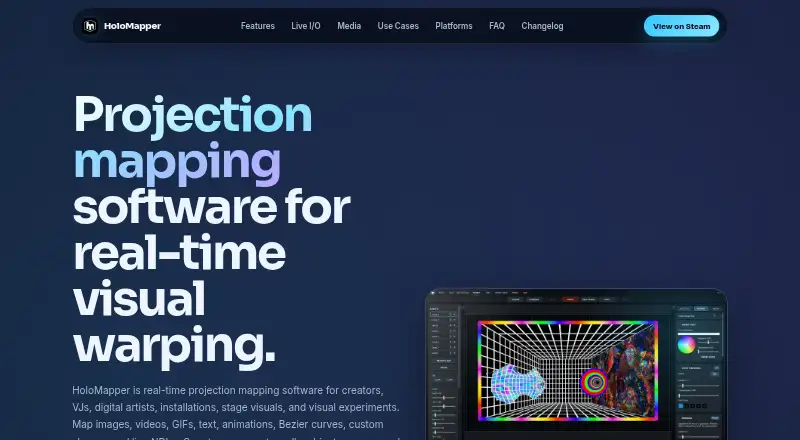
HoloMapper is a desktop projection-mapping application for creators, VJs, digital artists, installation designers, and event-visual teams. It maps images, videos, GIFs, text, animation presets, and live sources onto physical surfaces. The workflow combines real-time mapping with media-layer tools, projector or external-display output, and support for Windows, Linux, SteamOS, and Steam Deck workflows. It is distributed through Steam as an Early Access product.
For mapping work, the feature set covers both basic alignment and more flexible surface design. Users can work with quad, circle, line, custom-shape, and Bezier surfaces, then refine placement with corner or mesh warping. Snapping and automatic aspect-ratio fitting support faster arrangement, while layer grouping, ordering, locking, and duplication help organize compositions. Masks and chroma key add options for shaping and isolating visual content. These capabilities make HoloMapper a practical fit for creators who want to build live visuals without committing to a broader production environment.
Its ecosystem fit is strongest where NDI and Spout are already part of the workflow. Both input and output are supported, giving VJs, digital artists, and event-visual teams a way to connect live sources and external display workflows. The product remains a focused choice rather than a clearly documented solution for every projection requirement: teams that need edge blending, 3D mapping, or MIDI, OSC, or DMX-style control protocols should compare alternatives before choosing. HoloMapper suits budget-conscious users who value real-time mapping and simple media layers; larger or more specialized installations may need a different tool.
Questions about HoloMapper
What does HoloMapper run on? Windows and Linux. It runs as a desktop app.
What does HoloMapper integrate with? 2 integrations: NDI and Spout.
Who is HoloMapper built for? Solo users and small businesses (our editorial estimate).
Your product? Our editors can test HoloMapper in depth and publish a review, labelled as paid · from $149/mo →
HoloMapper pricing
All 1 HoloMapper plans and prices →
HoloMapper fact sheet
| Free plan | No |
|---|---|
| Paid from | Not verified |
| Workflow | Hybrid |
| Projection outputs | Not verified |
| Edge blending | Not verified |
| Live video input | Yes |
| 3D mapping | Not verified |
| Control protocols | Not verified |
| Deployment | Desktop |
| Platforms | Windows, Linux |
| Support | Email, Docs |
| Built for | Solo, Small business (editorial estimate) |
| Integrations | 2 integrations: NDI, Spout |
| Pricing | Paid (source) |
| Website | holomapperstudio.com |
| Facts checked | 20 Sep 2026 |
HoloMapper integrations
HoloMapper lists 2 integrations on its own site.
- NDI
- Spout
Alternatives to HoloMapper
- VIOSOA broad professional toolkit for planning, aligning, controlling, and playing projection shows.9.4
- Christie MystiqueA focused choice for automating alignment and projection mapping across Christie systems.9.3
- ScreenberryA broad, control-focused choice for projection mapping and live visual shows.9.1



See all HoloMapper alternatives →
Used HoloMapper? Be the first to review it
The editor score above is our own research. What this page doesn't have yet is a reader's view — what you used HoloMapper for, what worked and what didn't. No stars are seeded and no review is paid for; an editor reads every one before it appears.
Write a reviewTwo minutes · verified accounts only · read by an editor before it appears
Featured on iTechGuides

HoloMapper is listed in our Projection Mapping Software directory. Add the badge to your site — it links back to this page.
<a href="https://www.itechguides.com/products/holomapper/"><img src="https://www.itechguides.com/best/badge/holomapper.svg" alt="Featured on iTechGuides" width="230" height="46"></a>
Reviewed by iTechGuides Editors · Editorial team · Updated Nov 2026
Advertiser disclosure: iTechGuides is reader-supported. Vendors can pay for top positions in our rankings and for a place on other products' pages, and we may earn a commission when you click some links. Bought places stand at the number bought; this page and our disclosure say so. Paying vendors may get a fuller, more detailed review from our editors, and that review can change their score. How we rank.
Last updated · How we research and update