
Hivly Screenshot Annotator
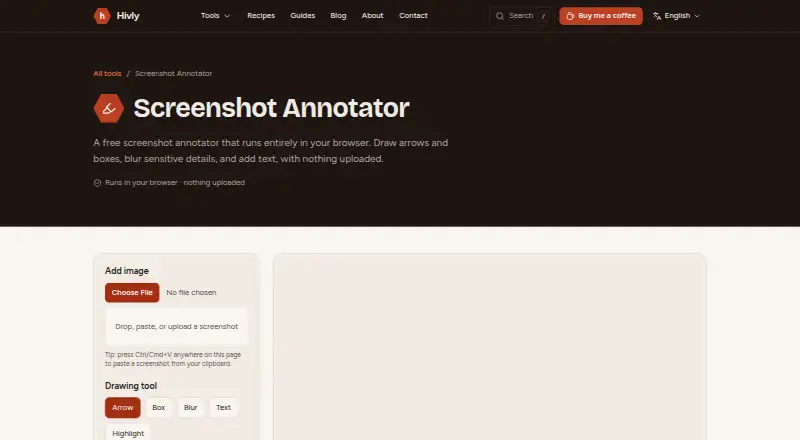
Hivly Screenshot Annotator: A free web tool for annotating screenshots privately and exporting them as PNGs. Ranked #67 of 75 in Screenshot Annotation Software by our editors (3.0/10); pricing: Free plan; best for users wanting free, private, basic screenshot markup.
At a glance
- Editor score3.0 / 10
- PricingFree plan
- Best forUsers wanting free, private, basic screenshot markup
- Free planYes
- Paid fromFree
- Redaction toolsYes
- Founded2020 · Dubai, UAE
- Facts checked24 Sep 2026
Where it wins
- Add arrows, boxes, highlights, text, and blur to screenshots
- Paste, drag and drop, or upload an image in the browser
- Processes images on-device and exports annotations as PNG
Where it doesn't
- Limited to the web platform
- Markup tools focus on basic screenshot annotation
- Exports are limited to PNG
Our verdict on Hivly Screenshot Annotator
Hivly Screenshot Annotator is a free browser-based tool for people who need to explain a screenshot without installing software. Solo users and small teams can paste, drag and drop, or upload an image, then add arrows, boxes, highlights, text, and blurred regions. It suits quick bug reports, documentation, and visual explanations where straightforward markup matters more than a broader image-editing workflow.
Its privacy approach is central to the product: image processing happens on the device, and the image is not uploaded. That makes Hivly a practical option for annotating screenshots that contain sensitive details, with the blur tool available to obscure them. The completed annotation downloads as a PNG. The workflow is compact and browser-based, so it fits users who want to mark up an image without an installation step; it is less suited to people who need formats beyond PNG or a wider set of editing capabilities.
Hivly describes the tool as free, with no accounts, trials, or locked features. It runs on the web and offers email as a support channel. Those choices make it easy to consider for basic, occasional markup, but buyers seeking a desktop application or a more extensive annotation environment should look elsewhere. Choose Hivly for free, on-device screenshot markup with common tools; skip it if platform choice or export flexibility is a priority.
Your product? Our editors can test Hivly Screenshot Annotator in depth and publish a review, labelled as paid · from $149/mo →
Hivly Screenshot Annotator pricing
Hivly Screenshot Annotator fact sheet
| Free plan | Yes |
|---|---|
| Paid from | Free |
| Redaction tools | Yes |
| Measurement tools | Not verified |
| Team collaboration | Not verified |
| Browser extension | Not verified |
| Export formats | PNG |
| Maximum file size | Not verified |
| Deployment | Cloud |
| Platforms | Web |
| Support | |
| Built for | Solo, Small business (editorial estimate) |
| Pricing | Free plan |
| Website | hivly.net |
| Facts checked | 24 Sep 2026 |
Alternatives to Hivly Screenshot Annotator
- SnagitA paid desktop suite for detailed screenshot capture, annotation, OCR, and short video creation.9.3
- ShareXA highly configurable Windows capture tool for annotation, OCR, recording, and automated sharing.9.1
- ScreenpressoA broad Windows capture toolkit with strong annotation, OCR, document, and sharing features.8.9



See all Hivly Screenshot Annotator alternatives →
Used Hivly Screenshot Annotator? Be the first to review it
The editor score above is our own research. What this page doesn't have yet is a reader's view — what you used Hivly Screenshot Annotator for, what worked and what didn't. No stars are seeded and no review is paid for; an editor reads every one before it appears.
Write a reviewTwo minutes · verified accounts only · read by an editor before it appears
Featured on iTechGuides

Hivly Screenshot Annotator is listed in our Screenshot Annotation Software directory. Add the badge to your site — it links back to this page.
<a href="https://www.itechguides.com/products/hivly-screenshot-annotator/"><img src="https://www.itechguides.com/best/badge/hivly-screenshot-annotator.svg" alt="Featured on iTechGuides" width="230" height="46"></a>
Reviewed by iTechGuides Editors · Editorial team · Updated Oct 2026
Advertiser disclosure: iTechGuides is reader-supported. Vendors can pay for top positions in our rankings and for a place on other products' pages, and we may earn a commission when you click some links. Bought places stand at the number bought; this page and our disclosure say so. Paying vendors may get a fuller, more detailed review from our editors, and that review can change their score. How we rank.
Last updated · How we research and update