
HiClip
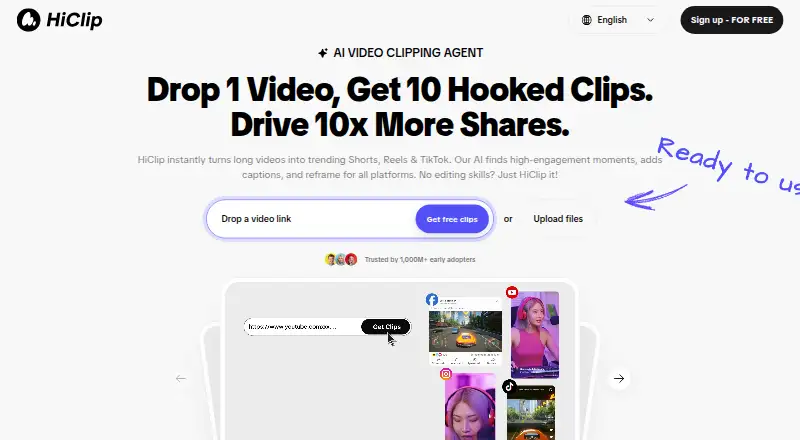
HiClip: A web-based tool for turning long spoken-content videos into social-ready clips. Ranked #43 of 50 in AI Video Repurposing Tools by our editors (4.9/10); pricing: Paid; best for creators repurposing podcasts, interviews, or webinars.
At a glance
- Editor score4.9 / 10
- PricingPaid
- Best forCreators repurposing podcasts, interviews, or webinars
- AI highlight detectionYes
- Facts checked24 Sep 2026
Where it wins
- Identifies highlight moments in longer videos with AI assistance
- Generates short-form clips and reframes them for vertical video
- Adds captions and outputs clips in social-media formats
Where it doesn't
- Paid product, with no plan details stated here
- Web-based and cloud-deployed rather than a desktop workflow
- Focused on repurposing existing long videos, not general video editing
Our verdict on HiClip
HiClip helps creators, marketers, and teams turn longer recordings into short videos for social publishing. It is a web-based, cloud-deployed product aimed at people working with spoken content such as podcasts, interviews, and webinars. Its central purpose is to reduce manual editing when a source video needs to become several short-form clips, rather than to serve as a general video-editing environment. The published feature set covers AI-assisted highlight identification, short-clip generation, vertical reframing, captions, and social-oriented formats.
The standout value is the connected repurposing workflow: HiClip identifies candidate moments, generates clips, adapts framing for vertical video, and prepares captions and social-format outputs. That combination suits a creator who already has longer recordings and wants to make them usable in short-form channels without handling each of those steps entirely by hand. The description focuses on spoken-content recordings, so buyers whose source material fits that pattern have the clearest use case. It does not establish a broader editing toolset, so teams needing extensive creative control over a full video production workflow may prefer a dedicated editor.
HiClip is a paid product offered on the web, with cloud deployment. Its stated audience spans solo creators, small organizations, and mid-market teams; that makes it relevant to individuals as well as groups publishing clips from existing content. The scope is intentionally specific: it is for extracting and formatting short social videos from longer videos, not for every stage of video creation. Choose HiClip if highlight discovery, vertical reframing, captions, and social-ready outputs address the main work. Look elsewhere if a desktop-based workflow or a broader editing focus is central to your process.
Your product? Our editors can test HiClip in depth and publish a review, labelled as paid · from $149/mo →
HiClip pricing
HiClip fact sheet
| Free plan | Not verified |
|---|---|
| Paid from | Not verified |
| Max source length | Not verified |
| AI highlight detection | Yes |
| Automatic reframing | Yes |
| Social platform presets | Yes |
| Transcript-to-post output | Not verified |
| Brand templates | Not verified |
| Monthly clip limit | Not verified |
| Deployment | Cloud |
| Platforms | Web |
| Built for | Solo, Small business, Mid-market (editorial estimate) |
| Pricing | Paid (source) |
| Website | hiclip.ai |
| Facts checked | 24 Sep 2026 |
Alternatives to HiClip
- OpusClipA broad AI workflow for turning long videos into branded, social-ready clips.9.9
- HeadlinerA broad, affordable toolkit for turning long-form media into social-ready clips.8.9
- quso.aiA broad AI repurposing suite with scheduling and analytics, though paid access starts at $29 monthly.8.7



Used HiClip? Be the first to review it
The editor score above is our own research. What this page doesn't have yet is a reader's view — what you used HiClip for, what worked and what didn't. No stars are seeded and no review is paid for; an editor reads every one before it appears.
Write a reviewTwo minutes · verified accounts only · read by an editor before it appears
Featured on iTechGuides

HiClip is listed in our AI Video Repurposing Tools directory. Add the badge to your site — it links back to this page.
<a href="https://www.itechguides.com/products/hiclip/"><img src="https://www.itechguides.com/best/badge/hiclip.svg" alt="Featured on iTechGuides" width="230" height="46"></a>
Reviewed by iTechGuides Editors · Editorial team · Updated Oct 2026
Advertiser disclosure: iTechGuides is reader-supported. Vendors can pay for top positions in our rankings and for a place on other products' pages, and we may earn a commission when you click some links. Bought places stand at the number bought; this page and our disclosure say so. Paying vendors may get a fuller, more detailed review from our editors, and that review can change their score. How we rank.
Last updated · How we research and update