Hear2Read
Hear2Read: A free, ad-free offline TTS tool focused on Indic-language accessibility. Ranked #165 of 222 in Text-to-Speech Software by our editors (3.0/10); pricing: Free plan; best for free Indic-language accessibility TTS.
At a glance
- Editor score3.0 / 10
- PricingFree plan
- Best forFree Indic-language accessibility TTS
- Free planYes
- Paid fromFree
- Founded2013
- Facts checked20 Sep 2026
Where it wins
- Free use without ads or purchases
- Offline synthesis after installing a language voice
- NVDA, TalkBack and Android accessibility support
Where it doesn't
- No API or export workflows
- Current development focuses on the Windows NVDA add-on
- Its focus on Indic languages limits broader TTS coverage
Our verdict on Hear2Read
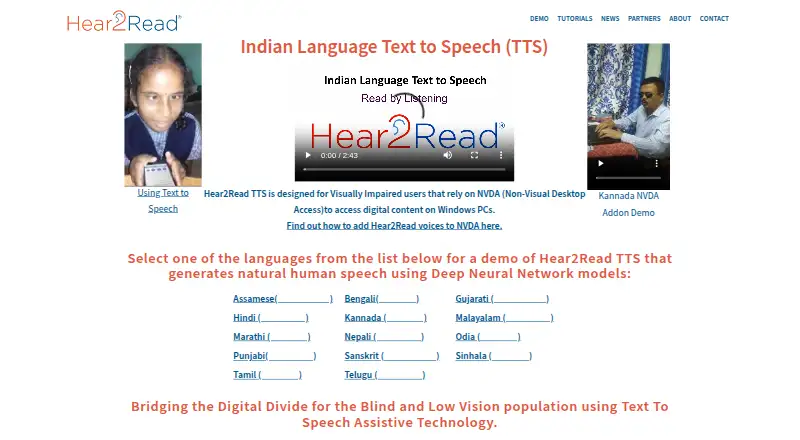
Hear2Read is an open-source text-to-speech project for blind and low-vision users, with broader use for listening to digital content. It supports Windows and Android, using Indic-language voice models with Deep Neural Network speech synthesis. On Windows, its current development focus is an NVDA add-on. On Android, it works as a background TTS engine for applications such as TalkBack.
Its strongest point is accessibility-oriented offline reading. After a language voice is installed, Android can synthesize speech offline, while TalkBack compatibility supports screen-reader use. The software also integrates with NVDA, TalkBack and @Voice Aloud Reader. Demo screens accept user-pasted text, giving users a direct way to hear sample content. Free use without ads or purchases keeps the product focused on access rather than paid tiers or upgrades.
Hear2Read suits users who need free Indic-language speech on Windows or Android, particularly those using NVDA or TalkBack. Its scope is narrower than a general-purpose text-to-speech platform: the positioning centers on Indic-language voice models, and the product does not provide API or export workflows. The vendor also says Android apps remain available but are no longer planned for further improvement, while current work is directed toward the Windows NVDA add-on. Choose Hear2Read for offline accessibility reading and supported Indic-language voices; choose another tool if your priority is developer API access, audio exports or a broader platform focus.
Your product? Our editors can test Hear2Read in depth and publish a review, labelled as paid · from $149/mo →
Hear2Read pricing
Hear2Read fact sheet
| Free plan | Yes |
|---|---|
| Paid from | Free |
| Commercial use | Not verified |
| Voice cloning | Not verified |
| API access | Not verified |
| Languages | Not verified |
| Maximum input | Not verified |
| Export formats | Not verified |
| Platforms | windows, android |
| Deployment | Desktop, Mobile |
| Platforms | Windows, Android |
| Support | Email, Docs |
| Integrations | 3 integrations: NVDA, TalkBack, @Voice Aloud Reader |
| Pricing | Free plan |
| Website | hear2read.in |
| Facts checked | 20 Sep 2026 |
Hear2Read integrations
Hear2Read lists 3 integrations on its own site.
- NVDA
- TalkBack
- @Voice Aloud Reader
Alternatives to Hear2Read
- ElevenLabsAffordable voice cloning with multilingual generation, dubbing, streaming, and API access.9.4
- Google Cloud Text-to-SpeechA broad, API-only TTS service for developers building voice-enabled products.9.3
- Azure AI SpeechA broad, production-ready TTS platform for teams building voice applications.9.2


See all Hear2Read alternatives →
Used Hear2Read? Be the first to review it
The editor score above is our own research. What this page doesn't have yet is a reader's view — what you used Hear2Read for, what worked and what didn't. No stars are seeded and no review is paid for; an editor reads every one before it appears.
Write a reviewTwo minutes · verified accounts only · read by an editor before it appears
Featured on iTechGuides

Hear2Read is listed in our Text-to-Speech Software directory. Add the badge to your site — it links back to this page.
<a href="https://www.itechguides.com/products/hear2read/"><img src="https://www.itechguides.com/best/badge/hear2read.svg" alt="Featured on iTechGuides" width="230" height="46"></a>
Reviewed by iTechGuides Editors · Editorial team · Updated Oct 2026
Advertiser disclosure: iTechGuides is reader-supported. Vendors can pay for top positions in our rankings and for a place on other products' pages, and we may earn a commission when you click some links. Bought places stand at the number bought; this page and our disclosure say so. Paying vendors may get a fuller, more detailed review from our editors, and that review can change their score. How we rank.
Last updated · How we research and update